18
MSHP2800D-2
Before you start
Getting Started . . .
18
MSHP2800D-2
4.
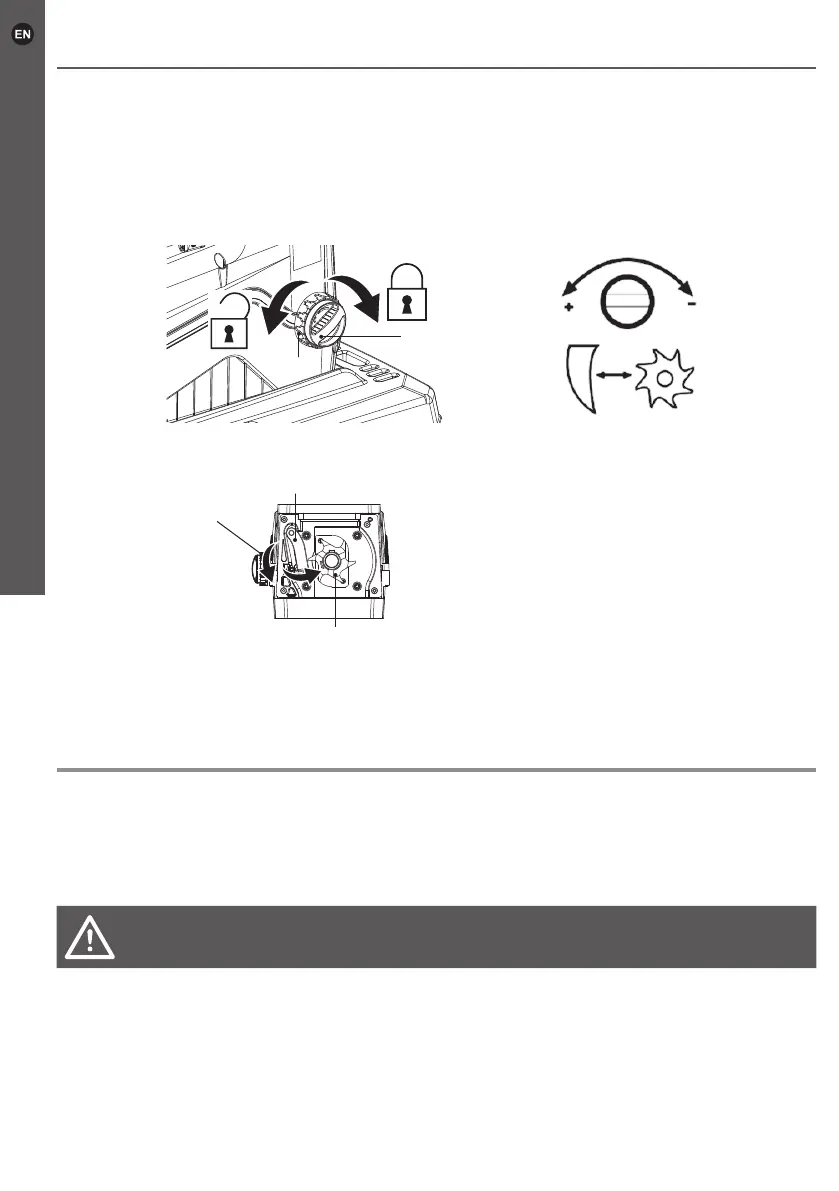
Turn the lock ring (6) clockwise, to secure the position of the counter blade adjuster (5).
5. Avoid unnecessary wear on the counter blade by not overadjusting.
6. After adjusting, make cutting tests to check if the best effect is achieved. Readjust
if necessary.
MSHP2800D-2
18
GB
IE
Getting started...
Before you start
WARNING! Check the voltage! The voltage must comply
with the information on the rating label!
Connection to power supply
1. Make sure the on/off switch (16 & 19) is in its off position.
2. (For UK) Connect the power plug to a suitable power source.
/ (For EU) Connect the plug of extension cord to the socket
of machine, then correct another plug of extension cord to a
suitable power source.
3. Your product is now ready to be used.
Fig. 7
Fig. 9
Fig. 8
5
6
5
come out of the discharge chutes.
4. Turn the lock ring (6) clockwise, to secure the position of the
counter blade adjuster (5).
5. Avoid unnecessary wear on the counter blade by not over-
adjusting.
6. After adjusting, make cutting tests to check if the best effect is
achieved. Readjust if necessary.
Connection to power supply
1. Make sure the on/off switch (16 & 19) is in its off position.
2. (For UK) Connect the power plug to a suitable power source.
/ (For EU) Connect the plug of extension cord to the socket of machine, then
correct another plug of extension cord to a suitable power source.
WARNING! Check the voltage! The voltage must comply with the information
on the rating label!
3. Your product is now ready to be used.



 To Next Page