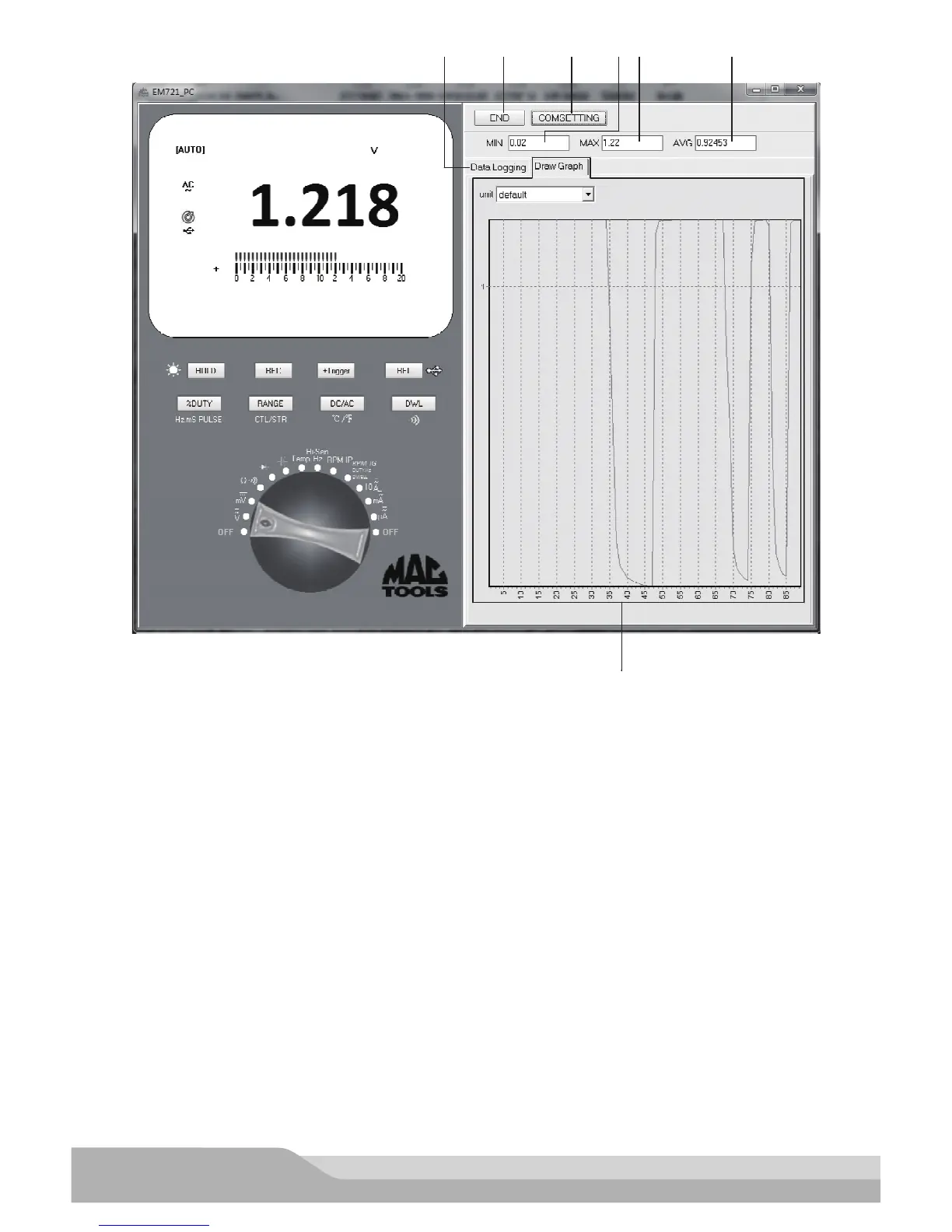
Explanations:
1. END/START Button - - - Used to stop/start transferring data.
2. COMSETTING Button - - - Used to display the Serial-Port Debug Assistant interface
3. “MIN” Box - - - Automatically shows the minimum reading of all readings being listed in the table on the
“Data Logging” tab.
4. “MAX” Box - - - Automatically shows the maximum reading of all readings being listed in the table on the
“Data Logging” tab.
5. “AVG” Box - - - Automatically shows the average reading of all readings being listed in the table on the
“Data Logging” tab.
6. “Data Logging” Tab - - - Used to display transferred data in table.
“Clear” Button - - - Used to clear all the data being listed in the table on the “Data Logging” tab.
“Save” Button - - - Used to save the data being listed in the table on the “Data Logging” tab as a le.
“Data Len” Spin Edit Box - - - Used to set the max. number of records that can be displayed in the table on
the “Data Logging” tab.
7. “Draw Graph” Tab - - - Used to show the plot of the readings being listed in the table on the “Data
Logging”tab.
“unit” Drop-down List Box - - - Used to select a desired unit for the Y-axis.


 To Next Page