9
ENGLISH
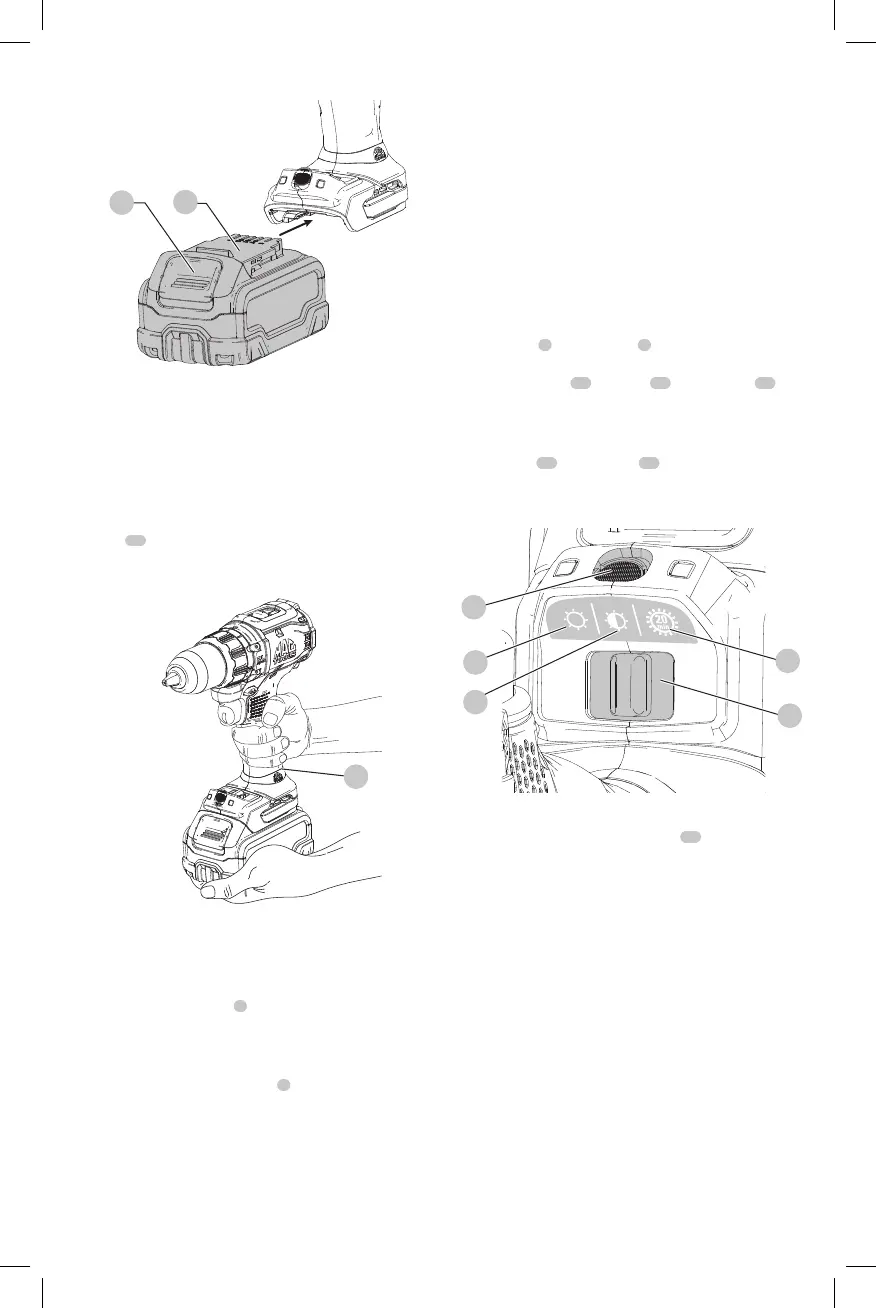
Worklight (Fig. F)
The worklight
7
and its switch
9
are located on the foot
of the tool. The worklight is activated when the trigger is
depressed. The low
11
, medium
12
and spotlight
13
modes can be changed by moving the switch on the foot
of the tool. If the trigger switch remains depressed, the
worklight will remain on in allmodes.
When on low
11
and medium
12
settings, the beam will
automatically turn off 20 seconds after the trigger switch
isreleased.
Fig. F
13
11
12
9
7
Spotlight Mode
The high setting is the spotlight mode
13
. The spotlight
will run for 20 minutes after the trigger switch is released.
Two minutes before the spotlight will shut off, it will flash
twice and then dim. To avoid the spotlight shutting off,
lightly tap the triggerswitch.
WARNING: While using the worklight in medium
or spotlight mode, do not stare at the light or
place the drill in a position which may cause
anyone to stare into the light. Serious eye injury
couldresult.
CAUTION: When using the tool as a spotlight, be sure
it is secured on a stable surface where it will not cause
a tripping or fallinghazard.
CAUTION: Remove all accessories from the chuck
before using the drill as a spotlight. Personal injury or
property damage couldresult.
Fig. D
1
2
Proper Hand Position (Fig. E)
WARNING: To reduce the risk of serious personal injury,
ALWAYS use proper hand position as shown.
WARNING: To reduce the risk of serious personal
injury, ALWAYS hold securely in anticipation of a
suddenreaction.
Proper hand position requires one hand on the main
handle
10
and one hand on the battery pack. Hold tool
firmly with both hands to control the twisting action of
thedrill.
Fig. E
10
Variable Speed Trigger and Forward/
Reverse Control Button (Fig. A)
The drill is turned on and off by pulling and releasing
the variable speed trigger
3
. The farther the trigger is
depressed, the higher the speed of the drill. Your tool is
equipped with a brake. The chuck will stop as soon as the
trigger switch is fullyreleased.
A forward/reverse control button
4
determines the
rotational direction of the tool and also serves as a
lock-offbutton.
• To select forward rotation, release the trigger and
depress the forward/reverse control button on the right
side of the tool.
• To select reverse, depress the forward/reverse control
button on the left side of the tool.
NOTE: The center position of the control button locks the
tool in the off position. When changing the position of the
control button, be sure the trigger is released.
NOTE: Continuous use in variable speed range is not
recommended. It may damage the switch and should
beavoided.
NOTE: The first time the tool is run after changing the
direction of rotation, you may hear a click on start up. This is
normal and does not indicate a problem.



 To Next Page