EasyManua.ls Logo

MAC TOOLS SHP20T - User Manual

MAC TOOLS SHP20T
20 pages
Print Icon
To Next Page IconTo Next Page
Loading...
SHP20T 5/13/16
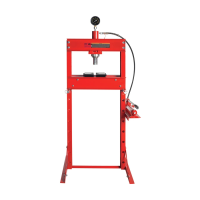
Maximum Capacity .............................................. 20-Ton
Overall Frame Height ................................................ 59"
Throat Height ....................................................0" - 38"
Throat Width ...................................................... 21-1/4"
Ram Stroke........................................................... 7-1/4"
Distance Between Bed Rails ................................4-1/4"
Frame Width ....................................................... 25-1/4"
Base Depth .........................................................27-1/2"
Shipping Weight ...............................................245-Lbs.
SPECIFICATIONS
OWNER'S MANUAL
SHP20T
20-TON CAPACIT Y
SHOP PRESS
S
A
F
E
T
Y
S
T
A
N
D
A
R
D
C
O
M
P
L
I
E
S
W
I
T
H
ASME PASE-2014
© 2016 Mac Tools

Questions and Answers

  • B
    brendabrownAug 11, 2025
    Why is my MAC TOOLS SHP20T pumping spongy under load?
    • J
      John BrownAug 11, 2025
      If the pumping action of your MAC TOOLS Power Tool feels spongy under a rated load, ensure that the round vent screw on the pump's reservoir is open. Then, purge air from the hydraulic system by following the procedure under SETUP.
  • K
    kparkerAug 16, 2025
    What to do if MAC TOOLS SHP20T ram will not extend?
    • C
      Carol WatkinsAug 16, 2025
      If the ram of your MAC TOOLS Power Tool does not extend, make sure the round vent screw on the pump's reservoir is open. Also, purge air from the hydraulic system by following the procedure under SETUP.
  • M
    Matthew GreenAug 22, 2025
    What to do if MAC TOOLS SHP20T Power Tool ram will not hold rated load?
    • R
      Ryan SmithAug 22, 2025
      If the ram of your MAC TOOLS Power Tool will not hold the rated load, ensure that the round vent screw on the pump's reservoir is open. You should also purge air from the hydraulic system by following the procedure under SETUP.
  • A
    Ashley McgeeAug 28, 2025
    How to fix MAC TOOLS Power Tool ram that won't extend all the way?
    • K
      Kevin LevineAug 28, 2025
      To address a MAC TOOLS Power Tool ram that doesn't extend fully, make sure the round vent screw on the pump's reservoir is open. After that, purge air from the hydraulic system by following the procedure under SETUP.
  • A
    Andrew McclureSep 4, 2025
    What to do if MAC TOOLS SHP20T ram will not retract all the way?
    • S
      samantha13Sep 4, 2025
      If the ram of your MAC TOOLS Power Tool does not retract completely, ensure the round vent screw at the top reservoir is open. If the problem persists, contact your Mac Tools Distributor for details on handling warranty.

MAC TOOLS SHP20T Specifications

General IconGeneral
BrandMAC TOOLS
ModelSHP20T
CategoryPower Tool
LanguageEnglish

Related product manuals