Owner’s Manual
5
Owner’s Manual
Hookup Diagrams
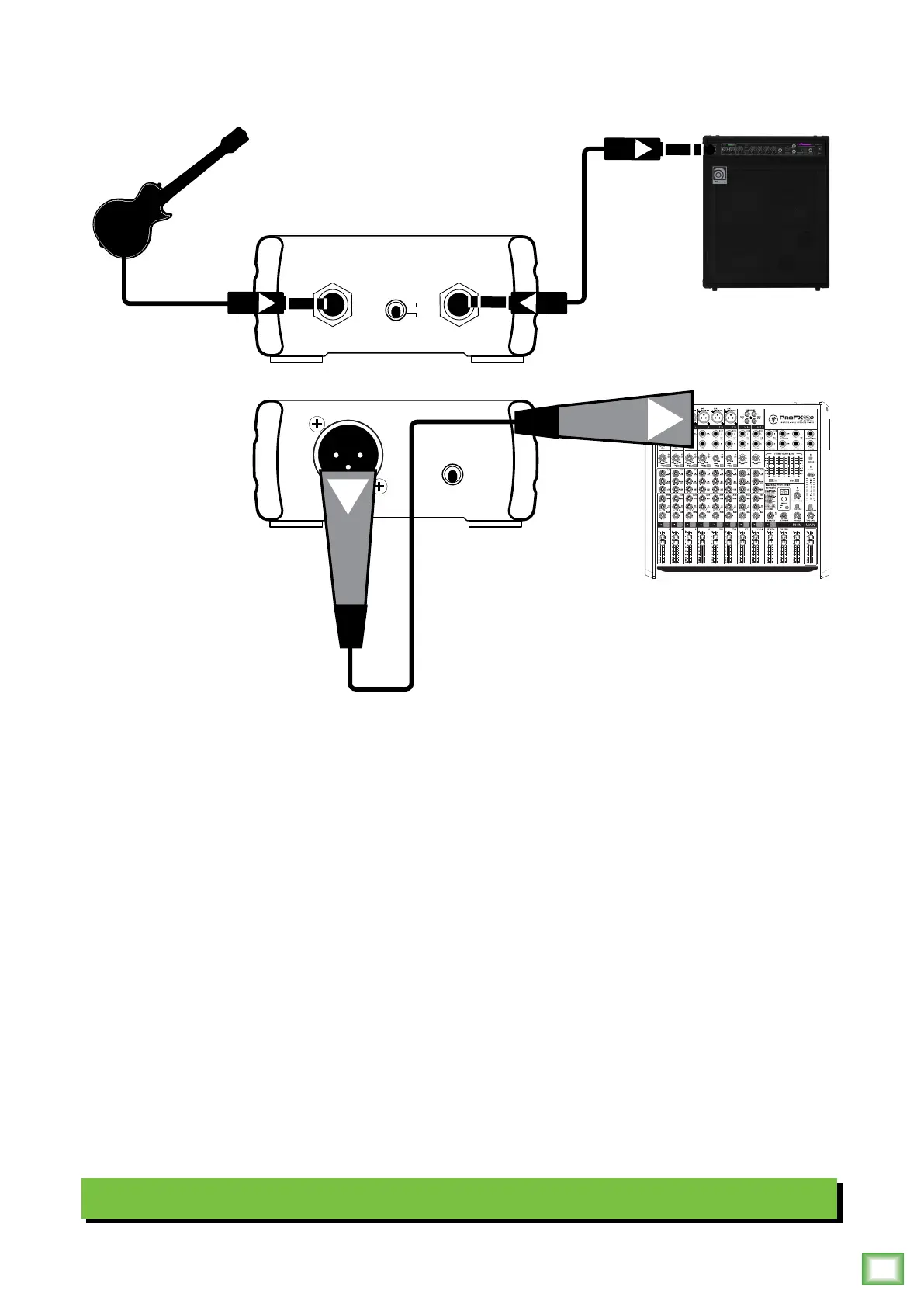
The MDB-1P is a convenient direct box for musicians – especially bass players – to add to the chain.
Let’s look at the front panel connections first. Start by simply connecting your instrument to the MDB-1P
input jack. And end by simply connecting a cable from the thru jack to your amplifier’s input jack.
Front panel connections made!
The rear panel connection is as straighforward as the front panel connections. Here we connected
an XLR cable from the MDB-1P output jack to a mixer’s input jack.
That was our part. The next part is up to you... the audience is waiting!
Note: While we used a Mackie ProFX12v2 mixer in this example, you could connect the output of the MDB-1P
to the input jack of an audio interface instead. The Mackie Big Knob Studio and Studio+ come to mind!
Typical MDB-1P Setup
INPUT
PAD
0 dB
-15 dB
THRU
OUTPUT
GROUND
LIFT
48V
MUTE MUTE MUTE MUTE MUTE MUTE MUTE MUTE MUTE


 To Next Page
 Loading...