G
11
12
≥15mm
6.
D
I
H
7.
R emote C ontr ol O pe ration Ins tru c tions
S tep 1:
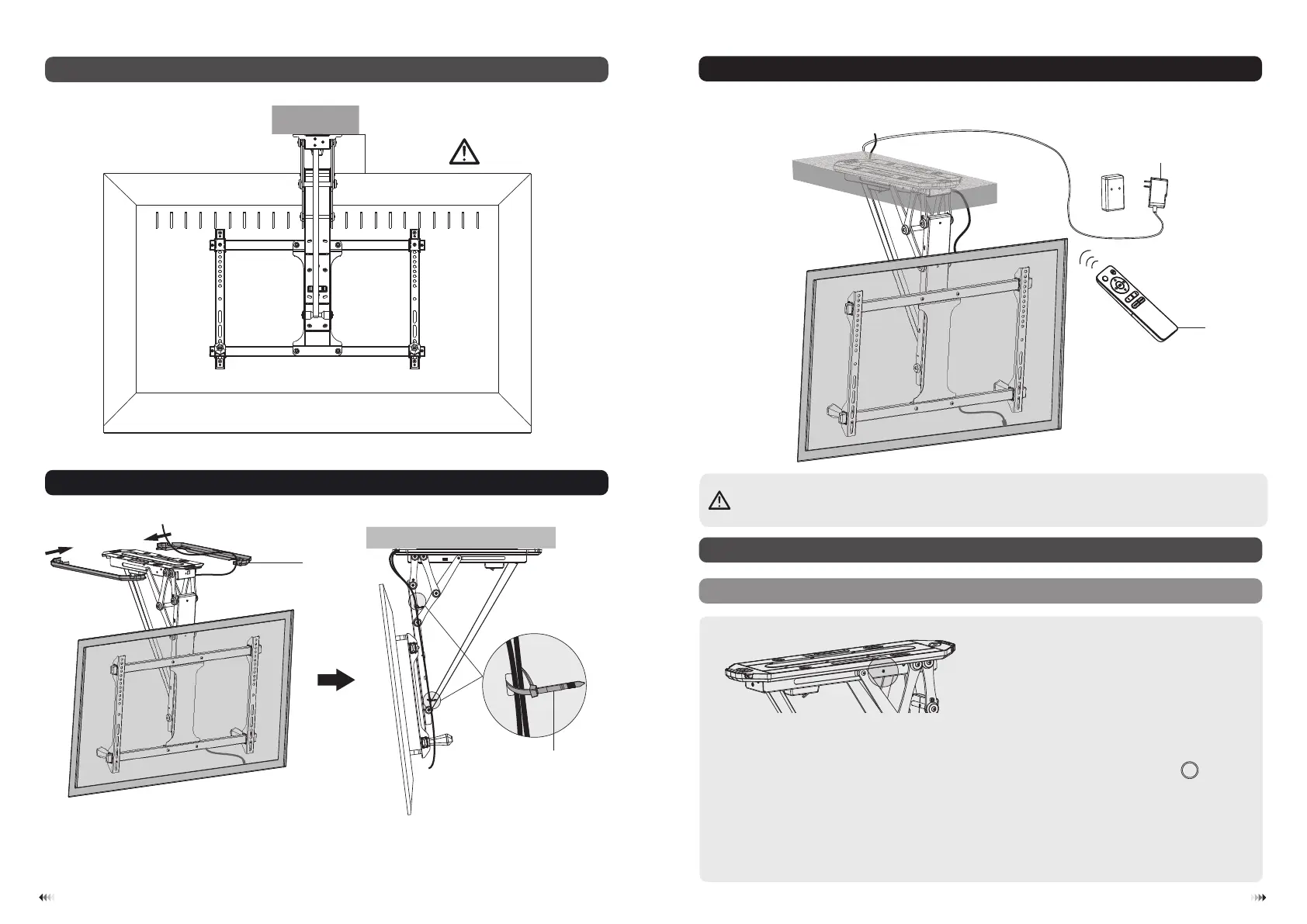
When the mount is powered on, press the code matching button on the mount with a thin needle or a
paperclip. The unit will emit repeatedly beeps for about 10 seconds, meanwhile press the “ ”button
on the remote controller.
S tep 2: Now please don’t press any button or it will cause the matching process error. The process will
be finished automatically until you can't hear a beep any longer.
Note: The TV Mount can be matched with up to 20 remote controllers. To c lea n u p the d a t
a o f all the
remote c o ntrolle r s , press and hold the code matching button for 5 seconds then release. The unit will
emits two beeps confirm the successful clean up and vice versa.
SET
A . C oding o f R emo te C ontro ller an d C ontrol B ox
• Never operate the unit without a TV installed.
• Nigdy nie używaj urządzenia bez zainstalowanego TV
• Betreiben Sie das Gerät niemals ohne einen Fernseher.
• N'utilisez jamais l'appareil sans un TV installé.
• Non utilizzare mai l'unità senza una TV installata.
• Nunca opere la unidad sin un televisor instalado.


 To Next Page