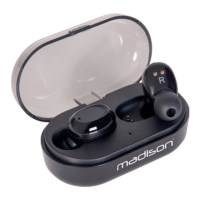
Note: When charging the earphones, pay attention to the charging box indicator. If the blue light ashes
once every 2 seconds, the battery in the charging box is low. Please charge the charging box in time.
Pairing procedure
As soon as the earphones are removed from the charging box, they will automatically connect to each
other within an interval of about 5 seconds. Once they have successfully paired, the left earphone which
is the main earphone in dual earphone mode, enters into pairing mode. The red and blue lights of the
Turn on the Bluetooth function of your device, select ETWS150 and pair with the device.
Tip: Tis earphone remembers the devices that were previously paired. If you have successfully paired
before, you only need to turn on your device’s Bluetooth mode and earphone, they will automatically
connect without having to enter pairing mode.
Note: The pairing process must be completed within 5 minutes, otherwise the earphones will automa-
tically shut down and you need to put them back into the charging box and remove them again to boot
the pairing process.
Operation
Power on Remove the earphones from the charging box or keep the touch button area
pressed for 3 seconds
Power Off Put back the earphones into the charging box to shut them down automatically
or keep the touch button area pressed for 5 seconds.
Play/pause Right side earphone: Click the left button once while playing music
Wake-up In standby mode: Right side earphone: click and hold the left button for 2
seconds.
Answer the phone Right side earphone: Click the left button once
End a call Right side earphone: Click the left button once
Reject a call Right side earphone: Click and hold the left button for 2 seconds
Last song Left side earphone: Click button twice while music is playing
Next song Right side earphone: Click button twice while music is playing
Single ear use
A) Pick up a single earphone from the charging box and click the button twice. When the earphone


 To Next Page