6
heating eect of hot air.
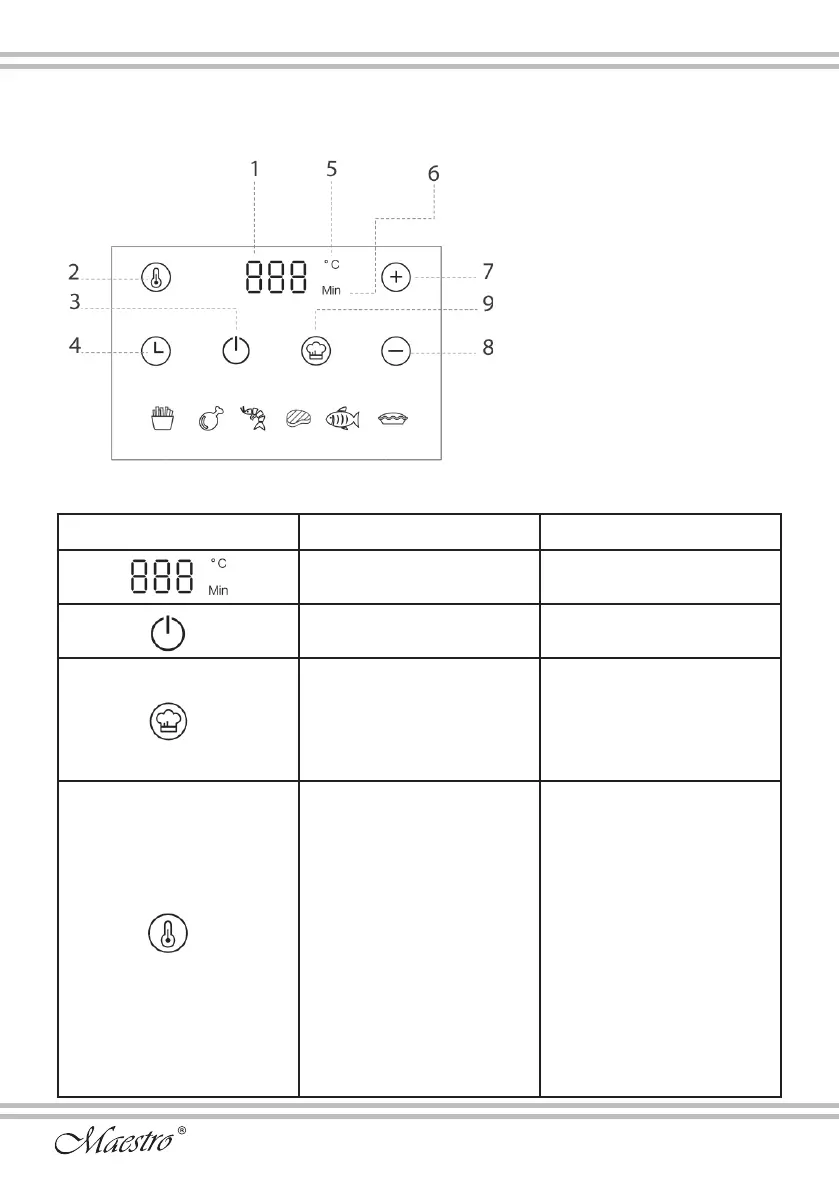
Operation panel and function introduction
1. Display Screen
2. Temperature Adjustment
3. Power
4. Time Adjustment
5. Cooking Temperature
6. Cooking Time
7. Temperature/time increase
8. Temperature/time reduction
9. Menu selection
Operation display instructions
Panel icon Icon annotation Usage Guidelines
Display screen
Show cooking temperature and
cooking time
Power
Start or cancel cooking tasks.
Menu
Used for menu selection: Click
this icon to cycle through the
bottom row of menus: French
fries, fried chicken legs,
prawns, beef, grilled sh, and
egg tarts.
Temperature adjustment
key
Cooking temperature
adjustment
1. After clicking the temperature
key, the display ashes
and displays the default
temperature;
2. The temperature can be set
freely through the «+, -» icons;
3. Temperature adjustable
range: 40~200°C, long press
«+, -» to quickly adjust the
temperature;
4. The temperature can be
adjusted at any time during the
working process.
Pictures 2


 To Next Page
 Loading...