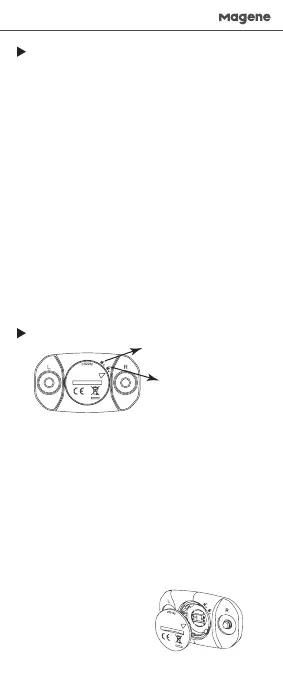
Opening position
Locking position
Pairing the heart rate sensor with an ANT+ device
Wear the heart rate sensor before you can pair it with
a compatible device.
Keep the sensor within 3 meters of the device to be
paired and over 10 meters away from other ANT+
devices.
When the initial pairing is complete, the compatible
device will automatically identify the enabled sensor.
Pairing the heart rate sensor with a Bluetooth device
Wear the heart rate sensor before you can pair it with
a compatible device.
Keep the sensor within 3 meters of the device to be
paired and over 10 meters away from other Bluetooth
devices.
The sensor cannot be found by directly using
Bluetooth on a phone and can only be connected to a
Bluetooth device or an app at the same time.
When the initial pairing is complete, the compatible
device will automatically identify the enabled sensor.
1. Use a coin to rotate the arrow mark on the battery
cover anticlockwise from the locking position to the
opening position. You can then open the battery
holder.
2. Remove the used battery.
3. Place a new battery into the battery holder. Align
the arrow mark to the opening position and press
down the battery cover (see figure below). After
pressing the whole cover into the battery holder, use
a coin to rotate the arrow mark clockwise to the
locking position.
*You may have to re-pair the heart rate sensor after
battery replacement.
Pairing and Settings
Battery Replacement
English



 To Next Page