
 Need help?
Do you have a question about the Magene T300 and is the answer not in the manual?
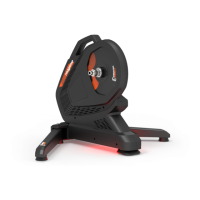
Thanks for your purchase of the Magene T300 Smart Trainer. Read this guide before use. Visit www.magenefitness.com for more info.
Lists the items included in the box: Magene T300 Smart Trainer, AC power adapter, quick release, QR adapter, and sprocket spacer.
Safety notes for trainer use: flat floor, heat, bicycle handling, and weight limits for stand riding.
Place the trainer on a stable floor, expand and secure the outriggers, ensuring they are flat on the floor.
Steps to install your bicycle onto the trainer, including shifting, rear wheel removal, and securing the bike.
Link the trainer to your device or riding software via ANT+ or Bluetooth after the indicator light is on.
Activate the new product using the Magene Utility Application and perform a spindown for accurate data.
Explanation of system status light patterns (power, standby, riding) and Bluetooth indicator states (connected, not connected).
The product warranty is valid for 1 year from the activation date.
 General
| Type | Smart Trainer |
|---|---|
| Resistance Type | Electromagnetic |
| Connectivity | ANT+, Bluetooth |
| Power Accuracy | ±2% |
| Simulated Inertia | Yes |
| Cassette Compatibility | 8/9/10/11 speed |
| Noise Level | 60 dB |
| Dimensions | 450 mm |

 To Next Page