S.T.E.A.M Master
Guide Book
23
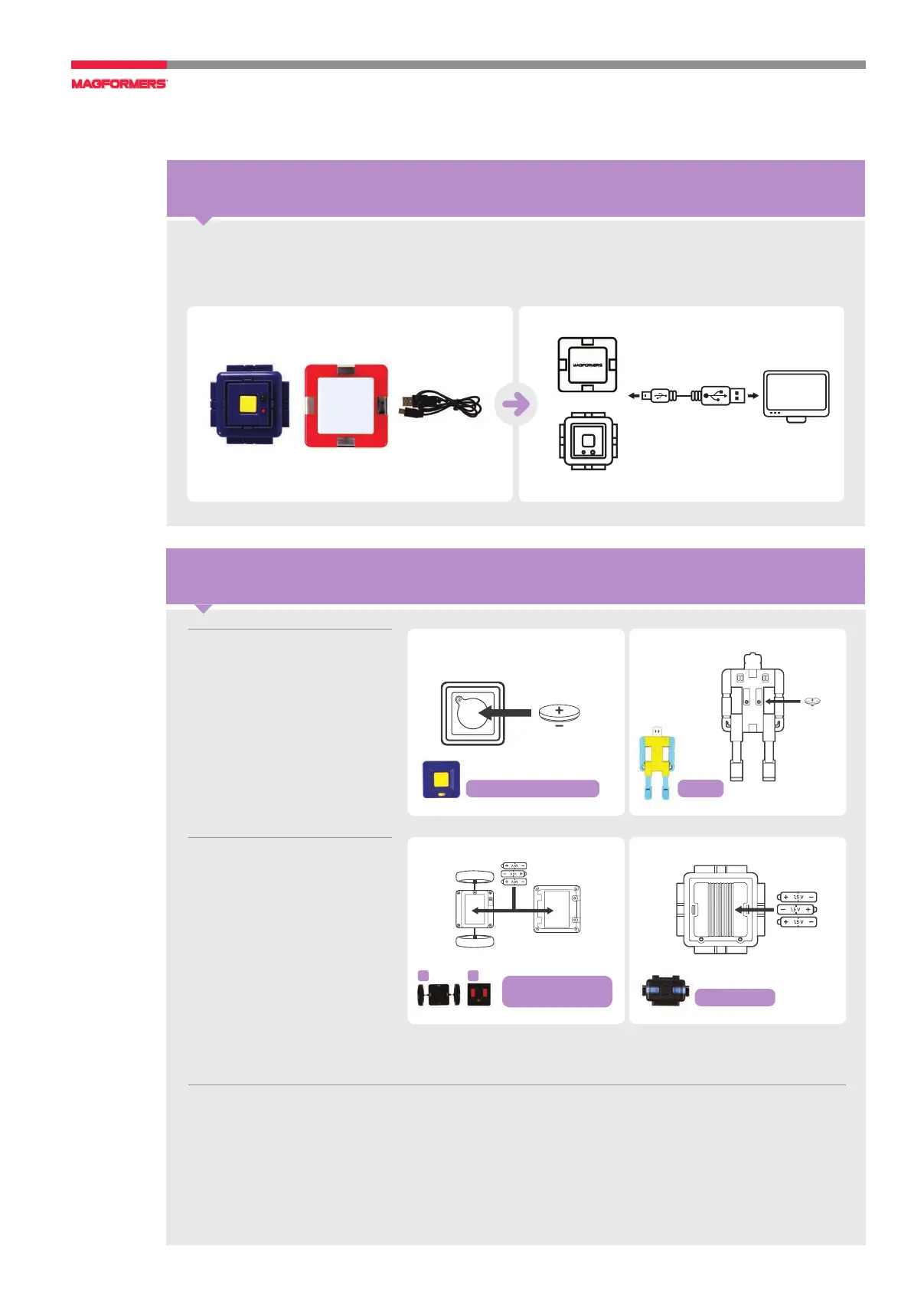
How to Change Batteries for Accessories
How to remove and insert replaceable batteries.
●
Remove screws and place three AAA batteries in the correct position as displayed inside.
●
Non-rechargeable batteries are not to be recharged.
●
Rechargeable batteries are to be removed from the toy before being charged.
●
Rechargeable batteries are only to be charged under adult supervision.
●
Batteries are to be inserted with the correct polarity.
●
Exhausted batteries are to be removed from the toy.
●
The supply terminals are not to be short-circuited.
If the Power Remote Control
and the Figure are not working,
please change the mercury
battery. (Refer to the model
name.)
The R/C Motor Wheel, the
R/C Remote Control and the
Battery Pack each need 3 AAA
batteries. Please insert the bat
-
teries according to the marked
(+) and (-) poles. (Batteries are
not included.)
MERCURY BATTERY
LR41 (X2)
AAA size
(R/C)
Remote
control
AAA size
Motor
wheel
(Power Generator)
USB
CABLE
PC/Laptop
Remote
control
MERCURY BATTERY
CR2032 3V
MERCURY BATTERY
CR2032 3V
MERCURY
BATTERY
LR41 (X2)
Remote
control
Battery Pack
1. R/C motor wheel
2. Remote control
Power Remote Control
Figure
1 2
MERCURY BATTERY
LR41 (X2)
AAA size
(R/C)
Remote
control
AAA size
Motor
wheel
(Power Generator)
USB
CABLE
PC/Laptop
Remote
control
MERCURY BATTERY
CR2032 3V
AAA Size
AAA Size
R/C
Remote control
Motor
wheel
How to Charge Accessories
Connect the included USB CABLE to a USB port on a computer.
The proper charging time is 2 hours.
LED Lighted Box
Power Generator
USB Cable
PC / Laptop





 To Next Page