AUTO DEFROST ConversionChart
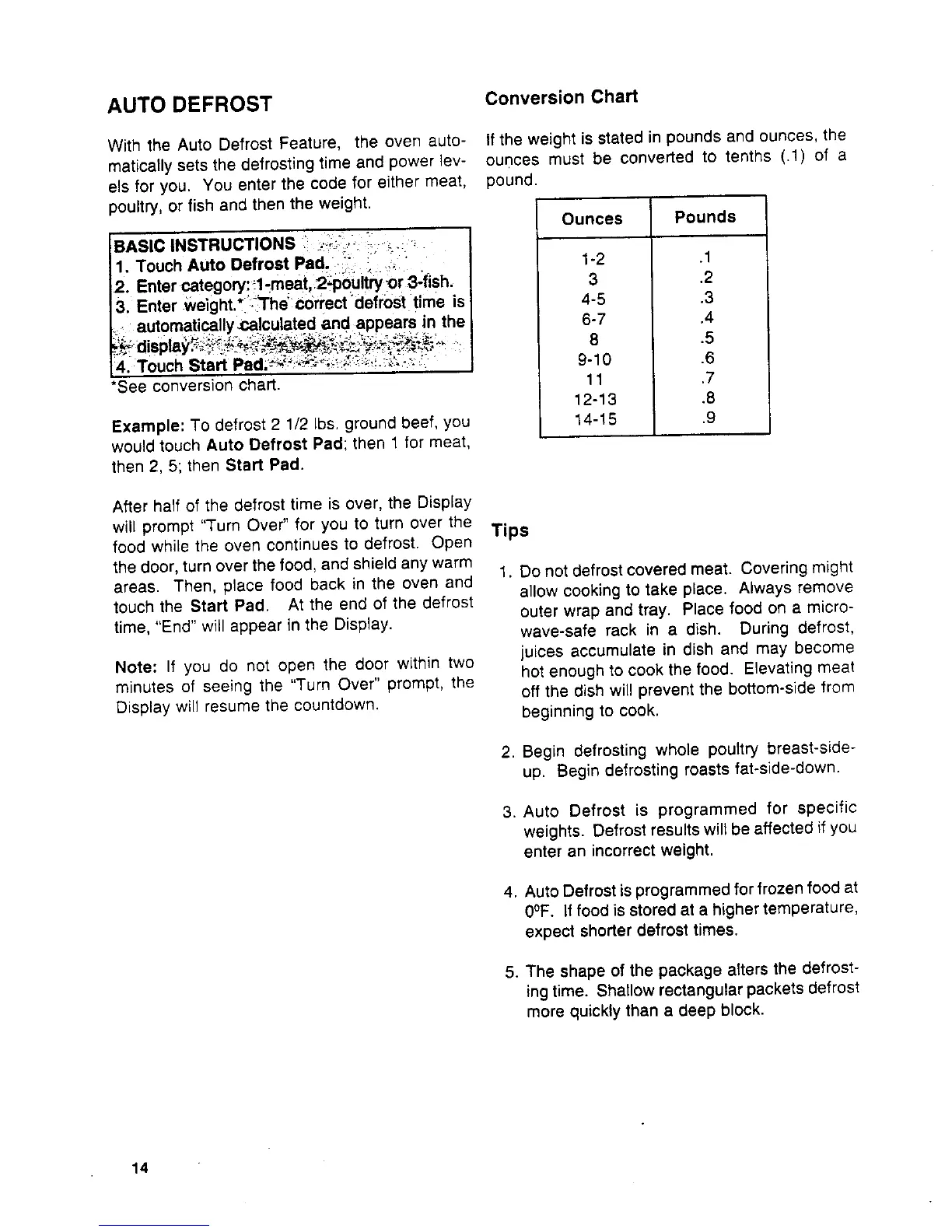
With the Auto Defrost Feature, the oven auto- If the weight isstated in pounds and ounces, the
maticatly sets the defrosting time and power ]ev- ounces must be converted to tenths (.1) of a
els for you. You enter the code for either meat, pound.
poultry, or fish and then the weight.
Ounces Pounds
BASIC INSTRUCTIONS ': " " "
1, Touch Auto Defrost Pad. : ,_i 1-2 .1
2. Enter category:_l-rneat 2_bitW0r3-fish. 3 ,2
3. Enter weight.* L_Thecorrect defr0sttime is 4-5 .3
automatically,ca!culated and appears in the 6-7 .4
4. Touch Start Pad._%_ "-_, :,:_i-;_,-_,i 9-10 .6
*See conversion chart. 11 .7
12-13 .8
Example: To defrost 2 1/2 Ibs. ground beef, you 14-15 .9
would touch Auto Defrost Pad; then 1 for meat,
then 2, 5; then Start Pad.
After half of the defrost time is over, the Display
will prompt "Turn Over" for you to turn over the Tips
food while the oven continues to defrost. Open
the door, turn over the food, and shield any warm
1. Do not defrost covered meat. Covering might
areas. Then, place food back in the oven and
allow cooking to take place. Always remove
touch the Start Pad. At the end of the defrost
time, "End" will appear in the Display. outer wrap and tray. Place food on a micro-
wave-safe rack in a dish. During defrost
Note: If you do not open the door within two juices accumulate in dish and may become
hot enough to cook the food. Elevating meat
minutes of seeing the "Turn Over" prompt, the off the dish will prevent the bottom-side from
Display will resume the countdown, beginning to cook.
2. Begin defrosting whole poultry breast-side-
up. Begin defrosting roasts fat-side-down.
3. Auto Defrost is programmed for specific
weights. Defrost results will be affected if you
enter an incorrect weight.
4. Auto Defrost is programmed for frozen food at
0°F. If food is stored at a higher temperature,
expect shorter defrost times.
5. The shape of the package afters the defrost-
ing time. Shallow rectangular packets defrost
more quickly than a deep block.
14



 To Next Page