3
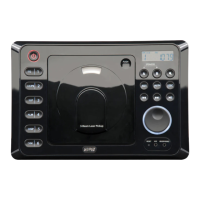
1. Power On/Off: Turns the unit on and off.
2. Infrared Sensor: Receives the signals from the remote control allowing you to adjust the basic
functions of this unit.
3. Auxiliary Input Jack: Allows you to listen to an auxiliary input audio source, such as a portable MP3
player or cassette player.
4. Audio Control Knob: Adjusts the Volume, Bass, Treble, Balance and Fader.
5. AMS Button: Automatic memory storing and preset scan.
6. Reset Button: Resets the microprocessor.
7. Radio Recall Button 1:
Radio: Recalls memorized radio station. Programs a radio station into memory.
8. Multi-Function Button 2 - Intro:
Radio:
Recalls a memorized radio station, and programs a radio station into memory.
C
D:
Plays the first ten seconds of each track
.
9. Multi-Function Button 3 - Repeat:
Radio:
Recalls a memorized radio station, and programs a radio station into memory.
C
D: Continuously repeats the same track
.
10. Multi-Function Button 4 - Shuffle:
Radio:
Recalls a memorized radio station, and programs a radio station into memory.
C
D:
Plays all tracks on the current disc in random order.
11. Multi-Function Button 5 - CD
–
:
Radio: Recalls a memorized radio station, and programs a radio station into memory.
CD: Selects the preceding disc in external CD changer.
12. Multi-Function Button 6 - CD
+
:
Radio: Recalls a memorized radio station, and programs a radio station into memory.
CD: Selects the next disc in external CD changer.
13. Band / Loud Button:
Radio: Selects the desired radio band in the following order: F1, F2, F3, AM.
Radio / C
D:
Enhances high frequency and low frequency sound quality.
14. Mode Button: Selects between tuner, CD player, auxiliary input and CD changer modes.
Location and Function of Controls at a Glance
M3200CD-UM (A&D).qxp 4/26/06 14:27 Page 3


 To Next Page