4
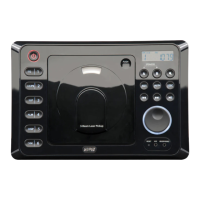
15. Play / Pause Button:
Starts / pauses disc play.
Mute Button: Mutes audio level.
16. Tack Up / Track Down Buttons: Adjusts the radio frequency, changes CD tracks and sets the clock.
17. Equalizer: Selects preprogrammed equalizer settings in the following order:
FLAT, CLASSICS, POP M (Pop), and ROCK M (Rock).
18. Display Button: Displays the frequency momentarily, then will revert to displaying the time.
19. Radio Scan Button: Scans up for next strong station, then pauses 5 seconds and scans up again.
Once the desired station is found, press the scan button again play that station.
20. Mono: Changes the unit from Mono to Stereo.
21. Eject Button: Ejects the disc from the CD Slot.
22. CD Slot: Insert a CD into slot with label facing up.
23. Display Area: Displays radio, clock and CD functions.
24. Audio Control Buttons: Adjusts the Volume, Bass, Treble, Balance and Fader.
25. Audio Control Selector: Selects the Volume, Bass, Treble, Balance and Fader controls.
Location and Function of Controls at a Glance
M3200CD-UM (A&D).qxp 4/26/06 14:27 Page 4


 To Next Page