EasyManua.ls Logo

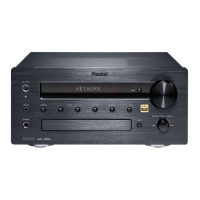
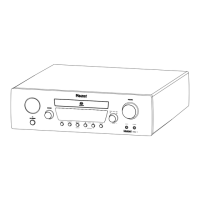
Magnat Audio MC 200 - User Manual

Magnat Audio MC 200
2 pages
Print Icon
To Next Page IconTo Next Page
Loading...
1) How do I connect my MC 200 to my home network
via LAN cable or Wi-Fi?
a) When you insert a LAN cable and connect it to your router,
the MC 200 will automatically establish a connection within 5 minutes.
b) You can start the "Network Wizard" via the MC 200 (or the remote control) from the
system menu.
This will then automatically trigger a search for existing Wi-Fi networks.
You can now select your desired Wi-Fi network by using the up/down arrows.
Enter your Wi-Fi password in the next step. The
MC 200 will then automatically establish a connection.
c) To integrate the unit into your Wi-Fi network, please proceed as follows:
- Download the Magnat Audio Stream app from the iOS App Store or Google Play
Store and install it on your phone or tablet.
- Switch on the MC 200.
- Then access the wireless settings for your mobile/tablet and search for
new networks. "MC200_XXXX" will be displayed. Select this network.
- Please start the Magnat Audio Stream app now.
- After starting the app and locating your device, click on 'Connect';
the app will then automatically guide you through the installation process.
2) Android
Android version 5.0 or higher is required to use and install the Magnat Audio
Stream app.
3) Windows Phone
Windows phones are not supported, as the Magnat Audio Stream app is only available for
Android and iOS platforms.
4) Software Update (streaming module)
Software updates can be installed via the app. Available updates are displayed, and can be
installed, via the Magnat Audio Stream app.
MC 200 FAQ

Other manuals for Magnat Audio MC 200

Question and Answer IconNeed help?

Do you have a question about the Magnat Audio MC 200 and is the answer not in the manual?

Overview

This document provides a comprehensive FAQ for the Magnat MC 200, detailing its connectivity, app compatibility, software updates, and troubleshooting for internet radio and streaming.

Function Description

The Magnat MC 200 is an audio device designed to integrate seamlessly into a home network, offering both wired (LAN) and wireless (Wi-Fi) connectivity options. Its primary function is to provide access to internet radio and streaming services, allowing users to enjoy a wide range of audio content. The device is capable of automatically establishing network connections, simplifying the setup process for users. It supports software updates for its streaming module, ensuring that the device remains current with the latest features and improvements.

Usage Features

Network Connectivity:

The MC 200 offers flexible network connection methods:

  • LAN Cable: By simply connecting a LAN cable to a router, the MC 200 will automatically establish a network connection within five minutes. This provides a stable and reliable wired connection.
  • Wi-Fi (Network Wizard): Users can initiate a "Network Wizard" via the MC 200's system menu or remote control. This wizard automatically searches for available Wi-Fi networks. Users can then select their desired network using the up/down arrows and enter their Wi-Fi password. The MC 200 will then automatically establish the wireless connection.
  • Wi-Fi (Magnat Audio Stream App): For a more guided setup, users can download the Magnat Audio Stream app from the iOS App Store or Google Play Store. After installing the app and switching on the MC 200, users access their mobile device's wireless settings to find and select a new network named "MC200_XXXX". Once connected to this network, starting the Magnat Audio Stream app will locate the device, and the app will guide the user through the installation process to integrate the unit into their Wi-Fi network.

App Compatibility:

  • Android: The Magnat Audio Stream app requires Android version 5.0 or higher for installation and use.
  • iOS: The Magnat Audio Stream app is also available for iOS devices.
  • Windows Phone: Windows phones are not supported, as the Magnat Audio Stream app is exclusively available for Android and iOS platforms.

Internet Radio and Streaming:

The MC 200 provides access to internet radio and streaming services. Users can enjoy various audio content through their home network.

Playback Interference Troubleshooting:

In cases of playback interference or dropouts during internet radio or streaming, the document suggests several troubleshooting steps:

  • Restart Audio Stream: If a specific radio station experiences interference, restarting the audio stream by pressing the Play button can often resolve the issue.
  • Check Other Stations: If restarting doesn't help, users should check if other radio stations exhibit the same problem.
  • Network Connection Issues: Interference can stem from LAN or Wi-Fi connection issues, which might be within the user's household or related to data transmission from the internet radio station itself.
  • Contact ISP: If problems persist, users are advised to contact their Internet service provider to inquire about potential line issues or internet service disruptions.

Internet Radio Advertisements:

It is important to note that advertisements on internet radio stations cannot be switched off. These advertisements are broadcast by the respective stations and are beyond the control of the MC 200 or its software.

Maintenance Features

Software Update (Streaming Module):

The MC 200 supports software updates for its streaming module. These updates can be conveniently installed via the Magnat Audio Stream app. When available, updates are displayed within the app, allowing users to keep their device's streaming capabilities current with the latest features, bug fixes, and performance enhancements. This ensures the device maintains optimal functionality and access to evolving streaming technologies.

Magnat Audio MC 200 Specifications

General IconGeneral
Display typeLCD
BluetoothYes
Output Power4 x 50 Watts
Radio TunerFM
Supported FormatsMP3, WMA
ConnectionsUSB, AUX
Frequency Response20 Hz - 20 kHz

Related product manuals