Need help?
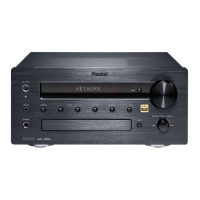
Do you have a question about the Magnat Audio MC 1 and is the answer not in the manual?
Covers device placement, ventilation, liquid exposure, heat sources, and cleaning.
Highlights risks of high voltage, electric shock, and advises against opening the unit.
Controls device power, switching between on and standby modes.
Selects the audio input source for the device.
Opens or closes the CD compartment tray.
Starts or pauses CD playback.
Stops CD playback or opens memory for radio presets.
For CD track search and radio station tuning.
Switches between FM stereo, FM mono, and AM radio bands.
Adjusts tone, skips tracks, sets balance, or selects presets.
3.5mm stereo input for auxiliary audio devices.
3.5mm stereo output for headphones.
Adjusts the audio output volume level.
Infrared receiver for the remote control.
Slot for inserting SACD/CD discs.
Shows device settings and information.
Indicates if an SACD disc is inserted.
Turns the device on or switches it to standby mode.
Activates the sleep timer for automatic shut-off.
Temporarily disables or enables audio output.
Cycles through available audio input sources.
For direct track selection or station frequency input.
For CD track search or radio station tuning.
Skips tracks or selects radio presets.
Initiates CD playback.
Pauses or resumes CD playback.
Switches between SACD and CD layers on hybrid discs.
Opens or closes the CD compartment.
Stops CD playback.
Adjusts the device volume up or down.
Activates/deactivates Direct Sound Mode.
Selects tone or balance settings for adjustment.
Allows manual entry of radio frequencies.
Accesses stored radio station memory.
Sets start and end points for repeat playback.
Selects repeat mode for CD playback.
Selects AM, FM mono, or FM stereo bands.
Cycles through display information modes.
Connects the supplied mains power cable.
Turns the device on/off or sets to standby.
Connects stereo speakers with 4-8 ohm impedance.
Coaxial and optical outputs for external digital devices.
Fixed level output for connecting recorders.
Input for auxiliary CD players or tuners.
Connects cassette or tape recorders.
Input for turntables with magnetic cartridges.
Connection for turntable ground wire.
Connects the AM loop antenna.
Connects FM indoor or house antenna.
Instructions for connecting stereo speakers to terminals.
Guide for connecting FM and AM antennas.
Connecting external audio sources.
Guidance on aiming the remote at the sensor.
Details on playing, pausing, track selection, search, and repeat functions.
Covers band selection, tuning methods, and station presets.
Explains the Radio Data System and its information display.
Shows examples of PS, PTY, RT, and CT messages on the display.
Adjusts audio volume and enables/disables mute function.
Fine-tunes bass and treble frequencies.
Activates/deactivates Direct Sound Mode for pure audio.
Adjusts the audio balance between left and right speakers.
Allows setting an automatic timer for device shut-off.
Details on power output, frequency response, and input sensitivity.
Provides FM and AM tuner frequency ranges and signal-to-noise ratios.
Includes dimensions, weight, and power consumption.
Outlines warranty period, exclusions, and claim procedures.
Instructions for filling out the warranty card.
 General
| DIN Size | 1 DIN |
|---|---|
| Supported audio formats | MP3, WMA |
| Display Type | LCD |
| Radio Data System (RDS) | Yes |
| Output Power | 4 x 50 W |
| USB Port | Yes |
| AUX Input | Yes |
| Frequency Response | 20 Hz - 20 kHz |

 To Next Page