EasyManua.ls Logo

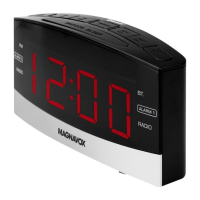
Magnavox MR41806BT - User Manual

Magnavox MR41806BT
17 pages
Print Icon
To Next Page IconTo Next Page
Loading...
MODEL: MR41806BT
PLEASE READ BEFORE OPERATING THIS EQUIPMENT.
OWNER'S MANUAL
1.8 INCH
DUAL ALARM CLOCK
with Bluetooth
®
Wireless Technology
Size: 148.5(W) x 210(H)mm (A5)

Questions and Answers

  • S
    Susan CarlsonJul 28, 2025
    Why is my Magnavox MR41806BT Alarm Clock radio sound distorted?
    • W
      William ReynoldsJul 28, 2025
      If your Magnavox Alarm Clock is making distorted noises during radio broadcasts, try these steps: * Retune the radio station. * Adjust the unit's position for better reception. * Increase the volume using the ALM 1/VOL + Button.
  • C
    connor23Aug 6, 2025
    How to fix Magnavox MR41806BT with no power?
    • K
      Kristin JenkinsAug 6, 2025
      If your Magnavox Alarm Clock has no power, make sure the AC power cord is fully inserted into a wall outlet that provides AC 120V~, 60 Hz.
  • B
    berrydanaAug 15, 2025
    What to do if the sound is weak on my Magnavox Alarm Clock via Bluetooth?
    • C
      Carl MorganAug 15, 2025
      If the sound from your Magnavox Alarm Clock is weak or distorted when using Bluetooth, try moving the Bluetooth device closer to the unit.

Summary

IMPORTANT SAFETY INSTRUCTION

Symbols, Warnings, and FCC Compliance

Explains danger symbols, warnings, and FCC rules.

Operational and Environmental Safety

Covers general operation, water, ventilation, heat, placement, and plug safety.

Electrical, Service, and Grounding Precautions

Covers power lines, overloading, object entry, antenna grounding, and servicing.

Damage, Replacement Parts, and Installation

Covers conditions requiring service, part replacement, and installation notes.

LOCATION OF CONTROLS

Control Panel Overview

Identifies all buttons, display, and jacks on the unit.

POWER SOURCE

AC Power Connection and Battery Backup

How to connect to AC power and use batteries for clock backup.

OPERATION

Setting the Actual Time

Step-by-step guide to setting the correct time on the clock.

BT (BLUE TOOTH) OPERATION

Pairing a Bluetooth Device

Instructions for first-time pairing or re-pairing a Bluetooth device.

RADIO OPERATION

FM Band Tuning and Playback

How to tune into FM stations and adjust volume.

Radio and AUX IN

AM Band, Presets, and AUX Connection

How to use AM radio, store presets, and connect audio via AUX.

ALARM SETTINGS

Alarm 1 and Alarm 2 Configuration

Step-by-step guide to setting alarms and selecting wake-up modes.

Alarm Control Functions

Shutting Off, Snooze, and Resetting Alarms

How to manage active alarms and the snooze function.

Sleep Timer and Dimmer

Using Sleep Timer and Display Dimmer

How to set the sleep timer and adjust display brightness.

TROUBLE SHOOTING GUIDE

Resolving Power, Radio, and BT Issues

Provides solutions for common problems encountered with the device.

GENERAL SPECIFICATIONS

Product Specifications and Accessories

Lists technical details like power, speakers, and included items.

LIMITED WARRANTY

Warranty Information and Claims

Details the warranty period, exclusions, and service procedures.

Magnavox MR41806BT Specifications

General IconGeneral
BrandMagnavox
ModelMR41806BT
CategoryAlarm Clock
BluetoothYes
Display TypeLED
Power SourceAC Power
USB Charging PortYes
Battery BackupYes
ConnectivityBluetooth
TypeDigital
RadioFM
Alarm TypeBuzzer

Related product manuals