This document describes the Magnavox Infrared Quartz Heater, model numbers MVH-2000, MVH-2000DE, and MVH-2000WW. It functions as an infrared heater designed to supplement an already heated, insulated room, rather than acting as a primary heat source or a traditional space heater that blows hot air. Infrared heaters heat objects, not air, and are most efficient at maintaining a desired temperature once a room is warmed. They are not recommended for uninsulated or unheated spaces like screened porches, RVs, garages, or basements.
Important Safety Instructions:
The heater must be plugged into a dedicated 120 V, 15 amp (or more) circuit. Do not plug anything else into the same circuit. It must be connected to a properly grounded, 3-prong outlet only, and not to extension cords, surge protectors, timers, or direct breakers. Failure to adhere to these instructions poses a significant risk of fire, overheating, malfunction, property damage, injury, or even death. The heater's surfaces become hot during use, so avoid bare skin contact and use handles or wheels for movement. Combustible materials such as furniture, pillows, bedding, papers, clothes, and curtains must be kept at least 3 ft. (0.9 m) from the front, sides, and rear of the heater. Extreme caution is necessary when the heater is used near children, invalids, or pets, or when left unattended. Always unplug the heater when not in use. Do not operate the heater with a damaged cord or plug, or if it has malfunctioned, been dropped, or damaged. The heater is for indoor use only and should not be used outdoors, in bathrooms, laundry areas, or near GFCI outlets. Never place it where it might fall into water. Do not run the cord under carpet or cover it with throw rugs. Ensure the cord is arranged away from traffic areas to prevent tripping. The heater has hot and arcing/sparking parts inside, so do not use it in areas where gasoline, paint, or flammable liquids are stored. Keep the heater dry at all times. Use only as described in the manual; any other use may cause fire, electric shock, or injury. Do not use abrasive solvents for cleaning. To prevent fire, do not block air intakes or exhaust. Always plug heaters directly into a wall outlet/receptacle; never use with an extension cord or relocatable power tap.
Technical Specifications:
- Voltage Rating: 120 V (60 Hz)
- Power Consumption: 750 W/1,500 W
- Unit Size: 12.9 in. (W) x 20.1 in. (D) x 17.4 in. (H)
- Unit Weight: 28.50 lbs.
Usage Features:
The heater is placed on a firm, level surface and plugged into a grounded 120 V, 60 Hz power outlet. It should only be operated in an upright position. The remote control requires two AAA batteries (not included).
Control Panel and Remote Control:
The heater features a control panel on the unit and a remote control for operation.
- Fan Indicator Light: Indicates when the fan is on.
- Timer Indicator Light: Indicates when the timer function is active.
- Digital Display: Shows the set room temperature or timer value.
- Celsius/Fahrenheit Indicator Light: Indicates if the temperature is displayed in Celsius or Fahrenheit.
- Power Indicator Light: Indicates when the unit is receiving power from the wall outlet.
- Power Switch Button (on unit) / Power Button (on remote): Turns the heater ON or OFF.
- Ambient Temp. Button (on unit) / Ambient/Lock Button (on remote): Short press shows ambient temperature; long press (3 seconds) activates/deactivates the child lock function.
- Temp-Down/Temp-Up Buttons: Decrease/increase the set temperature.
- Heater Mode Button (on unit) / Mode Button (on remote): Toggles between three heat modes: High (1,500 W), Low (750 W), and ECO.
- Safety Lock Button (on unit): Holds to lock/unlock the heater's control panel.
- Energy Saving Indicator: Indicates when energy-saving mode is on.
- High/Low Heat Indicator: Indicates when High or Low Heat mode is on.
- Timer Button (on unit and remote): Engages the on/off timer.
Operating Instructions:
- Turning On/Off: Press the Power button on the control panel or remote. When turned off, heating elements stop first, and the fan continues for up to 90 seconds to dispense residual heat.
- Heat Settings: Press the HEAT button on the control panel or remote to toggle between High (1,500 W), Low (750 W), and ECO modes. ECO mode maintains a constant 68°F.
- Setting Temperature: Use the arrow buttons on the control panel or remote to set the temperature between 50°F and 90°F (10°C and 32°C). The heater will cycle on and off to maintain the desired room temperature.
- Viewing Ambient Temperature: Short press the Ambient Temp. button on the control panel or remote.
- Switching Temperature Units: Press and hold the Ambient Temp. button on the control panel for 5 seconds to switch between Fahrenheit and Celsius.
- Child Lock: Press and hold the Ambient/Lock button on the remote for 3 seconds to engage/deactivate the child lock.
- Setting Timer (Power Off): While the heater is ON, press the Timer button on the control panel or remote. The display will show a time value. Repeatedly press the Timer button to set the power-off time from 0 to 12 hours in 1-hour intervals. The Timer light will illuminate.
- Setting Timer (Power On): While the heater is OFF, press the Timer button on the control panel. The display will show a time value. Repeatedly press the Timer button to set the power-on time from 0 to 12 hours in 1-hour intervals. The Timer light will illuminate.
- Remote Control Battery Replacement: Remove the battery cover (1) from the remote (B) by applying pressure and sliding it away. Insert two AAA batteries (2) and replace the cover. Do not mix old and new batteries, or different battery types (alkaline, standard, rechargeable).
Safety Features:
- Child Safety Lock: Press and hold the child lock button on the control panel for 5 seconds. A buzzer rings, and the control panel displays "CL." The control panel and remote control will not function when locked. To unlock, repeat the process.
- Tip-Over Safety: The heater has a tip-over safety feature that automatically shuts off if tipped. It will restore to an upright position upon reset.
- Overheat Safety: The heater is equipped with an overheat safety feature that automatically shuts off if internal components reach a certain temperature. If this occurs, unplug the unit from the wall and replug it in to use the heater again.
Maintenance Features:
- Cleaning: Before any maintenance, turn off the power switch, unplug the unit, and allow it to cool completely. Clean the outer shell with a soft, damp cloth and mild detergent if necessary, then dry with a soft cloth. DO NOT let liquid enter the heater, use alcohol, gasoline, abrasive powders, furniture polish, or rough brushes, or immerse the heater in water. Wait until the unit is completely dry before use.
- Storage: If not in use for a while, remove batteries from the remote control. Store the heater in a cool, dry location, using the original packaging to prevent dust and dirt buildup.
- Air Filter Cleaning: Clean the air filter (2) every three months or if airflow appears blocked. With the heater unplugged, remove the two filter screws (1) from the back of the unit. Clean all parts of the filter assembly and allow them to dry completely. Reassemble and reinstall the filter. WARNING: Do not use the heater without the filter assembly in place.
Troubleshooting:
- Heater does not turn on: Check if the power cord is plugged in, if electricity is working at the main fuse box, or if the remote control battery is dead. Also, ensure the thermostat is not set lower than the room temperature.
- Error code "E1" (Overheated): Unplug the heater, wait a few seconds, then plug it back in. Ensure the unit is plugged into a dedicated 3-prong outlet without extension cords or surge protectors. Clean the air filter (see page 13). Move the unit at least 3 ft. from the wall.
- Error code "E2" (Temperature sensor malfunction): Contact technical support.
- Temperature display mismatch: This is normal; the heater's sensor reads temperature directly around it, which may differ from wall thermostats. Set the unit to "High" and dial up to a comfortable temperature, then let it cycle.
- Using multiple heaters/appliances: Yes, but each heater requires its own minimum 15-amp dedicated circuit.
- Fan continues to run after power off/set temp reached: This is normal; the fan runs to dispense residual heat and filter air until internal components cool completely.
- Display shows 20s (when warmer): The heater is likely set to Celsius. Switch to Fahrenheit.
- Warm power cord/signs of heat/melting at outlet: A warm power cord is normal (rated up to 105°C/221°F). However, if heat, smoke, or melting signs are detected at the wall outlet contact point, it may indicate loose or worn wall contacts (arcing). Stop using the heater immediately, contact warranty support for a replacement power cord, and have a certified electrician replace the wall outlet.

 Need help?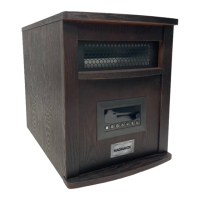

 To Next Page
 General