EasyManua.ls Logo

Magneti Marelli Obd Road - User Manual

Magneti Marelli Obd Road
9 pages
Print Icon
To Next Page IconTo Next Page
Loading...
Magneti Marelli Aftermarket Spółka z.o.o.
Plac Pod Lipami 5, 40-476 Katowice
Tel.: + 48 (032) 6036107, Faks: + 48 (032) 603-61-08
e-mail: checkstar@magnetimarelli.com
www.magnetimarelli-checkstar.pl
Obd Road
User’s Manual
007935800050
Question and Answer IconNeed help?

Do you have a question about the Magneti Marelli Obd Road and is the answer not in the manual?

Overview

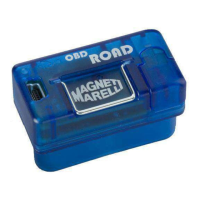
The Magneti Marelli OBD Road is a diagnostic device designed to acquire parameters and live data from vehicle ECUs, primarily for aftermarket analysis and maintenance. It offers a comprehensive suite of features for monitoring engine performance, diagnosing faults, and promoting eco-friendly driving.

Function Description:

The OBD Road device serves multiple key functions:

  • Data Recording: It records engineering parameters and engine operating conditions into its internal memory for later analysis. This includes capturing error codes related to emissions during a trip, triggering an acoustic signal when detected.
  • Real-time Display: The device can display engineering parameters, engine operating parameters, and fault codes in real-time.
  • Fault Code Management: It allows for the deletion of fault codes.
  • Eco-Driving Monitoring: The device registers if the user is driving in an "ECO mode" and provides acoustic signals to guide eco-friendly driving.
  • Software Analysis: When connected to a PC, the OBD-ROAD software performs detailed analysis of collected live data, including:
    • Identifying relevant accelerations and decelerations.
    • Analyzing, decoding, and canceling standard EOBD fault codes (P0xxx - P2xxx...).
    • Supporting alternative fuel management systems (CNG, LPG) by manufacturers or aftermarket sets.
    • Checking and promoting ECO style driving.
    • Providing detailed OBD parameter analysis and decoding, with examples such as vehicle speed, engine RPM, engine temperature, accelerator position, fuel pressure, overboost pressure, battery power supply, and atmospheric pressure.

Important Technical Specifications:

  • Vehicle Interface: EOBD standard connector, with full electrical and mechanical compatibility as determined by the standard.
  • EOBD Compliance: Full compatibility with J1850-41.6, J1850-10.4, ISO9141-2K/L, and CAN (Control Area Network ISO 11898) standards.
  • Power Supply (Vehicle): 12-24 V from the EOBD connector.
  • Current Consumption: < 50 mA Typical in live data reading mode, < 1 mA Typical in STAND-BY mode.
  • USB Slave: USB 1.0 Device Profile Virtual COM PORT.
  • Power Supply (PC): From the PC USB Port (Master).
  • Core Microcontroller: ARM.
  • Data Memory: 4 MB.
  • Working Conditions: Integrated multifunction LED.
  • Working Temperature: -40 °C to +85 °C.
  • Size: 43.5 x 22.5 x 25.1 (L x P x H) (mm).
  • Weight: 20 g.
  • Approval: E24 10R-030604.
  • RTC: Rechargeable Integrated Battery.
  • Warning Signals: Buzzer.
  • Visual Signals: LED.

Usage Features:

  • First Use: The device has an internal battery for maintaining date and time. If discharged, it needs to be powered via USB for about 1 hour, and the date and time must be set using the OBD ROAD software on the PC. If disconnected from the vehicle, the internal battery may go flat within 90 days, requiring the date/time setting procedure to be repeated.
  • Acoustic Signals:
    • 5 intermittent beeps when faults are detected on the vehicle.
    • 3 intermittent beeps in ECO driving style if the engine exceeds 2500rpm or 130km/h (default setting).
  • Device Layout: Features a warning light (LED) indicating operating conditions, vehicle connection status, memory status (full), and working state. It also has a USB port for PC connection.
  • Vehicle Setup and Use:
    • Safety Precaution: Always check the complete functionality of all on-board safety systems (e.g., AIRBAG, ABS) after installing the device.
    • OBD Connector Location: The standard EOBD connector is typically located near the driver's side, sometimes behind a plastic cover. The PC software can display the correct position.
    • Installation/Removal: Connection and disconnection must be done safely with the engine and dashboard off for at least one minute.
    • Connection Procedure:
      1. Engine and dashboard off.
      2. Locate the OBD connector.
      3. Use tools to safely remove any protective parts.
      4. Plug the device firmly into the EOBD connector.
      5. Reassemble removed parts.
      6. Wait for the warning light to indicate "Device Automatic Setup."
      7. Crank the engine.
      8. The vehicle can now be used on the road.
    • Disconnection Procedure:
      1. Crank off the engine and turn off the dashboard, wait at least one minute.
      2. Wait for the warning light to indicate "STAND-BY" mode.
      3. Remove the device from the diagnostic connector using the metal clip.
      4. Pull out the metal clip.
  • LED and BUZZER Warning and Alarm Signals: A detailed table outlines various modes (Device Plug-in, Stand-by, Ignition, Recording start-up/completed, DTC detected, Eco Drive - RPM/Speed Control/Economy Alert, PC Connection, All connections) with corresponding warning light states, acoustic signals, and descriptions of the device's mode.
  • Software Installation: The device uses software supplied by Tecnomotor on a CD. Installation involves closing other software, temporarily disabling antivirus/firewall, inserting the CD, and following on-screen instructions.
  • Plug/Unplug to PC:
    1. Turn on PC and start the application.
    2. Connect the USB cable to the device.
    3. Connect the USB cable to the PC (device LED blinks).
    4. Install drivers if requested (located in "OBD-ROAD/driver" folder).
    5. If the USB port isn't settled, select "System Setup" from the SETTING menu to allow the software to search for the device.
  • Software Description: The OBD-ROAD SW displays and analyzes live data captured by the device. Data is recorded into "travels" when the engine is cranked and the device communicates with the vehicle's ECU, stopping when the dashboard is turned off. The Eco-Drive mode allows monitoring consumption and driving style. Menu items include:
    • OBD-ROAD Setup: For setting parameters to record, either by selecting live data directly or using preconfigured items.
    • OBD-ROAD Analysis: Verifies live data.
    • OBD Diagnosis: Checks real-time live data values and reads/deletes DTC error codes.
    • Database: Accesses all saved records.
    • OBD-ROAD Management: Verifies settings (firmware version), sets date and time, updates firmware, and checks memory status.

Maintenance Features:

  • Cleaning: Never use thinners, cosmetics, or other volatile agents to clean the exterior. Clean with a cloth wetted with a diluted solution of water and mild detergent.
  • Package Maintenance: For maintenance of packages containing the equipment and relocation, Italian Law Decrees DDLL 626 of 19/9/94 and 242 of 19/3/96 apply. Use appropriate tools to open packages.
  • Warranty: The product is covered by a 12-month warranty from the date of purchase. The warranty does not cover physical damage, malfunction of cables (unless claimed within 10 days of receipt), damage from tampering/unauthorized changes, or short circuits due to external events or improper use.

Magneti Marelli Obd Road Specifications

General IconGeneral
BrandMagneti Marelli
ModelObd Road
CategoryAutomobile Accessories
LanguageEnglish

Related product manuals