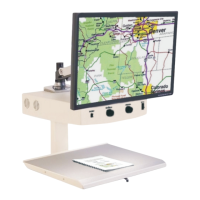
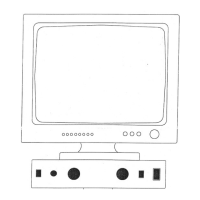
The MagniSight Explorer HD (Model MSE-L22-HD) is a desktop video magnifier (CCTV) designed to assist individuals with low vision in reading and viewing various materials. It features a camera unit with an integrated monitor and a movable viewing table, providing magnification, adjustable brightness, and various viewing modes to enhance visibility.
Function Description:
The Explorer HD functions by capturing an image of material placed on its viewing table and displaying a magnified version on its integrated monitor. This allows users to read text, view pictures, or examine objects at a larger size, making them more accessible for individuals with visual impairments. The system is designed for ease of use, with controls for magnification, brightness, and viewing mode readily accessible on the camera control panel.
Important Technical Specifications:
- Model: MSE-L22-HD
- Power: The unit connects to an AC power source. It includes an AC OUT jack on the rear panel of the camera, which supplies power to the monitor and turns on/off with the camera's main power switch.
- Connectivity: It utilizes a DVI signal cable to connect the monitor to the camera unit and a control cable for communication between the camera and the monitor.
- Lighting: The camera unit is equipped with two sets of lightbulbs (front and rear) to illuminate the viewing table, allowing users to select the optimal lighting angle for different materials and magnifications. The factory setting defaults to the rear lights being ON.
- Viewing Table: The device includes an X-Y viewing table mounted on a slide mechanism, enabling movement of material left-to-right and front-to-back under the camera. This table can be locked in place using a brake lever for steady viewing or writing. It also features a rear alignment edge for lining up pages and envelopes, and a non-glare, wipeable dark-colored surface with a speckled pattern to reduce eyestrain and help distinguish the edges of white pages.
Usage Features:
- System Power On/Off: The unit is turned ON and OFF using a power switch located under the front, right corner of the camera housing. Upon powering on, the viewing table lights should illuminate, and the screen should display an image after a short delay. If the screen does not turn on, users are instructed to press the monitor power button located in the lower right corner of the monitor.
- Viewing Modes: The Mode Switch on the camera control panel allows users to cycle through various viewing modes, including Full Color HD, Black & White, and Select-A-Color combinations. Full Color HD is recommended for pictures and color graphics, while Black & White or Select-A-Color modes are often preferred for reading or writing text.
- Magnification Adjustment: The "SIZE Control" knob is used to adjust the magnification of the image. Turning the knob to the RIGHT increases the image size (LARGER), while turning it to the LEFT decreases the image size (SMALLER). For new users, it's recommended to start at the smallest magnification and gradually increase it until the text is readable.
- Brightness Adjustment: The "BRIGHTNESS Control" knob allows users to brighten or darken the displayed image. Turning the knob to the RIGHT brightens the image, and turning it to the LEFT darkens it. This can be adjusted as needed in any viewing mode.
- Lighting Control: A "LIGHT Switch" located under the front, left corner of the camera unit allows users to switch between the front and rear lights. This feature helps optimize lighting for different materials and magnifications.
- Viewing Table Operation: The X-Y viewing table facilitates smooth movement of reading material. A brake lever, located below the front edge of the table, allows users to lock the table in a steady position by moving the lever all the way to the RIGHT. Releasing the lever back to the CENTER position restores full table movement (front-to-back and side-to-side).
Maintenance Features:
- Cleaning: The screen should be dusted with a soft, dry cloth as needed. For cleaning the unit's surfaces, ensure the unit is powered OFF, then use a slightly damp cloth. Users are explicitly warned NOT to spray chemicals or cleaning liquids directly on the unit.
- Safety Precautions:
- Always place the unit on a sturdy table, away from heat sources, to prevent falls and potential damage or injury.
- When moving the unit, the viewing table should always be in the LOCKED position (brake lever to the far right), and users should utilize the handholds in the base.
- A surge-protected power strip is recommended to protect the unit from power outages.
- Avoid inserting hands or fingers into any openings, as touching the camera lens or mirror can reduce image quality.
- Service and Repair: The unit contains NO USER SERVICEABLE PARTS. All service and repairs must be performed by the factory or an authorized service center. In case of malfunctions or questions, users are advised to contact MagniSight, Inc. at (800) 753-4767 or (719) 578-8893.
- Packaging for Service: If the unit requires service and needs to be shipped, it is MANDATORY to use the ORIGINAL PACKAGING to prevent damage during transit. Users should contact MagniSight for return information or to order replacement packaging if needed.
- FCC Information: The Explorer CCTV has been tested and complies with Class B digital device limits under FCC Rules Part 15, designed to provide reasonable protection against harmful interference. Users are advised that if the equipment causes harmful interference, they may be required to correct it.
- Important Packaging Note: Users are instructed NOT to discard the packing carton and materials, as the original packaging is REQUIRED for safe shipping if service or return of the unit is necessary.

 Need help?
 General

 To Next Page