Operating the
Ballhead
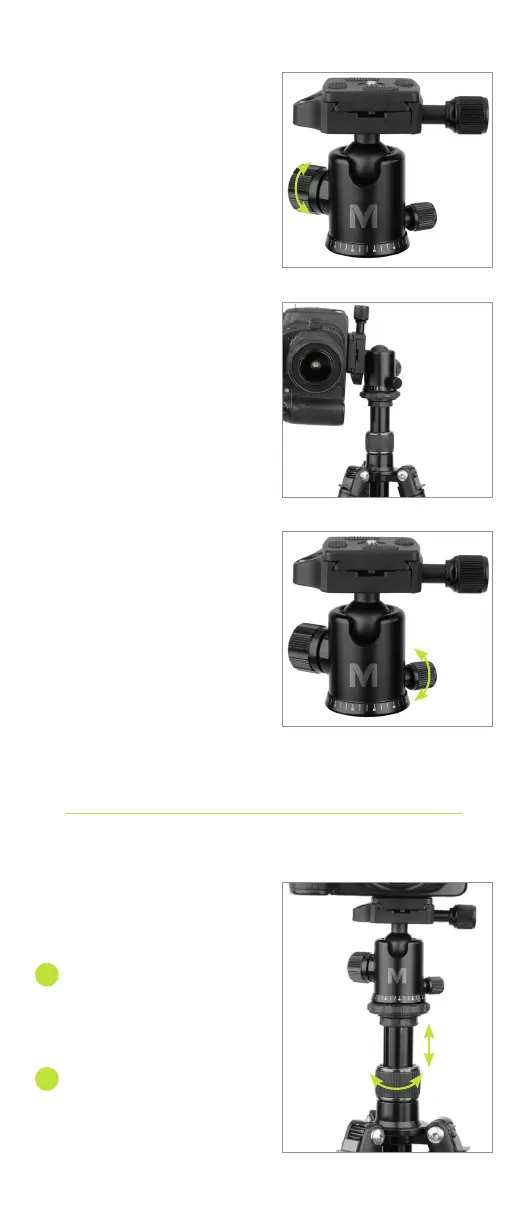
Important! Always support the
camera with one hand when
loosening the tilt locking knob.
To adjust the tilt, loosen the ball
locking knob, and change the
position of the camera.
For 90° portrait orientation,
loosen the ball locking knob,
and place the ballhead into the
90° notch.
For 360° panning, loosen the
pan locking knob, and rotate
the base of the ballhead. Use
the degree scale at the base
of the head for precise aiming,
and tighten the locking knob
until secure.
Adjusting the
Center Column
To raise or lower the center
column, loosen the center-
column collar by turning it
counterclockwise.
Adjust the center column
to the desired height, and
tighten the center-column
collar until secure.
1
2


 To Next Page