P11
CAUTION
Please ensure that no objects (walls) will interrupt the movement of the desk,
The control panel must be fixed horizontally under the desktop before use.
Please set the sensitivity of the Anti-collision function according to your usage habits.
Please
RESET the desk at the first time use.
and all cables of relevant devices are sufficiently long.
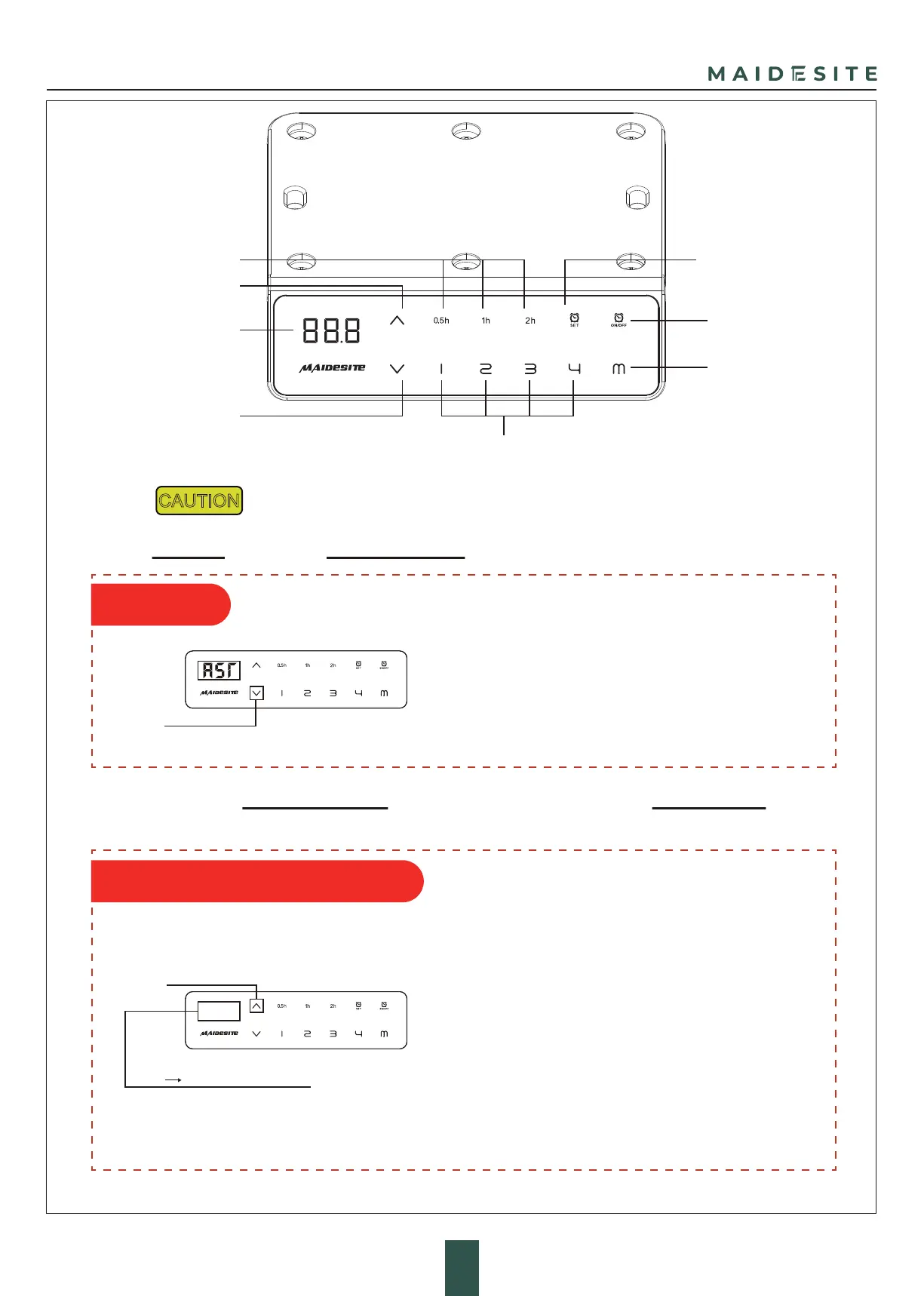
1.Enter the RST mode:
Hold the 'DOWN' key for 5s while the desktop is at the
lowest position (otherwise lower the desktop first).
The digital display shows 'RST'. Now the system enters
RST mode.
2.Quit the RST mode:
Hold the 'DOWN' key again until the desktop moves down
slightly and then moves up slightly. The display shows
the current height. The system quits RST mode.
UP
DOWN
Memory Heights
Digital Display
Sit-stand Reminder
Time Display
Sit-stand
Reminder Setting
Sit-stand
Reminder Switch
Memory/Setting
'RST' '10.5/10.6/10.7/10.8'
Hold for 5s
Hold for 5s
Hand Controller Instruction
Press and hold the DOWN button, the digital display
showing 'RST'. Press and hold the 'UP' button for 5
seconds, you can adjust the Anti-collision sensitivity.
Press and hold the 'UP' button for 5 seconds each
time, the digital display will switch to one of the
following options:
'10.5' - least sensitive (default initial setting)
'10.6' - normal sensitivity
'10.7' - moderate sensitivity
'10.8' - maximum sensitivity
After the selected settings are displayed, release and
wait for 5 seconds, the display will return to 'RST.'
Press and hold the 'DOWN' button to exit the reset state.
#1 RESET
#2
Anti-collision Sensitivity Setting


 To Next Page