EasyManua.ls Logo

Majestic DEC 663N - User Manual

Majestic DEC 663N
12 pages
Print Icon
To Next Page IconTo Next Page
Loading...
3
New Majestic S.p.A.
Via Rossi Martini, 41
26013 Crema (CR) – ITALY
www.newmajestic.com
MADE IN CHINA
Please read this user manual before using or connecting this product.
And keep it handy for future reference.
MODEL NO.: DEC 663N
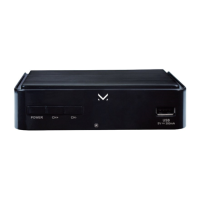
HD Digital Terrestrial Receiver
User Manual
Question and Answer IconNeed help?

Do you have a question about the Majestic DEC 663N and is the answer not in the manual?

Overview

This document describes the Majestic DEC 663N HD Digital Terrestrial Receiver, a device designed to receive and decode digital terrestrial television broadcasts. It functions as a set-top box, allowing users to access digital channels on their television sets.

Function Description:

The DEC 663N is primarily a Digital Terrestrial Receiver that processes broadcast signals and outputs them to a television. It supports both standard definition (SD) and high definition (HD) video. The device includes a remote control for easy navigation and operation. Key functions include:

  • Channel Reception: Tunes into VHF and UHF frequencies to receive digital terrestrial TV and radio channels.
  • Video Decoding: Decodes various video formats, including MPEG-2/4 (H.264), VC-1, and HEVC (H.265), supporting resolutions up to 1080p at 60fps.
  • Audio Decoding: Decodes audio formats such as MPEG-1, MPEG-2 layer I & II, HE-AAC, and Dolby Digital (AC-3), with stereo down-mixing to analog and digital outputs.
  • Multimedia Playback: Features a USB jack for playing multimedia files (music, photos, movies) from compatible USB storage devices (FAT32 file system).
  • Electronic Program Guide (EPG): Provides program information and scheduling.
  • Subtitle Support: Displays DVB subtitles with customizable size, background, and text color.
  • Teletext: Supports DVB teletext.
  • Parental Guidance: Allows setting age restrictions for programs with a default password.
  • Automatic and Manual Channel Search: Facilitates finding and saving TV and radio channels.
  • Time Settings: Configures time zone, sleep timer, and automatic switch-on/off times.
  • OSD Language: Supports changing the on-screen display language.
  • Image Ratio Adjustment: Allows users to change the image aspect ratio (4:3/16:9).
  • HDMI Video Resolution Change: Enables adjustment of HDMI output resolution.

Important Technical Specifications:

  • Model Number: DEC 663N
  • Input Connector: IEC16902.Female
  • Input Frequency Range: VHF & UHF
  • RF Input/Output: 1 input, 1 bypass output (IEC 169-2 male), 177.5-866MHz
  • Input Impedance: 75ohm
  • Demodulation Standard: ETSU EN300 744
  • Guard Interval Models: 1/32, 1/16, 1/8 active symbol duration
  • FEC Modes Rate: 1/2, 2/3, 3/4, 5/6, 7/8
  • Carriers/Constellation: COFDM (QPSK/QAM16/QAM64/QAM256) 2k and 8K
  • Video Decoding Standards: ISO/IEC 13818-2, ISO/IEC 14496-10, MPEG-2 SD/HD, MPEG-4 H.264/AVC, H.265/HEVC SD/HS DIVX 4.X~5.X
  • Supported Image Files: JPEG, BMP, PNG, MOTION JPEG
  • Supported Video Containers: AVI, VOB, MOV, MKV, TS, MPG, MP4
  • Video Resolutions: 1080p, 1080i, 720p, 576p, 576i, 480p, 480i
  • Frame Rates: Up to 60fps for H.264/HEVC, 30fps for MPEG-2/4
  • Audio Decoding Standards: SO/IEC13818-3 TR1011154, MPEG-1, MPEG-2 layer 1 & II, HE-AAC digital audio
  • Dolby Digital (AC-3): Stereo down-mixing to analog and digital outputs (including HDMI). L-PCN stereo encoding for digital outputs.
  • Sample Rates: 32KHZ, 22.1KHZ, 44.1KHZ, 48KHZ
  • Subtitle Type: DVB subtitle
  • Power Input Range: AC 100 - 240V 50/60Hz
  • DC Input: 5V/1A
  • Power Consumption: <8W
  • Standby Consumption: 0.5W
  • Connectivity: USB jack, DC IN 5V/1A, IR sensor jack, ANT-IN, ANT-OUT, HDMI output (version 1.4), Scart socket (RGB / CVBS).

Usage Features:

  • Remote Control: A comprehensive remote control is provided with dedicated buttons for power, channel navigation, volume, menu access, EPG, multimedia playback controls (play, pause, stop, rewind, fast forward), and specific function keys (Red, Green, Yellow, Blue) for contextual menu options, HDMI resolution, image ratio, and other functions.
  • First-Time Installation Guide: Upon first use or factory reset, an on-screen installation guide assists with language selection, country setting, and automatic channel search.
  • Main Menu Navigation: The main menu, accessible via the remote's "MENU" button, allows users to configure program settings, picture settings, channel search options, time settings, general options (OSD language, subtitle language, audio language), and system settings (parental guidance, password change, factory reset).
  • Multimedia Playback: The "USB" button on the remote provides access to multimedia playback, categorized into Music, Photo, and Movie. Users can adjust slide show intervals and effects for photos, and subtitle display options (size, background, color) for videos.
  • Signal Loop-Through: The ANT-OUT port allows the digital terrestrial signal to be passed through to another device, such as a television's internal tuner.
  • IR Sensor: An external IR sensor jack is provided, suggesting the possibility of using an external IR receiver for flexible placement of the main unit.

Maintenance Features:

  • Cleaning: The device should be cleaned only with a damp cloth, and the power unplugged prior to cleaning.
  • Ventilation: Ensure ventilation openings are not blocked to prevent overheating.
  • Power Cord Protection: Protect the power cord from being walked on or pinched.
  • Battery Replacement: The remote control uses two 1.5V AAA batteries. Instructions are provided for correct insertion and replacement. Users are advised not to use rechargeable batteries, mix old and new batteries, or attempt to recharge/disassemble them. Batteries should be removed if the remote is not used for long periods.
  • Troubleshooting Guide: A table of common problems and their possible causes/solutions is included, covering issues like no display, "NO signal" message, missing channels, and remote control malfunction.
  • Software Updates: The manual mentions that corrective software updates may be published on www.newmajestic.com, implying the device supports firmware updates.
  • Factory Default Reset: The system settings include an option to restore the unit to its default factory settings.
  • Qualified Service: Users are advised to refer all servicing to qualified service personnel and not to remove the cover or attempt user-serviceable repairs.
  • Environmental Disposal: The product and its batteries are marked with symbols indicating separate collection for recycling at the end of their useful life, in accordance with EU directives. Users are instructed to dispose of the equipment at appropriate waste centers or return it to the retailer. Batteries should be disposed of in designated bins.

Majestic DEC 663N Specifications

General IconGeneral
BrandMajestic
ModelDEC 663N
CategoryReceiver
LanguageEnglish

Related product manuals