The SmartView Pro 1100 Imager System is a next-generation gel documentation instrument designed for ease of use in laboratory gel imaging experiments. It features a 5.0-megapixel high-sensitivity and resolution CMOS camera for outstanding imaging quality. The system offers convenience with a 312(302)nm pull-out UV transilluminator for easy gel cutting and a pre-focused lens for one-touch image capture. It also includes a user-friendly software interface and, for the 1200 series, an innovative iPad/PC remote control. Expandable accessories, such as an epi-blue module and white light table, are available for environment-safe nucleic acid stains or western blot analysis.
Function Description:
The SmartView Pro 1100 Imager System is primarily used for fluorescent imaging of gels. It captures and analyzes images of nucleic acid (DNA/RNA) and protein samples. The system supports various staining methods, including EtBr, SYBR Green, Novel Juice, Midori Green Direct, Hydra Green, HD Green, SafeView DNA Stain, SYBR Safe, Midori Green, Midori Green Advanced, GelGreen, and GelRed for nucleic acid imaging, and Coomassie blue or silver stain for protein imaging. It also supports X-ray film imaging. The integrated software provides tools for image capture, processing, and gel analysis, including density calculation and molecular weight determination.
Important Technical Specifications:
- Model Name: UVCI-1100
- Total Weight: Approx. 24.5 kg
- Unit Dimension (W × D × H): 410 × 405 × 570mm
- Construction Material: Painted iron metal, ABS front door
- Display: LED indicator light
- Rated Voltage: 100-240V~, 50/60Hz, 2A
- Power: 120W
- Connectivity: USB
- Image Storage: PC
- Save Image Format: BMP/JPEG/PNG/TIFF (8 bit and 16 bit for PNG/TIFF)
- Safety Regulation: CE, FCC
- CMOS Camera:
- Camera Type: CMOS camera
- Image Sensor: 1/2.5" 5M Pixel Monochrome sensor
- Resolution (H × V): 2592 × 1944 pixels
- Video Output Format: RAW 8 bit / 10 bit / 12 bit
- Cell Size (H × V): 2.2 × 2.2 µm
- Max. Frame Rate: 14fps
- Interface: USB3.0
- Dynamic Range: 70.1DB
- Grayscale: 12 bit, 0-4095 gray levels
- Lens:
- Focal Length: 6mm
- Aperture: F1.2
- Filter (for camera): Optical EtBr filter / Optical SYBR Green filter / Yellow Amber filter / Orange Amber filter (ordered separately)
- Darkroom:
- Built-in Drawer Type UV transilluminator: 312(302) nm, Light source: 8W × 6 tubes
- Built-in LED white light: Light source: 1W × 6 lamps
- UV safety door switch: Yes
- Maximum field of view: 21 × 26cm
- (optional) Blue Light Module: Yes
- (optional) White Light Table: Yes
- Viewing Window:
- Built-in UV viewing window: Yes
- Built-in viewing window Amber filter: 560nm
- PC Minimum Hardware Requirements:
- Processor: 1.8GHz Pentium® IV or equivalent AMD Athlon® processor
- Memory: 1GB
- Storage: 1GB available HD space
- Media: CD-ROM drive
- Connectivity: 1 port USB 2.0
- Display: 1280 × 800 resolutions
- Operating System: Windows® 7 SP1/ Windows® Vista SP1 / Windows® XP SP3/ Windows® 8/ Windows® 10
- PC Software: Control UVCI-1100, Image capture, Image processing and gel analysis
Usage Features:
- Image Capture: One-touch image capture with a pre-focused lens. The software allows real-time image display, cropping, and saving in various formats (BMP, JPEG, PNG, TIFF).
- Light Sources: Standard epi white light and trans-UV. Optional blue light module and white light table for enhanced flexibility.
- Filters: Default optical EtBr filter. Other optical filters (SYBR Green, Yellow Amber, Orange Amber) are available for different applications. Amber filter viewing window is built-in.
- Exposure Control: Manual and auto-exposure settings. Auto-exposure can take up to 30 seconds to calculate the best time, capped at 3 seconds to prevent over-exposure. Manual input allows for longer exposure times if needed.
- UV Intensity: Adjustable between 70% and 100% illumination.
- Image Processing: Software features include rotating, flipping, adjusting brightness and contrast, negative inversion, zooming, adding text, undo/redo actions, and reverting to the original image.
- Gel Analysis:
- Lane Selection: Users can define rectangular boxes along lanes for analysis.
- Peak Detection: "Auto Find" feature automatically identifies peaks based on a user-adjustable sensitivity level (1-10). Peaks above the sensitivity level are highlighted. Manual peak addition and deletion are also supported.
- Baseline Adjustment: A green line can be adjusted to include or exclude peaks from quantification.
- Density Calculation: Inputting two known concentrations allows the software to project unknown concentrations for other bands.
- Molecular Weight Calculation: Inputting known molecular weight values for markers allows the software to calculate unknown molecular weights.
- Data Export: Analysis data can be exported in CSV file format for use with spreadsheet software like Microsoft Excel.
- Dot Blot Analysis: Specific analysis mode for dot blot samples, including automatic dot-blot sample analysis, manual dot addition, and density calculation based on known concentrations.
- Safety Features: UV safety door switch ensures the UV light is off when the door is open.
- Software Language: Automatically selects language based on user's system (English/Traditional Chinese/Simplified Chinese).
- Advanced Features: Date stamp and saturation detection (note: saturation detection uses considerable memory).
Maintenance Features:
- Cleaning: Painted surfaces and filter areas should be cleaned with water and soap using a sponge or towel, then dried with a soft cloth. Abrasive cleaners, solvent-based cleaners, or scouring pads should not be used. The housing can be cleaned with a moist cloth and mild soap solution.
- Fuse Replacement: Instructions are provided for replacing the fuse (T2A/250V~) located in the Power Entry Module. The fuse compartment will not open with the power cord in place.
- Camera Adjustment: Instructions are provided for adjusting the scientific camera if it is out of focus, requiring a 2.5mm hex wrench to loosen screws and clean the lens.
- Amber Filter Replacement: Steps are outlined for removing and reinstalling the amber filter on the viewing window using a 7M/M socket wrench.
- Troubleshooting Guide: Provides solutions for common issues such as "No Signal from the CMOS camera," "UV light doesn't light up," and problems with printing or operating lights.
- Warranty: Major Science provides a one-year warranty against defects in materials and workmanship from the shipping date. Consumable parts (UV lamp and UV filter) are not covered.

 Need help?
 General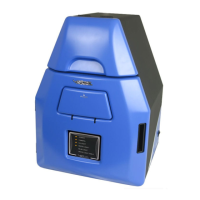

 To Next Page