
 Need help?
Do you have a question about the Major tech MT694 and is the answer not in the manual?
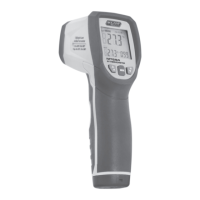
Identifies and labels the various parts and components of the thermometer.
Defines the meaning of icons and symbols appearing on the device's liquid crystal display.
Outlines the function and operation of each control button on the thermometer.
Explains the fundamental principles of infrared temperature sensing and measurement.
Advises on ensuring the target area is larger than the measurement spot size for accuracy.
Clarifies how the distance from the object affects the size of the measured spot.
Offers a technique for effectively scanning and identifying hot spots.
Presents important considerations and warnings for optimal and safe thermometer usage.
Defines emissivity and its critical role in accurate IR temperature readings.
The MAJOR TECH MT694 is an Infrared Thermometer with a Multipoint Laser, designed for non-contact temperature measurements. This instrument allows users to measure surface temperatures quickly and accurately by simply pressing a button. Its built-in multipoint laser pointer enhances targeting precision, while the backlit LCD and user-friendly push-buttons contribute to convenient and ergonomic operation.
The MT694 is primarily used for non-contact (Infrared) temperature measurements. This makes it ideal for situations where traditional contact thermometers are impractical or unsafe, such as measuring moving objects, surfaces with electrical currents, or objects that cannot be touched directly. The device senses emitted, reflected, and transmitted energy from an object's surface, collects and focuses it onto a detector, and then translates this information into a temperature reading displayed on the unit. The laser is solely for aiming purposes, helping the user pinpoint the measurement area.
The thermometer features a rapid detection function, ensuring quick measurements. It offers precise non-contact measurements and includes a circular laser sighting for improved accuracy. A unique flat surface and modern housing design contribute to its aesthetic and functional appeal. The device is rated IP54 for dust and waterproof protection and has been tested for a 2-meter drop, indicating its durability.
Key functional capabilities include automatic data hold, which freezes the last reading on the display. The emissivity is digitally adjustable from 0.10 to 1.0, allowing users to compensate for different surface materials to achieve more accurate readings. It can display MAX, MIN, AVG, and DIF (difference) temperatures, providing comprehensive data analysis. The backlit LCD display ensures readability in various lighting conditions. The MT694 also features an automatic selection range and a display resolution of 0.1°C (0.1°F). Users can set high and low alarms to be notified when temperatures exceed or fall below predefined thresholds. Additionally, it includes a Type-K input, expanding its measurement capabilities to include contact temperature measurements using a thermocouple.
To operate the MT694, hold the meter by its handle grip and point the IR sensor towards the surface to be measured. Pull and hold the measurement trigger to turn the meter on and initiate testing. The display will illuminate if the battery is sufficient. Upon releasing the trigger, the "HOLD" icon will appear on the LCD, indicating that the reading is being held. In HOLD status, the UP button can be used to turn the laser on or off, and the DOWN button controls the backlight. The meter automatically powers down after approximately 10 seconds of inactivity following the trigger release, conserving battery life.
The meter automatically compensates for temperature deviations from ambient temperature. For accurate readings, especially after significant changes in ambient temperature or when transitioning from low to high temperature measurements, allow up to 30 minutes for the meter to adjust. This adjustment period is crucial for the IR sensor's cooling process.
The MT694 offers several modes accessible via the MODE button. Pressing the MODE button allows cycling through various settings and displays, including Emissivity (EMS), temperature unit (°C/°F), High Alarm (HAL) on/off, HAL adjustment, Low Alarm (LAL) on/off, and LAL adjustment. To set values for HAL, LAL, and EMS, press and hold the MODE button until the appropriate code appears, then use the UP and DOWN buttons to adjust the desired values. The UP/DOWN buttons also adjust emissivity and toggle the laser and backlight.
When a Type-K thermocouple is connected during measurement, its data will automatically display in the lower left quarter of the screen. In this scenario, the MAX/MIN/DIF/AVG modes cannot be changed. The MAX MIN DIF AVG display shows the maximum, minimum, difference, and average values recorded during a measurement session, which are updated each time the "ON/OFF" button is pressed and released.
When measuring, ensure the target is larger than the unit's spot size. For critical accuracy, the target should be at least twice as large as the spot size. To locate a hot spot, aim the thermometer outside the area of interest and then scan across with an up and down motion until the hot spot is found.
For general maintenance, periodically wipe the body of the instrument with a dry cloth. It is important not to use abrasives or solvents on the MT694, as these can damage the device. Repairs or service for the MT694 are not covered in the manual and should only be performed by a qualified technician. When service is required, only manufacturer-specified parts should be used to ensure proper functioning and safety.
Battery replacement is indicated when the LCD displays a "+" symbol, signifying insufficient power. The device uses 2xAAA batteries. To replace them, open the battery cover, insert new batteries, and then close the cover to resume using the instrument.
It is important to note that the MT694 is not recommended for measuring shiny or polished metal surfaces (e.g., stainless steel, aluminum) due to their low emissivity, which can lead to inaccurate readings. To compensate, cover such surfaces with masking tape or flat black paint, allow time for the tape/paint to reach the same temperature as the underlying material, and then measure the temperature of the covered surface. The unit cannot measure through transparent surfaces like glass; it will measure the surface temperature of the glass itself. Additionally, steam, dust, or smoke can obstruct the unit's optics and prevent accurate measurements.
When using the laser, extreme caution is advised. Do not stare into the laser beam, and ensure the beam does not enter anyone's eye (human or animal). Be careful of reflective surfaces, as the laser beam can strike your eye indirectly. The laser light beam should not impinge on any gas that could explode.
 General
| Type | Infrared Thermometer |
|---|---|
| Accuracy | ±1.5°C or ±1.5% (whichever is greater) |
| Response Time | <500ms |
| Power Supply | 9V Battery |
| Distance to Spot Ratio | 12:1 |
| Battery | 9V Battery |
| Resolution | 0.1°C/°F |
| Display | LCD |
| Auto Power Off | Yes |

 To Next Page