TROUBLESHOOTING
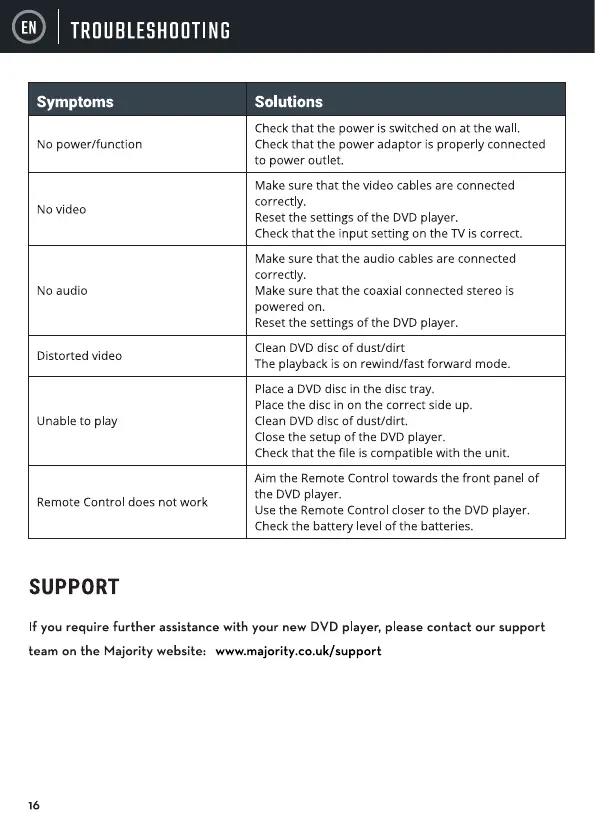
Symptoms
No power/function
No video
NO audio
Distorted video
Unable to play
Remote Control does not work
SUPPORT
Solutions
Check that the power is switched on at the wa
Check that the power adaptor is properly connected
to power outlet.
Make sure that the video cables are connected
correctly.
Resetthe settings of the DVDplayer.
Check that the input setting on the TV is correct.
Make sure that the audio cables are connected
correctly.
Make sure that the coaxial connected stereo is
powered on.
Resetthe settings of the DVDplayer.
Clean DVD disc Of dust/dirt
The playback is on rewind/fast forward mode.
Place a DVD disc in the disc tray.
Placethe disc in on the correct side up.
Clean DVD disc of dust/dirt.
Close the setup Of the DVD player.
Check that the file is compatible with the unit.
Aim the Remote Control towards the front panel Of
the DVD player.
Usethe Remote Control closer to the DVD player.
Check the battery level Of the batteries.
If you require further assistance with your new DVD player, please contact our support
team on the Majority website: www.majority.co.uk/support
16


 To Next Page
 Loading...