6
FUNCTIONAL
DESCRIPTION
CAUTION:
• Always be sure that the tool is switched off and
unplugged before adjusting or checking function on the
tool.
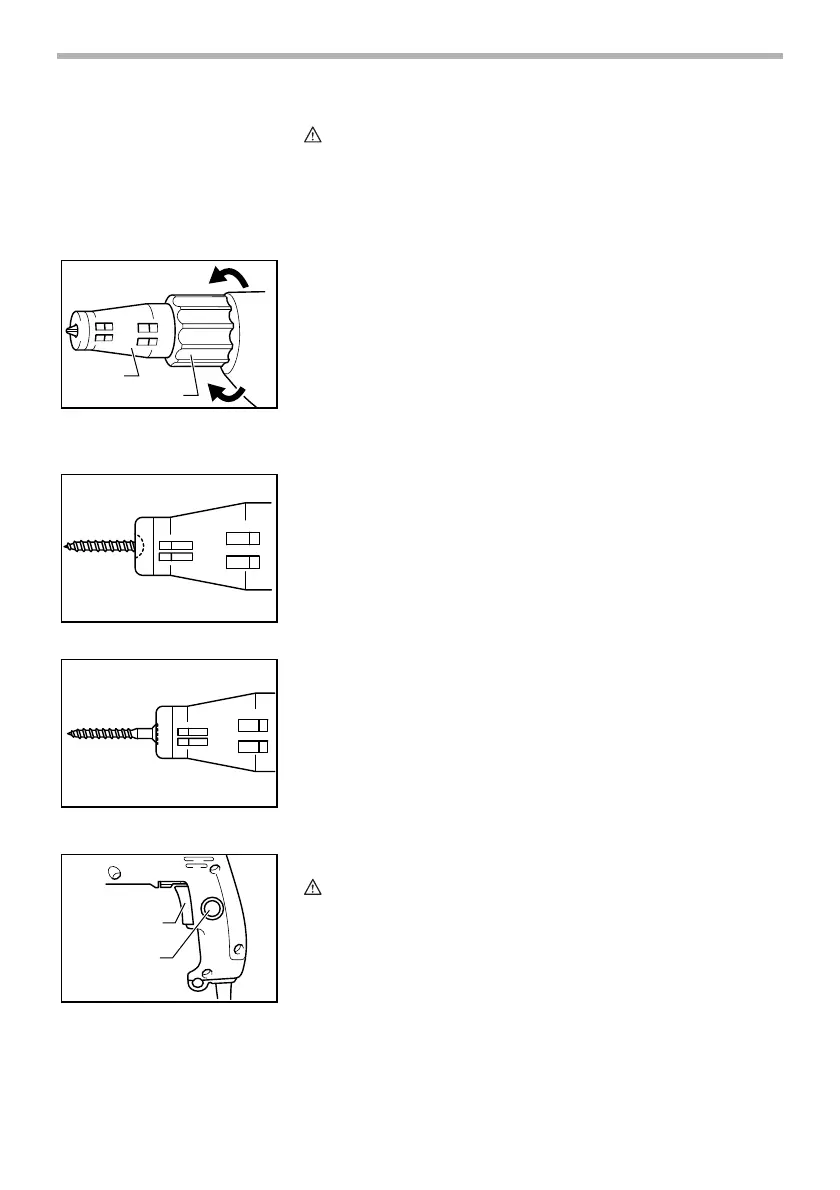
Depth adjustment
The depth can be adjusted by turning the locking sleeve.
Tu r n i t i n “A” direction for less depth and in “B” direction for
more depth. One full turn of the locking sleeve equals 2 mm
(3/32”) change in depth.
Adjust the locking sleeve so that the tip of the locator is flush
with the base of the screw head. Drive a trial screw into your
material or a piece of duplicate material. If the depth is still
not suitable for the screw, continue adjusting until you obtain
the proper depth setting.
Switch action
CAUTION:
• Before plugging in the tool, always check to see that the
switch trigger actuates properly and returns to the “OFF”
position when released.
To start the tool, simply pull the switch trigger. Tool speed is
increased by increasing pressure on the switch trigger.
Release the switch trigger to stop.
For continuous operation, pull the switch trigger and then
push in the lock button.
1. Locator
2. Locking sleeve
A
B
1
2
002611
002617
002618
1. Switch trigger
2. Lock button
1
2
002627



 To Next Page