8 ENGLISH
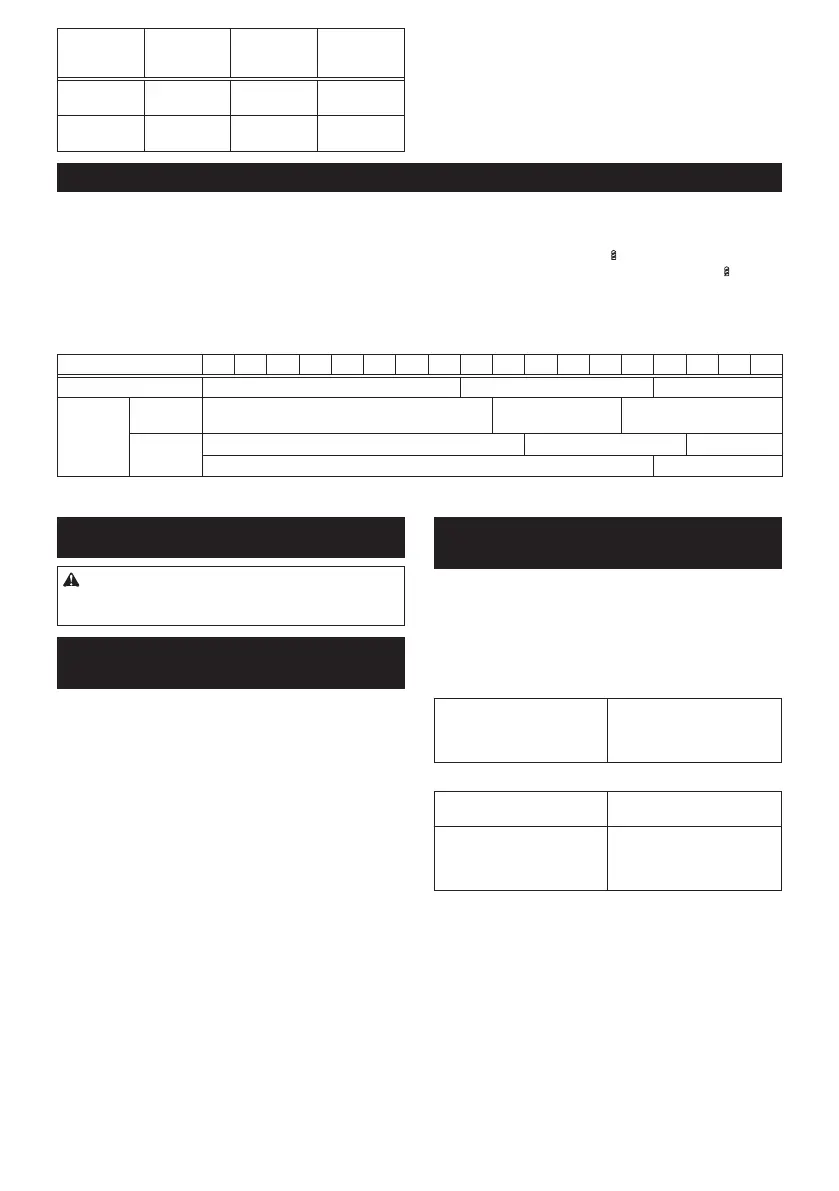
Position of
speed
change lever
Speed Torque Applicable
operation
1 Low High Heavy load-
ing operation
2 High Low Light loading
operation
Tochangethespeed,switchoffthetoolrst.Select
the"2"sideforhighspeedor"1"forlowspeedbuthigh
torque.Besurethatthespeedchangeleverissettothe
correctpositionbeforeoperation.
If the tool speed is coming down extremely during the
operationwith"2",slidethelevertothe"1"andrestart
the operation.
Adjusting the fastening torque
[Fig.7: 1.Adjustingring 2.Graduation 3.Arrow]
Thefasteningtorquecanbeadjustedin19stepsbyturningtheadjustingring.Alignthegraduationswiththearrow
onthetoolbody.Youcangettheminimumfasteningtorqueat1andmaximumtorqueat
marking.
Theclutchwillslipatvarioustorquelevelswhensetatthenumber1to18.Theclutchdoesnotworkatthe
marking.
Before actual operation, drive a trial screw into your material or a piece of duplicate material to determine which
torquelevelisrequiredforaparticularapplication.
Thefollowingshowstheroughguideoftherelationshipbetweenthescrewsizeandgraduation.
Graduation 1 2 3 4 5 6 7 8 9 10 11 12 13 14 15 16 17 18
Machine screw M4 M5 M6
Wood
screw
Soft wood
(e.g. pine)
– ɸ3.5 x 22 ɸ4.1x 38
Hard wood
(e.g. lauan)
– ɸ3.5 x 22 –
– ɸ4.1x 38
ASSEMBLY
CAUTION: Always be sure that the tool is
switched off and the battery cartridge is removed
before carrying out any work on the tool.
Installing or removing driver bit/drill
bit
For Model DF331D (optional accessory)
[Fig.8: 1. Sleeve 2. Close 3. Open]
Turnthesleevecounterclockwisetoopenthechuck
jaws.Placethedriverbit/drillbitinthechuckasfar
asitwillgo.Turnthesleeveclockwisetotightenthe
chuck.Toremovethedriverbit/drillbit,turnthesleeve
counterclockwise.
Installing or removing driver bit/
socket bit
For Model DF031D (optional accessory)
[Fig.9]
Useonlydriverbit/socketbitthathasinsertingportion
showninthegure.Donotuseanyotherdriverbit/
socketbit.
For tool with shallow driver bit hole
A=12mm
B=9mm
Use only these type of driver
bit.Followtheprocedure
1. (Note) Bit-piece is not
necessary.
For tool with deep driver bit hole
A=17mm
B=14mm
Toinstallthesetypesofdriver
bits,followtheprocedure1.
A=12mm
B=9mm
Toinstallthesetypesofdriver
bits,followtheprocedure2.
(Note) Bit-piece is necessary
forinstallingthebit.
1. Toinstallthedriverbit,pullthesleeveinthedirec-
tionofthearrowandinsertthedriverbitintothe
sleeve as far as it will go.
Thenreleasethesleevetosecurethedriverbit.
[Fig.10: 1.Driverbit 2.Sleeve]
2. Toinstallthedriverbit,pullthesleeveinthedirec-
tionofthearrowandinsertthebit-pieceanddriver
bitintothesleeveasfarasitwillgo.Thebit-piece
shouldbeinsertedintothesleevewithitspointed
endfacingin.Thenreleasethesleevetosecure
thedriverbit.
[Fig.11: 1.Driverbit 2.Bit-piece 3.Sleeve]



 To Next Page