Need help?
Do you have a question about the Makita DF347D and is the answer not in the manual?
The tool is intended for drilling and screw driving in wood, metal and plastic.
Keep work area clean and well lit. Do not operate in explosive atmospheres. Keep children and bystanders away.
Match plugs to outlets. Avoid body contact with earthed surfaces. Do not expose to rain or wet conditions. Do not abuse cord.
Stay alert, use common sense. Wear eye protection. Prevent unintentional starting. Do not overreach. Dress properly. Use dust collection.
Use correct tool. Do not force. Repair if switch is faulty. Disconnect before adjustments. Store idle tools safely. Maintain tools.
Recharge with correct charger. Use only designated battery packs. Keep battery away from metal objects. Avoid battery liquid contact.
Have tool serviced by qualified person using identical parts. Follow instructions for lubrication and accessory changes.
Use auxiliary handle(s). Hold by insulated gripping surfaces. Ensure firm footing. Hold tool firmly. Keep hands away from rotating parts.
Operate tool only when hand-held. Do not touch hot bits or workpiece after operation. Prevent dust inhalation and skin contact.
Charge before completely discharged. Stop operation when power decreases. Never recharge a fully charged battery.
Ensure tool is off and battery removed. Slide button to remove. Align tongue and groove to install. Ensure it locks.
Cuts off power for overload or hot battery cells. Restart after removing cause or cooling.
Pull trigger to start; speed increases with pressure. Release trigger to stop. Check trigger returns to OFF.
Change direction of rotation with lever. Neutral position prevents trigger pull. Stop tool before changing direction.
Slide speed change lever to '1' for low or '2' for high speed. Ensure lever is set correctly before operation.
Adjust ring in 17 steps. Clutch slips on 1-16. Clutch does not slip at marking. Drive trial screw to determine torque.
Ensure tool is switched off and battery removed before any work. Perform assembly with caution.
Turn sleeve counterclockwise to open chuck. Place bit fully in chuck. Turn sleeve clockwise to tighten.
Adjust ring to proper torque. Place bit in screw head, apply pressure. Start slowly, increase speed. Release trigger when clutch cuts in.
Turn adjusting ring to marking. Proceed with drilling operations. Avoid excessive pressure on the tool.
Use wood drills with guide screw for best results. Guide screw pulls bit into workpiece.
Make indentation for starting. Use cutting lubricant for metals (except iron/brass). Secure small workpieces.
Ensure tool is off and battery removed before maintenance. Use only identical replacement parts.
Use recommended Makita accessories for safety. Use accessories only for their stated purpose.
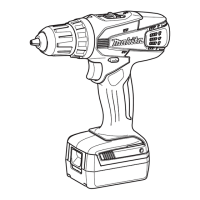
This document provides an instruction manual for the Makita Cordless Driver Drill models DF347D and DF457D. It includes general power tool safety warnings, specific cordless drill safety warnings, important safety instructions for battery cartridges, and detailed functional descriptions, usage, and maintenance information for the tool.
WARNING Read all safety warnings and instructions. Failure to follow the warnings and instructions may result in electric shock, fire and/or serious injury. Save all warnings and instructions for future reference. The term "power tool" in the warnings refers to your mains-operated (corded) power tool or battery-operated (cordless) power tool.
Work area safety:
Electrical safety: 4. Power tool plugs must match the outlet. Never modify the plug in any way. Do not use any adapter plugs with earthed (grounded) power tools. Unmodified plugs and matching outlets will reduce risk of electric shock. 5. Avoid body contact with earthed or grounded surfaces such as pipes, radiators, ranges and refrigerators. There is an increased risk of electric shock if your body is earthed or grounded. 6. Do not expose power tools to rain or wet conditions. Water entering a power tool will increase the risk of electric shock. 7. Do not abuse the cord. Never use the cord for carrying, pulling or unplugging the power tool. Keep cord away from heat, oil, sharp edges or moving parts. Damaged or entangled cords increase the risk of electric shock. 8. When operating a power tool outdoors, use an extension cord suitable for outdoor use. Use of a cord suitable for outdoor use reduces the risk of electric shock. 9. If operating a power tool in a damp location is unavoidable, use a ground fault circuit interrupter (GFCI) protected supply. Use of an GFCI reduces the risk of electric shock.
Personal safety: 10. Stay alert, watch what you are doing and use common sense when operating a power tool. Do not use a power tool while you are tired or under the influence of drugs, alcohol or medication. A moment of inattention while operating power tools may result in serious personal injury. 11. Use personal protective equipment. Always wear eye protection. Protective equipment such as dust mask, non-skid safety shoes, hard hat, or hearing protection used for appropriate conditions will reduce personal injuries. 12. Prevent unintentional starting. Ensure the switch is in the off-position before connecting to power source and/or battery pack, picking up or carrying the tool. Carrying power tools with your finger on the switch or energising power tools that have the switch on invites accidents. 13. Remove any adjusting key or wrench before turning the power tool on. A wrench or a key left attached to a rotating part of the power tool may result in personal injury. 14. Do not overreach. Keep proper footing and balance at all times. This enables better control of the power tool in unexpected situations. 15. Dress properly. Do not wear loose clothing or jewellery. Keep your hair, clothing, and gloves away from moving parts. Loose clothes, jewellery or long hair can be caught in moving parts. 16. If devices are provided for the connection of dust extraction and collection facilities, ensure these are connected and properly used. Use of dust collection can reduce dust-related hazards.
Power tool use and care: 17. Do not force the power tool. Use the correct power tool for your application. The correct power tool will do the job better and safer at the rate for which it was designed. 18. Do not use the power tool if the switch does not turn it on and off. Any power tool that cannot be controlled with the switch is dangerous and must be repaired. 19. Disconnect the plug from the power source and/or the battery pack from the power tool before making any adjustments, changing accessories, or storing power tools. Such preventive safety measures reduce the risk of starting the power tool accidentally. 20. Store idle power tools out of the reach of children and do not allow persons unfamiliar with the power tool or these instructions to operate the power tool. Power tools are dangerous in the hands of untrained users. 21. Maintain power tools. Check for misalignment or binding of moving parts, breakage of parts and any other condition that may affect the power tool's operation. If damaged, have the power tool repaired before use. Many accidents are caused by poorly maintained power tools. 22. Keep cutting tools sharp and clean. Properly maintained cutting tools with sharp cutting edges are less likely to bind and are easier to control. 23. Use the power tool, accessories and tool bits etc. in accordance with these instructions, taking into account the working conditions and the work to be performed. Use of the power tool for operations different from those intended could result in a hazardous situation.
Battery tool use and care: 24. Recharge only with the charger specified by the manufacturer. A charger that is suitable for one type of battery pack may create a risk of fire when used with another battery pack. 25. Use power tools only with specifically designated battery packs. Use of any other battery packs may create a risk of injury and fire. 26. When battery pack is not in use, keep it away from other metal objects, like paper clips, coins, keys, nails, screws or other small metal objects, that can make a connection from one terminal to another. Shorting the battery terminals together may cause burns or a fire. 27. Under abusive conditions, liquid may be ejected from the battery; avoid contact. If contact accidentally occurs, flush with water. If liquid contacts eyes, additionally seek medical help. Liquid ejected from the battery may cause irritation or burns.
Service: 28. Have your power tool serviced by a qualified repair person using only identical replacement parts. This will ensure that the safety of the power tool is maintained. 29. Follow instruction for lubricating and changing accessories. 30. Keep handles dry, clean and free from oil and grease.
SAVE THESE INSTRUCTIONS.
WARNING: DO NOT let comfort or familiarity with product (gained from repeated use) replace strict adherence to safety rules for the subject product. MISUSE or failure to follow the safety rules stated in this instruction manual may cause serious personal injury.
SAVE THESE INSTRUCTIONS.
CAUTION: Always be sure that the tool is switched off and the battery cartridge is removed before adjusting or checking function on the tool.
Installing or removing battery cartridge: To remove the battery cartridge, slide it from the tool while sliding the button on the front of the cartridge. To install the battery cartridge, align the tongue on the battery cartridge with the groove in the housing and slip it into place. Always insert it all the way until it locks in place with a little click. If you can see the red indicator on the upper side of the button, it is not locked completely. Install it fully until the red indicator cannot be seen. If not, it may accidentally fall out of the tool, causing injury to you or someone around you. Do not use force when installing the battery cartridge. If the cartridge does not slide in easily, it is not being inserted correctly.
Battery protection system: The battery cartridge is equipped with a protection system, which automatically cuts off the output power for its long service life. The tool stops during operation when the tool and/or battery are placed under an overload or when battery cells get hot. In case of overload, release the switch trigger, remove the battery cartridge, clear the cause of overload, and then restart. If battery cells are hot, stop use and cool the battery cartridge. When the remaining battery capacity gets low, the motor runs but stops soon. In this case, remove the battery cartridge and charge it to prevent over-discharge.
Switch action: CAUTION: Before inserting the battery cartridge into the tool, always check to see that the switch trigger actuates properly and returns to the "OFF" position when released. To start the tool, simply pull the switch trigger. Tool speed is increased by increasing pressure on the switch trigger. Release the switch trigger to stop.
Reversing switch action: This tool has a reversing switch to change the direction of rotation. Depress the reversing switch lever from the A side for clockwise rotation or from the B side for counterclockwise rotation. When the reversing switch lever is in the neutral position, the switch trigger cannot be pulled. CAUTION: Always check the direction of rotation before operation. Use the reversing switch only after the tool comes to a complete stop. Changing the direction of rotation before the tool stops may damage the tool. When not operating the tool, always set the reversing switch lever to the neutral position.
Speed change: To change the speed, first switch off the tool and then slide the speed change lever to the "2" side for high speed or "1" side for low speed. Be sure that the speed change lever is set to the correct position before operation. Use the right speed for your job. CAUTION: Always set the speed change lever fully to the correct position. If you operate the tool with the speed change lever positioned halfway between the "1" side and "2" side, the tool may be damaged. Do not use the speed change lever while the tool is running. The tool may be damaged.
Adjusting the fastening torque: The fastening torque can be adjusted in 17 steps by turning the adjusting ring so that its graduations are aligned with the pointer on the tool body. The fastening torque is minimum when the number 1 is aligned with the pointer, and maximum when the marking is aligned with the pointer. The clutch will slip at various torque levels when set at the number 1 to 16. The clutch is designed not to slip at the marking. Before actual operation, drive a trial screw into your material or a piece of duplicate material to determine which torque level is required for a particular application.
CAUTION: Always be sure that the tool is switched off and the battery cartridge is removed before carrying out any work on the tool.
Installing or removing driver bit or drill bit: Turn the sleeve counterclockwise to open the chuck jaws. Place the bit in the chuck as far as it will go. Turn the sleeve clockwise to tighten the chuck. To remove the bit, turn the sleeve counterclockwise.
CAUTION: Always insert the battery cartridge all the way until it locks in place. If you can see the red indicator on the upper side of the button, it is not locked completely. Insert it fully until the red indicator cannot be seen. If not, it may accidentally fall out of the tool, causing injury to you or someone around you.
Screwdriving operation: CAUTION: Adjust the adjusting ring to the proper torque level for your work. Place the point of the driver bit in the screw head and apply pressure to the tool. Start the tool slowly and then increase the speed gradually. Release the switch trigger as soon as the clutch cuts in. CAUTION: Make sure that the driver bit is inserted straight in the screw head, or the screw and/or bit may be damaged. NOTE: When driving wood screws, predrill pilot holes to make driving easier and to prevent splitting of the workpiece.
Drilling operation: First, turn the adjusting ring so that the pointer points to the marking. Then proceed as follows.
Drilling in wood: When drilling in wood, the best results are obtained with wood drills equipped with a guide screw. The guide screw makes drilling easier by pulling the bit into the workpiece.
Drilling in metal: To prevent the bit from slipping when starting a hole, make an indentation with a center-punch and hammer at the point to be drilled. Place the point of the bit in the indentation and start drilling. Use a cutting lubricant when drilling metals. The exceptions are iron and brass which should be drilled dry. CAUTION: Pressing excessively on the tool will not speed up the drilling. In fact, this excessive pressure will only serve to damage the tip of your bit, decrease the tool performance and shorten the service life of the tool. There is a tremendous force exerted on the tool/bit at the time of hole break through. Hold the tool firmly and exert care when the bit begins to break through the workpiece. A stuck bit can be removed simply by setting the reversing switch to reverse rotation in order to back out. However, the tool may back out abruptly if you do not hold it firmly. Always secure small workpieces in a vise or similar hold-down device. If the tool is operated continuously until the battery cartridge has discharged, allow the tool to rest for 15 minutes before proceeding with a fresh battery.
CAUTION: Always be sure that the tool is switched off and the battery cartridge is removed before attempting to perform inspection or maintenance. Never use gasoline, benzine, thinner, alcohol or the like. Discoloration, deformation or cracks may result. To maintain product SAFETY and RELIABILITY, repairs, any other maintenance or adjustment should be performed by Makita Authorized Service Centers, always using Makita replacement parts.
 General
| Voltage | 14.4V |
|---|---|
| Battery Type | Li-ion |
| Max in Steel | 10 mm |
| Max in Wood | 25 mm |
| No Load Speed | 0-400 / 0-1, 400 RPM |


 To Next Page