Need help?
Do you have a question about the Makita DWD181ZJ and is the answer not in the manual?
Definitions of safety symbols and signal words.
Purpose and application scope of the product.
Compliance with laser beam safety regulations.
Product safety declarations and radio compliance.
Safety guidelines for laser use and the operating environment.
Precautions for operator, electrical, and product storage safety.
Safety instructions for batteries, maintenance, and scanning.
Further safety advice and pre-use checks.
Critical safety instructions for handling battery cartridges.
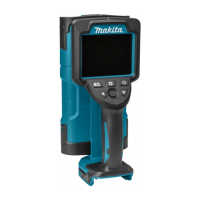
Identification of the scanner's external components.
Description and function of control buttons.
List of optional accessories available for the scanner.
General battery information and tips for maximizing lifespan.
Step-by-step overview of the scanner's basic operation.
Instructions for powering on and initializing the scanner.
How to choose between different scan modes.
Selecting the appropriate scanning environment or material.
Guidelines for performing the actual scanning of surfaces.
Understanding and analyzing the data displayed from scans.
Techniques for marking the locations of scanned objects.
Proper procedure for powering down the scanner.
Guide to navigating and modifying scanner settings.
Detailed description of available settings and their functions.
Step-by-step guide for detecting iron bars in concrete.
Method for finding resin pipes embedded in concrete.
Procedure for scanning and identifying objects behind gypsum boards.
Guide to detecting iron bars and voids in block fences.
Advice for improving scan performance and accuracy.
Explanation of protective functions and error messages.
Guidelines for cleaning and maintaining the wall scanner.
 General
| Power source type | Battery |
|---|---|
| Accuracy | 10 mm |
| Wall types | Concrete |
| Measurement modes | Live cable detector, Metal detector, Stud finder |
| Maximum detection depth (wood) | 25 mm |
| Maximum detection depth (steel) | 180 mm |
 Weight and Dimensions
| Weight | 1700 g |
|---|

 To Next Page