Need help?
Do you have a question about the Makro Detektor JEOTECH and is the answer not in the manual?
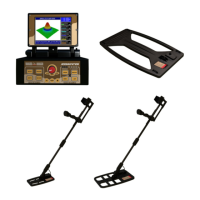
The control unit where detector sockets, earphone jack, and battery slot are located, displaying results.
The antenna responsible for receiving signals from the ground during detection.
Details on 11.1V Lithium-Ion rechargeable batteries, charger specifications, and battery life.
Description of the protective carrying case and the audio earphone accessory.
Explanation of the device's control buttons: Commutator, Ground Switch, Sensitivity, and Sound/Light Adjustments.
Overview of joystick functions: Scan, indicator lights (Cavity, Mineral, Ferrous, Non-Ferrous, Battery), and Reset button.
Step-by-step guide for assembling the metal detector, focusing on the telescopic tube connection.
Instructions for connecting the detector head to the system unit.
Instructions for connecting the earphone to the system unit.
Guide for connecting the battery and understanding the charger's states for normal and defective batteries.
Detailed procedure for charging a depleted battery, including indicator light sequences and charge time.
Procedure to turn on the device and interpret the battery status indicators.
How to use the Light and Sound buttons to set device audio and visual output levels.
Instructions for resetting the device and using the SCAN button for target analysis.
Explanation of how to adjust the device's sensitivity level for optimal performance.
Detailed explanation of Max, Medium (Min2-Max), and Min (Min 1) sensitivity levels.
Explanation of the purpose and importance of ground setting for accurate detection.
Initial steps for ground setting: device activation, spot selection, and cap movement.
How to understand device signals indicating no ground effect or detected ground effects.
Procedure to address 'METAL and MINERAL' warnings by adjusting cap position and resetting.
Procedure to address 'CAVITY and MINERAL' warnings by adjusting cap position and resetting.
Methods to eliminate persistent ground effects by lowering the search cap and repeating steps.
Actions to take if ground setting cannot be successfully completed.
Key considerations for difficult ground, sensitivity, search area, and surface changes.
Guidance on search cap movement, sweeping, and target identification post ground setting.
Using 'NONFERROUS' and 'FERROUS' lights to identify target metal types.
Details regarding the exclusion of batteries and chargers from the device's warranty period.
 General
| Brand | Makro Detektor |
|---|---|
| Model | JEOTECH |
| Category | Metal Detector |
| Language | English |

 To Next Page