EasyManua.ls Logo

Mäktig 710135 - User Manual

Mäktig 710135
18 pages
Print Icon
To Next Page IconTo Next Page
Loading...
1
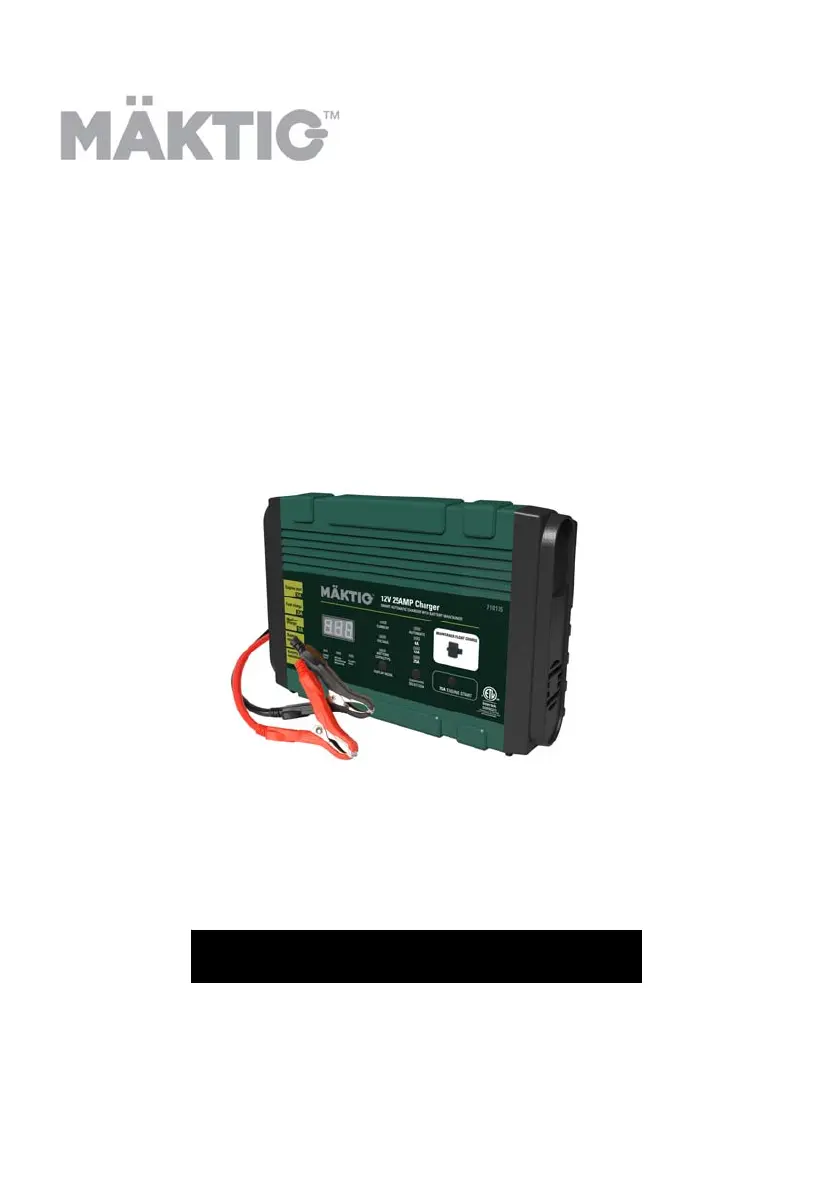
12V/25A
BATTERY CHARGER
MAINTAINER / JUMPSTARTER
OWNER’S MANUAL
Read carefully and understand all ASSEMBLY AND
OPERATION INSTRUCTIONS before operating. Failure to
follow the safety rules and other basic safety precautions
may damage the equipment or create hazardous conditions
for the user. Keep this manual for future reference.
Part No
710135

Questions and Answers

Summary

CONVENTIONS USED

Abbreviations and Acronyms

Lists common abbreviations and acronyms used in the manual.

INTRODUCTION

3 Stage Battery Charging

Explains the three stages of battery charging: Bulk, Absorption, and Float/Maintenance.

IMPORTANT SAFETY INSTRUCTIONS

Risk of Explosive Gases

Warns about explosive gases generated by lead-acid batteries and the importance of following instructions.

Lead Exposure Warning

Warns about potential lead exposure from handling the product cord and advises washing hands.

PERSONAL SAFETY INSTRUCTIONS

AC CONNECTIONS AND PREPARATION

AC Connections and Extension Cords

Instructions for plugging in and guidelines for using extension cords.

Charger Placement and Battery Preparation

Specifies charger placement and steps for preparing the battery before charging.

Charging a Battery Installed in a Vehicle

Instructions for charging a battery while it is still installed in a vehicle.

CHARGING A BATTERY REMOVED FROM VEHICLE

OPERATING INSTRUCTIONS

CHARGER CONTROLS AND FEATURES

Digital Display Modes

Explains how to use the Display Mode button to view voltage, current, and battery capacity.

Charge Rate Selection

Details how to select the appropriate charge rate (Optimal, 12/25A, 4A, 2A).

Charger Features Overview

Covers connection methods, charge status indicator, automatic shut off, and completion indicators.

Advanced Modes and Protections

Explains Maintenance Mode, Reverse Polarity, Reconditioning, Aborted Charges, Diagnostics, Cooling, and Overheat Protection.

Front Panel Components and Controls

Display Panel and Indicators

Details the display panel, current, voltage, battery level, and automatic charging indicators.

Charge Rate and Display Control Switches

Explains the switches for selecting charge rates and changing the display content.

Status and Protection LEDs

Covers Reverse Polarity, Battery Recondition, and Charging State LEDs.

Jumpstart and Maintenance Features

Describes the Engine Start button and the 2A Maintainer port.

USING THE ENGINE START

BATTERY CHARGING TIMES

TROUBLESHOOTING FAULT CODES

MAINTENANCE AND CARE

Overview

This document describes the Mäktig 12V/25A Battery Charger, Maintainer, and Jumpstarter, an automatic smart battery charger designed for 12V lead-acid batteries, including Gel and AGM types. It offers multiple charging rates and a jumpstarter function, along with a dedicated maintainer option.

Function Description:

The Mäktig Smart Battery Charger serves three primary functions:

  • Battery Charger: It charges 12V lead-acid batteries (automotive, marine, deep cycle, farm tractor, garden tractor) with selectable rates of 4A, 12A, or 25A. It also features an "Optimal Charge" mode that automatically selects the ideal charge rate for the battery to extend its life and ensure maximum potential. The charging process follows a 3-stage curve:
    • Stage 1 - Bulk Charge: Delivers maximum charging amperage to "wake up" the battery and allows for quick engine starting.
    • Stage 2 - Absorption Charge: Maintains maximum possible charge at a constant, safe voltage, reducing current as the battery absorbs energy.
    • Stage 3 - Float Charge/Maintenance Mode: Automatically maintains and reduces voltage to a predetermined level, adjusting current for a safe, effective charge. This feature is ideal for maintaining a battery, automatically topping it off as needed to keep it fully charged.
  • Battery Maintainer: A 2A maintainer option is available for use while storing vehicles without disconnecting the battery. It comes with dedicated maintainer cables (ring terminal and clamp wiring) that plug into a 2A charging port. LED indicators on the wiring show correct or reverse connections.
  • Jumpstarter: The device includes a 75A jumpstarter option to start vehicles with low batteries. The Engine Start feature requires some voltage from the battery to activate and cannot be used if a battery is not installed in the vehicle. It delivers up to 25A initially, then automatically provides 75A for up to 5 seconds during cranking, followed by a 3-minute cool-down period where it continues to charge at up to 25A.

Important Technical Specifications:

  • Voltage: 12V
  • Charging Amperage: Selectable rates of 4A, 12A, 25A, and an Optimal Charge mode.
  • Maintainer Amperage: 2A
  • Jumpstarter Amperage: 75A
  • Battery Types: Suitable for 12V Gel and AGM lead-acid batteries.
  • AC Electrical Connection: Requires a 3-pin, grounded 120 V AC electrical wall outlet.
  • Cooling: Built-in high-speed cooling fan that runs automatically when charging current is higher than 3.5A or temperature exceeds 122°F (50°C).
  • Overheat Protection: Designed to shut off if overheating is detected and resume charging automatically once cooled.

Usage Features:

  • Digital Display Mode Selection: A display mode button allows toggling between showing charging current (A), charging voltage (V), and approximate battery capacity (%).
    • Battery capacity display: "LO" for less than 50%, 10% increments between 50-90%, and "FUL" for full charge.
  • Charge Rate Selection: A charge rate button allows selection of 4A, 12A, 25A, or Optimal Charge.
  • Optional Connection Methods: Comes with two sets of charging leads for versatility: standard clamps and ring terminals. Only one charging method can be selected at a time.
  • Charge Status Indicator: A blinking green LED indicates charging, while a solid green LED indicates full charge or Maintenance mode.
  • Automatic Shut Off: The charger automatically shuts off once charging is complete to prevent overcharging. The digital display will show "FUL".
  • Maintenance Mode (Float Mode Monitoring): After charging, the unit automatically enters Maintenance mode, delivering small amounts of current to keep the battery at peak charge for about 1 hour, after which the DC clamps lose power.
  • Reverse Polarity Protection: An indicator illuminates if cables are incorrectly connected, and charging will not begin.
  • Battery Reconditioning Mode: Automatically activates if a sulphated battery is detected (indicated by a blinking yellow LED and ".–." on the display). It attempts to reverse sulphation effects. If unsuccessful after multiple attempts, a "F01" fault code is displayed, indicating the battery should be replaced.
  • Aborted Charges: If charging cannot be completed normally, it will be aborted, and a fault code may be displayed. Disconnecting the battery or unplugging the charger resets it.
  • Battery Diagnostics: Continuously monitors battery condition and reports failures via fault codes (e.g., F01 for short circuit/sulphated battery, F02 for 24V battery, F03 for high charge current, F04 for high temperature, F05 for not entering maintenance mode, F06 for reverse polarity).
  • Engine Start Procedure:
    1. Connect battery and AC cords as per instructions for "CHARGING A BATTERY INSTALLED IN A VEHICLE."
    2. Press the Engine Start button. Charger charges at up to 25A.
    3. Crank engine for no more than 5 seconds. If it doesn't start, wait 3 minutes.
    4. During cranking, 75A is delivered for up to 5 seconds, with a countdown on the display (555, 444, 333...000).
    5. After 5 seconds of cranking, a 3-minute cool-down mode activates (countdown from 180 to 0), during which charging continues at up to 25A.
    6. Unplug AC cord and disconnect cables after engine starts.
    • Note: A severely discharged battery may require 20 minutes of 25A charging before attempting to boost.

Maintenance Features:

  • Cord and Clamp Cleaning: Clean cords and clamps after each use to remove battery fluid or debris and prevent corrosion.
  • Cable Storage: Store power and output cables neatly to prevent damage.
  • Case Cleaning: Occasional cleaning of the charger case with a soft cloth helps protect the finish.
  • Storage: Always unplug the charger when not in use and store it in a cool, dry place.

Mäktig 710135 Specifications

General IconGeneral
BrandMäktig
Model710135
CategoryBattery Charger
LanguageEnglish

Related product manuals