CONTROLS AND CONNECTIONS
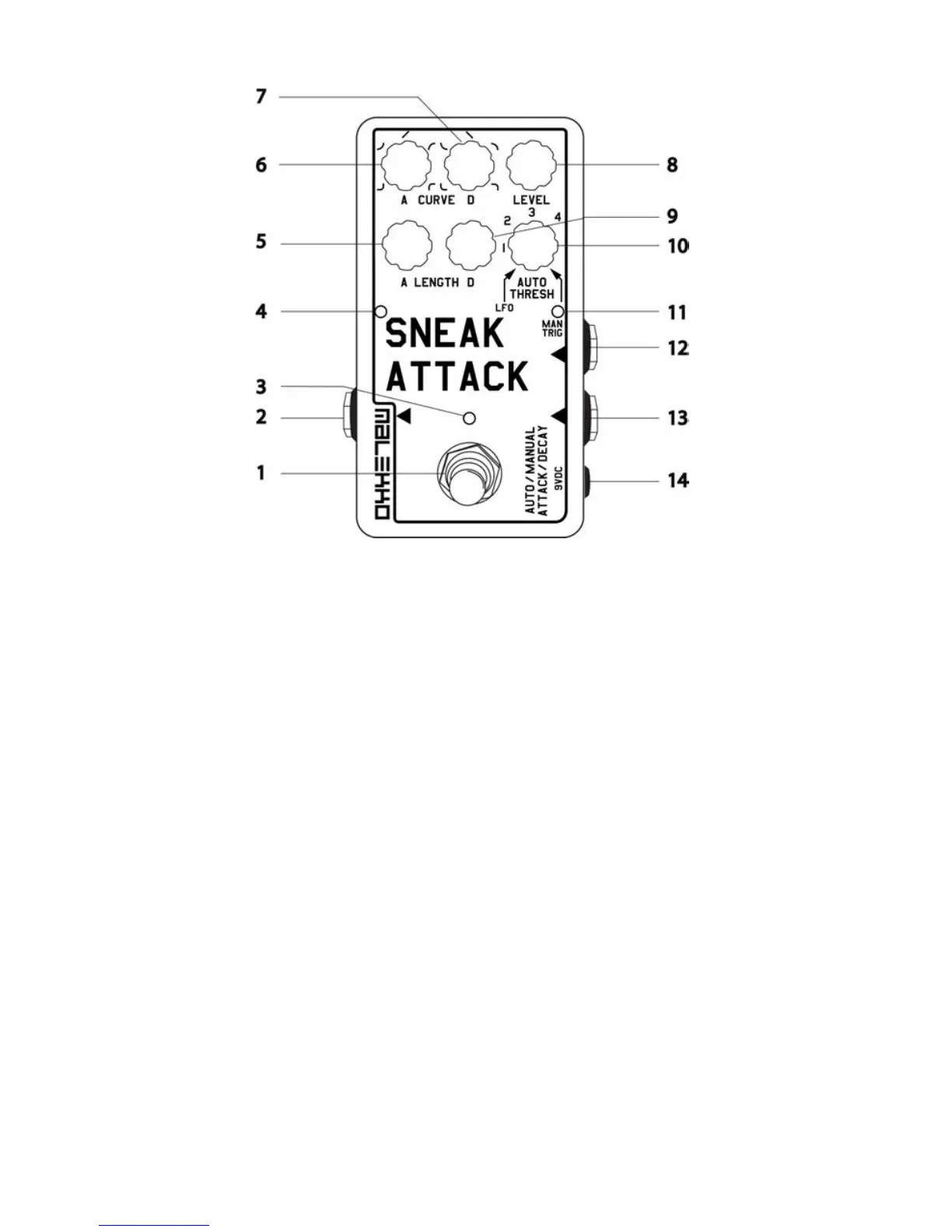
1. STOMP SWITCH - Turns effect on or off. (Must be held down one second to disengage
the pedal when in MANUAL TRIGGER mode)
2. OUTPUT - Connect to amplifier
3. MAIN LED - Effect on/off
4. ENVELOPE LED INDICATOR - Indicates the status of the envelope
5. ATTACK LENGTH CONTROL – Adjusts the length of the attack. Ranges from approx 10
msec to 6 sec. With the knob at the 12 o'clock position, the length is approx 1 sec.
6. ATTACK CURVE CONTROL - Adjust the shape of the attack. The curve ranges from a
very fast exponential shape (counter-clockwise) through linear and to a very fast inverted
exponential (clockwise)
7. DECAY CURVE CONTROL - Adjust the shape of the decay
8. LEVEL - This is a dual function knob that is VOLUME in single trigger modes and DEPTH
in LFO (TREMOLO) modes
9. DECAY LENGTH CONTROL - Adjust the length of the decay. Ranges from approx 10
msec to 6 sec. With the knob at the 12 o'clock position, the length is approx 1 sec.
10. AUTO THRESHOLD CONTROL - Sets the threshold for auto-triggering the envelope. All
the way clockwise is MANUAL TRIGGER MODE. With the knob set all the way counter-
clockwise, the LFO will continuously repeat (TREMOLO) mode. When in TAP TEMPO
MODE (Lil Buddy plugged in), you can also multiply the tempo by 1, 2, 3, or 4 by turning
the AUTO THRESHOLD knob clockwise from LFO.
11. MAIN TRIGGER LED - Blinks when Attack/Decay envelope is triggered or as tempo
indicator if in TAP TEMPO MODE
12. JACK FOR LIL BUDDY OR CLOCK INPUT - TAP TEMPO or external clocking / click
track
13. INPUT JACK - Connect instrument cable
14. 9VOLT DC POWER JACK - only for use with standard 2.5mm neg-tip 200mA 9volt DC
power supply


 To Next Page