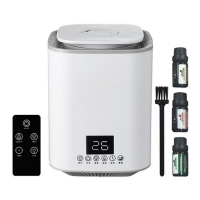
Operating of Digital Models
If model is digital one with remote control, you can set the machine by LCD display on the
base or by remote control. If remote control fails to work, make sure a battery is installed
and the plastic is removed to activate the battery.
Place the appliance on the level and firm surface.
Do not operate the unit without water.
To fill the tank, remove the nozzle cover and nozzle, and then add water into the
base, do not add water into the pillar parts. Wait a few minutes before starting the
machine. Details as below pictures.
Water should not exceed the level of pillar at the water tank.
Make sure the filter is properly in place.
Put back the nozzle cover and nozzle at right position.
You can put oil into water if you desire. 3 to 5 drops of oil are usually adequate
depending on the quality of oil and desired amount of aroma.
Plug in the appliance, touch the ON/OFF icon on the base or remote control. The
appliance will beep one time. The LCD display will be on. The display will show the
humidity % near the machine and the function you set. The mist will start coming
out after some seconds.
Press the MIST icon on the base or remote control to adjust the speed weak-
medium-strong.
Press the LIGHT icon to set the night light on/off.
Press the HUMIDITY to set the humidity %, from 45% to 90%.
Note: When the appliance is on, it shows the current humidity level. When the room
reaches the humidity % you set, the machine will stop working automatically. When
the humidity % decrease and becomes less than the preset humidity %, the
machine will start working again. If you don’t set the room humidity, the machine will
keep running until the water is over.
Take in account that the tolerance between the reading of your home humidity
meter and the humidifier depending on the distance between the humidity meter
and the humidifier.
Press the SLEEP icon to set the sleep function on/off.
Press the TIMER icon to set the time 1, 2, ….. , 9 hours.
If there is not enough water in the water tank, the appliance will beep and the
display will show twinkle indication and have beep indication voice. The appliance
will stop working after some seconds. Unplug the appliance and refill the water tank.
Note: if moisture collects around the appliance, this is not a defect. It may be an
indication that the humidity level is set too high. Reduce the mist output or reduce
the humidity % or stop the machine.
It is normal to her dripping sound when the mist output is at high level.
If the unit won’t be used for an extended period of time, unplug it from the wall
outlet.
Operating of Mechanical Models
If model is mechanical one, you can set the machine ON/OFF and mist output by the
button.
Place the appliance on the level and firm surface.
Do not operate the unit without water.
14/24


 To Next Page
 Loading...