EasyManua.ls Logo

Mamiya M645 - Names and Functions of Parts (4); Roll-Film Insert

Mamiya M645
29 pages
Print Icon
To Next Page IconTo Next Page
To Previous Page IconTo Previous Page
Loading...
Harnes
and,
Fundiotts,of
Parts
t3)
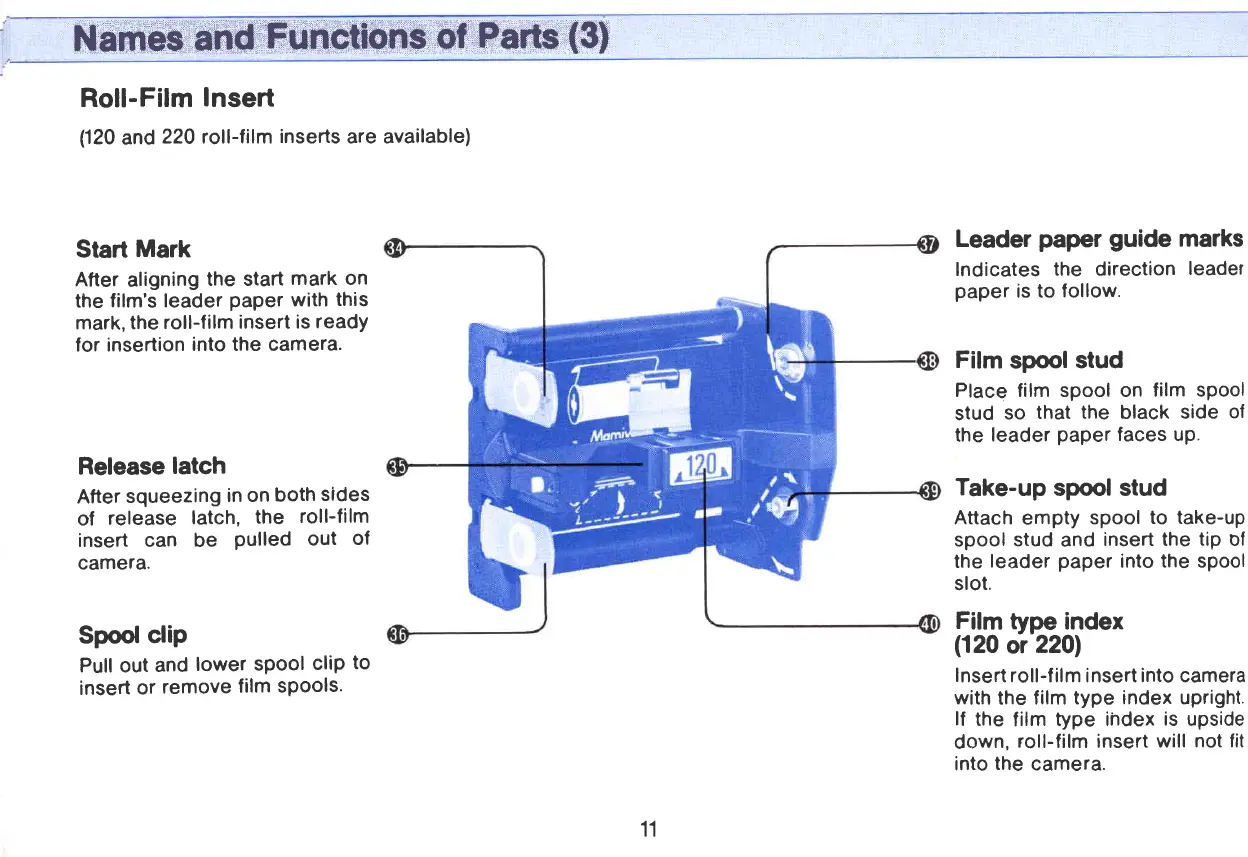
Roll-Film
Insert
(120
and
220 roll-lilm
inserts
are available)
Start
Mark
After
aligning
the start
mark on
the
film's leader
paper
with
this
mark, the
roll-film
insert is
ready
lor insertion
into the camera.
Release
latch
After
squeezing
in on
both
sides
of
release
latch,
the
roll-film
insert can be
Pulled
out
of
camera.
Spool
clip
Pull out
and
lower
sPool
cliP
to
insert
or
remove
film sPools.
Leader
paper
guide
marks
Indicates
the direction
leadet
paper
is to
follow.
Film
spool
stud
Place film spool on
film spool
stud
so
that
the
black
side
of
the
leader
paper
faces up.
Take-up
spool stud
Attach
empty
spool
to take-up
spool
stud
and
insert the
tip
of
the
leader
paper
into the spool
slot.
Film
type
inder
(120
or
2201
Insert
roll-f ilm insert into camera
with
the film
type index upright.
lf
the
film
type ihdex
is
upside
down,
roll-film insert will
not fit
into
the
camera.
11
www.orphancameras.com

Related product manuals