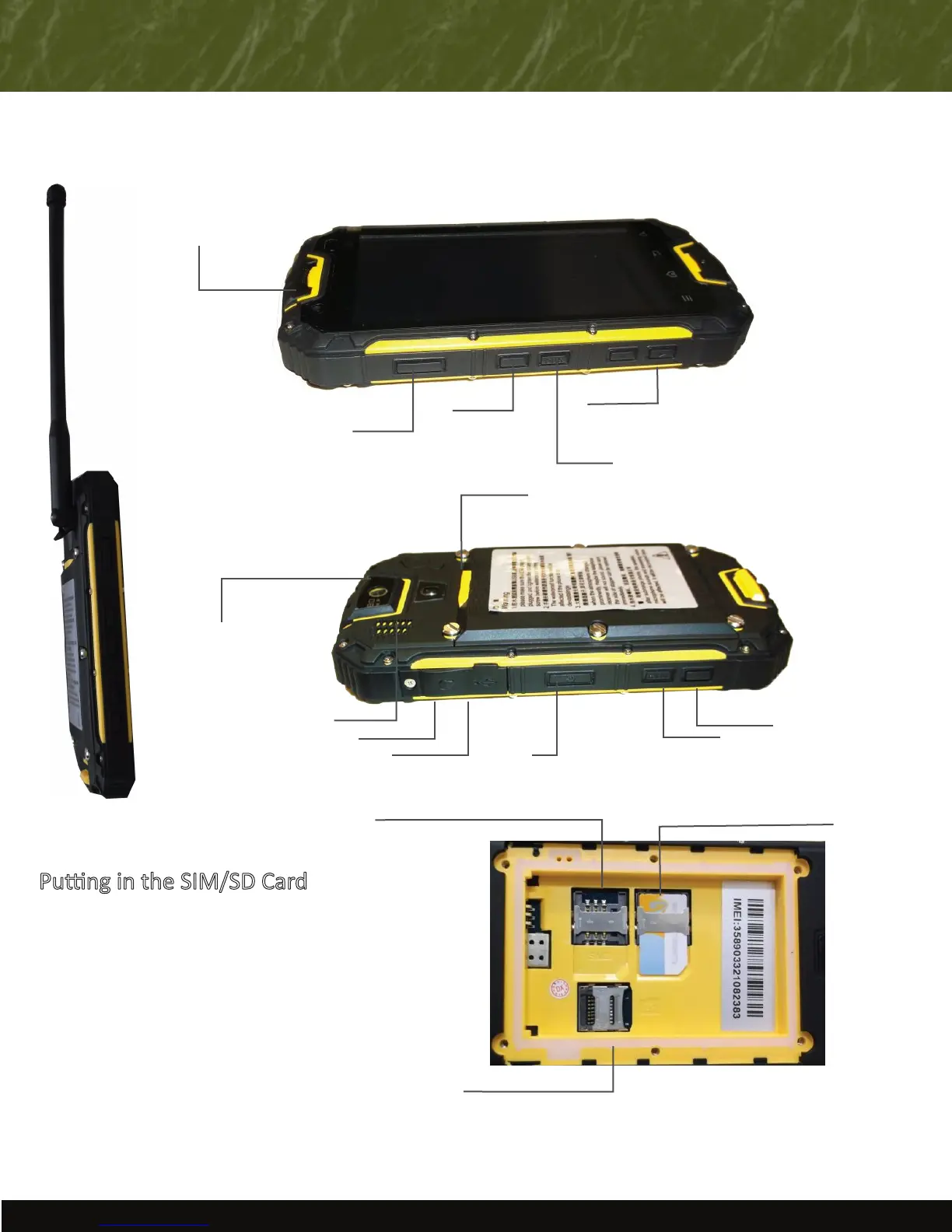
OVERVIEW
Power On/Off
Baery Cover Indentaon
Rear Facing
Camera
Speaker
Ear phone
Jack Connector
Volume Control
Walkie Talkie
Front Facing
Camera
USING PERIPHERALS
Pung in the SIM/SD Card
1) Turn off device, remove back cover, and
remove baery.
2) Insert a correctly oriented SIM card, metal side
down. You can use either slot for the SIM card.
3) If you would like to use an SD card for external
storage, insert the card into the provided slot.
4) Replace baery.
5) Put the baery cover back in place
Note: Never remove the SIM/SD card when an
external power supply is connected. This may
cause damage to the card or to your phone.
SIM #2 (Micro)
SIM #1 (Micro)
Micro SD Card
Advantage Route Systems, Inc. - 3201 Liberty Square Parkway Turlock, CA 95380 USA - 1.209.632.1122 - Toll Free (USA) 888.294.7688 - www.AdvantageRoute.com - Sales@AdvantageRoute.com
Emergency
Flashlight
USB Port
Reset
Camera


 To Next Page