EasyManua.ls Logo

Mania WS-858 - User Manual

Mania WS-858
2 pages
Print Icon
To Next Page IconTo Next Page
Loading...
INSTRUCTION MANUAL
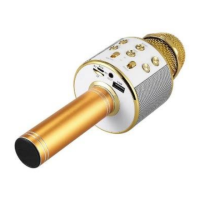
KARAOKE MICROPHONE
PACKAGE CONTENTS
Wireless karaoke Microphone
USB Micro USB cable
Instruction manual
TECHNICAL SPECIFICATIONS
Power supply: built-in Li-ion rechargeable
battery
Battery capacity: 1800 mAh
Speaker power: 5 W
Maximum volume: 115 dB
Reverb mode: Echo sound reverberation
Microphone frequency range: 100Hz10kHz
Size: 22.1 × 7.6 × 7.6 cm
COMPONENTS
(1) Power
(2) Play/Pause
(3) Previous song
(4) Next song
(5) Microphone volume +/-
(6) Speaker volume +
(7) Speaker volume
(8) Reverb +/-
(9) Microphone
(10) Charging port
(11) AUX/headphones port
(12) USB port
(13) TF Card slot
HOW TO USE
Press and hold the power button (1) until a
blue LED light turns on.
Find the device (WS-858) in your phone’s
Bluetooth menu and connect to it.
A sound will play when the phone connects
to the microphone.
O USING THE SPEAKER
Play songs from your phone through the
microphone’s speaker.
Adjust volume with the VOL+ (6) and VOL-
(7) buttons.
To play the next song or the previous song,
press the PREV (3) and NEXT (4) buttons.
To pause or play media press the
Play/Pause button (2).
O USING THE MICROPHONE
Speak or sing into the microphone and the
sound will be amplified through the
speaker.
To raise and lower the microphone volume
use the MIC VOL slider (5).
The microphone features 5 different voice
changers which can be switched with the
microphone button (9). Their effects can be
lowered or amplified with the REMIX slider
(8).
O RECORDING SOUNDS
To record sounds, you must first connect
your phone with the microphone with a
micro USBAUX cable.
Question and Answer IconNeed help?

Do you have a question about the Mania WS-858 and is the answer not in the manual?

Summary

Package Contents and Technical Specifications

Package Contents

Lists the items included in the karaoke microphone package.

Technical Specifications

Details power, speaker output, volume, reverb, and physical dimensions.

Karaoke Microphone Components and Usage

Device Components

Identifies and describes all physical parts and ports of the microphone.

Basic Operation

Instructions for powering on, connecting via Bluetooth, and basic playback.

Using the Speaker

Guidance on playing songs, adjusting speaker volume, and navigating tracks.

Using the Microphone

Instructions for singing, adjusting microphone volume, and voice changers.

Recording Sounds

Steps to connect the microphone for audio recording purposes.

Advanced Features and Safety

Selfie Mode

Instructions for using the microphone as a remote shutter for phone cameras.

Charging the Device

Details on how to charge the device and indicator light behavior.

General Warnings

Important safety precautions to avoid damage or injury.

Warranty Information

Details on warranty validity, claims, and product lifespan.

Mania WS-858 Specifications

General IconGeneral
BrandMania
ModelWS-858
CategoryMicrophone
LanguageEnglish