2-66
IT
EN
648870 IT-EN-ES (04/05/2015)
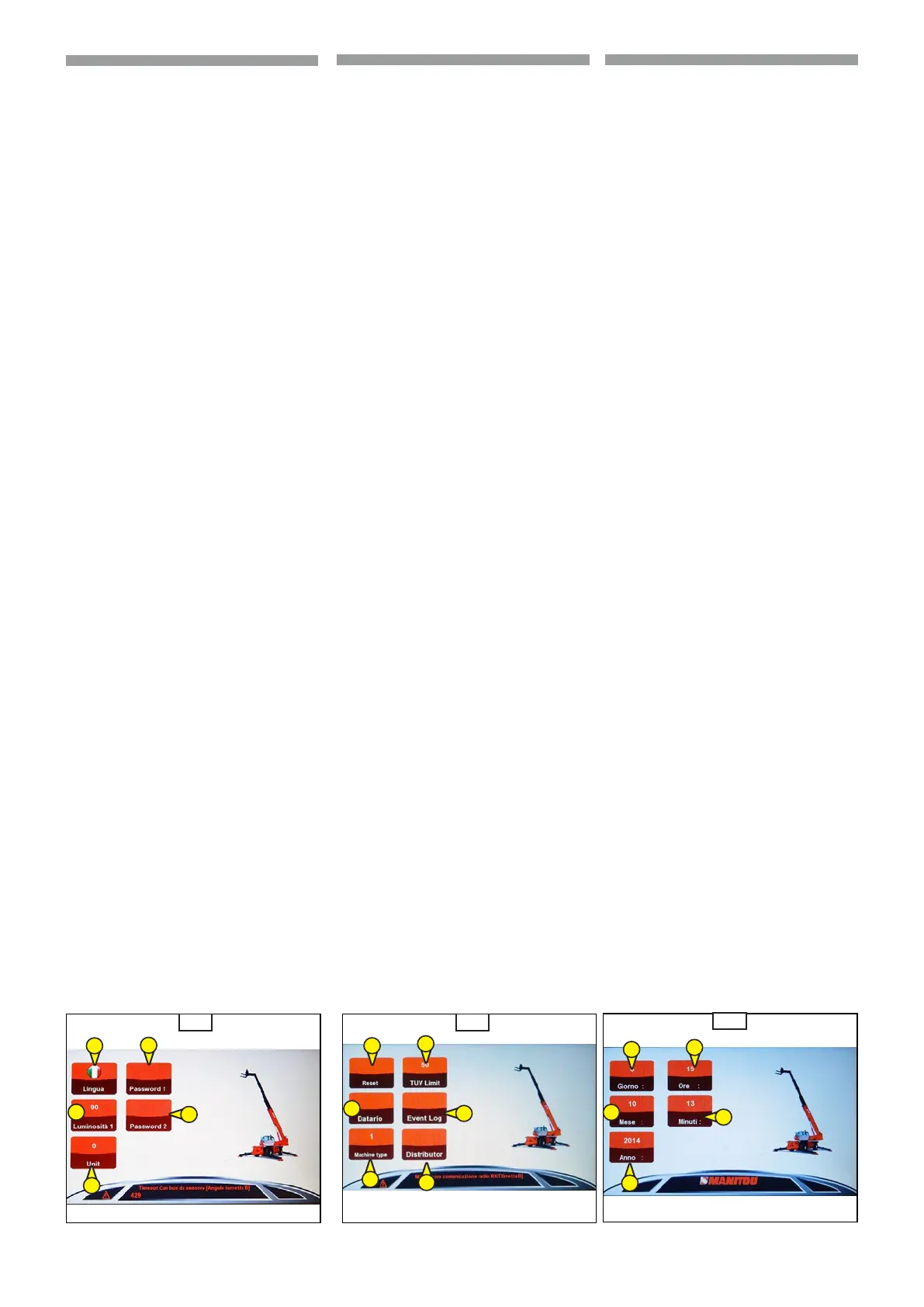
Congurations (1,4.11)
Press the knob encoder to select and to ac-
cess at the functions:
• Language (1,
4.11a)
• Brightness (2,
4.11a)
• Password 1 (only with password)
(3,
4.11a)
• Password 2 (only with password)
(4,
4.11a)
• Unit (only with password)
(5,
4.11a)
- Press the knob encoder to enter in the
function.
- Rotate the knob encoder to set the
function.
- Press the knob encoder to conm the
setup.
- Press the “Home” key on keypad to re-
turn in the “Menu” screen.
Options (3,
4.11)
Rotate the knob encoder to choose the
functions:
• Hours zeroing (1,
4.11b)
Keep pressed the knob encoder to
reset in “Hours” (6,
4.11b).
• Time setting (2,
4.11b):
- day (2a,
4.11c)
- month (2b,
4.11c)
- year (2c,
4.11c)
- hour (2d,
4.11c)
- minutes (2e,
4.11c)
Press the knob encoder to enter in
these functions and settings.
• TUV limit (only with password)
(3,
4.11b)
• Machine settings (only with
password)(5,
4.11b)
• Event log (only with password)
(4,
4.11b)
• Distributor (only with password)
(6,
4.11b)
Save (5,
4.11b)
Push the knob encoder to save the settings.
1
5
4.11a
3
2
4
1
5
4.11b
3
2
4
4.11c
6
4
2a
2c
2d
2b
2e
Congurazioni (1,4.11)
Premere il selettore a manopola per selezio-
nare e accedere alle funzioni:
• Lingua (1,
4.11a)
• Luminosità (2,
4.11a)
• Password 1 (solo con password)
(3,
4.11a)
• Password 2 (solo con password)
(4,
4.11a)
• Unità (solo con password)(5,
4.11a)
- Premere il selettore a manopola per acce-
dere alla funzione.
- Ruotare il selettore a manopola per impos-
tare la funzione.
- Ruotare il selettore a manopola per confer-
mare la congurazione.
- Premere il tasto "Home" sul tastierino per
tornare alla schermata "Menu".
Opzioni (3,
4.11)
Ruotare il selettore a manopola per seleziona-
re le funzioni:
• Azzeramento ore (1,
4.11b)
Tenere premuto il selettore a manopola
per azzerare le "Ore" (6,
4.11b).
• Impostazione della data e dell'ora
(2,
4.11b):
- giorno (2a,
4.11c)
- mese (2b,
4.11c)
- anno (2c,
4.11c)
- ore (2d,
4.11c)
- minuti (2e,
4.11c)
Premere il selettore a manopola per ac-
cedere a queste funzioni e impostarle.
• Limite TUV (solo con password)
(3,
4.11b)
• Impostazioni macchina (solo con
password)(5,
4.11b)
• Registro eventi (solo con password)
(4,
4.11b)
• Distributore (solo con password)
(6,
4.11b)
Salva (5,
4.11b)
Premere il selettore a manopola per salvare le
impostazioni.
Conguraciones (1,
4.11)
Pulsar el selector de pomo para seleccionar y
acceder a las funciones:
• Idioma (1,
4.11a)
• Brillo (2,
4.11a)
• Contraseña 1 (solo con contraseña)
(3,
4.11a)
• Contraseña 2 (solo con contraseña)
(4,
4.11a)
• Unidad (solo con contraseña)
(5,
4.11a)
- Pulsar el selector de pomo para acceder a
la función.
- Girar el selector de pomo para congurar
la función.
- Girar el selector de pomo para conrmar la
conguración.
- Pulsar la tecla “Inicio” en el teclado para re-
gresar a la pantalla “Menú”.
Opciones (3,
4.11)
Girar el selector de pomo para seleccionar las
funciones:
• Puesta a cero horas (1,
4.11b)
Mantener pulsado el selector de
pomo para poner a cero las “Horas”
(6,
4.11b).
• Conguración de la fecha y la hora
(2,
4.11b):
- día (2a,
4.11c)
- mes (2b,
4.11c)
- año (2c,
4.11c)
- horas (2d,
4.11c)
- minutos (2e,
4.11c)
Pulsar el selector de pomo para acce-
der a estas funciones y congurarlas.
• Límite TUV (solo con contraseña)
(3,
4.11b)
• Conguraciones máquina (solo con
contraseña)(5,
4.11b)
• Registro eventos (solo con contraseña)
(4,
4.11b)
• Distribuidor (solo con contraseña)
(6,
4.11b)
Guardar (5,
4.11b)
Pulsar el selector de pomo para memorizar las
conguraciones.
ES


 To Next Page
 Loading...