2-119
IT
EN
648870 IT-EN-ES (04/05/2015)
Automatic mode
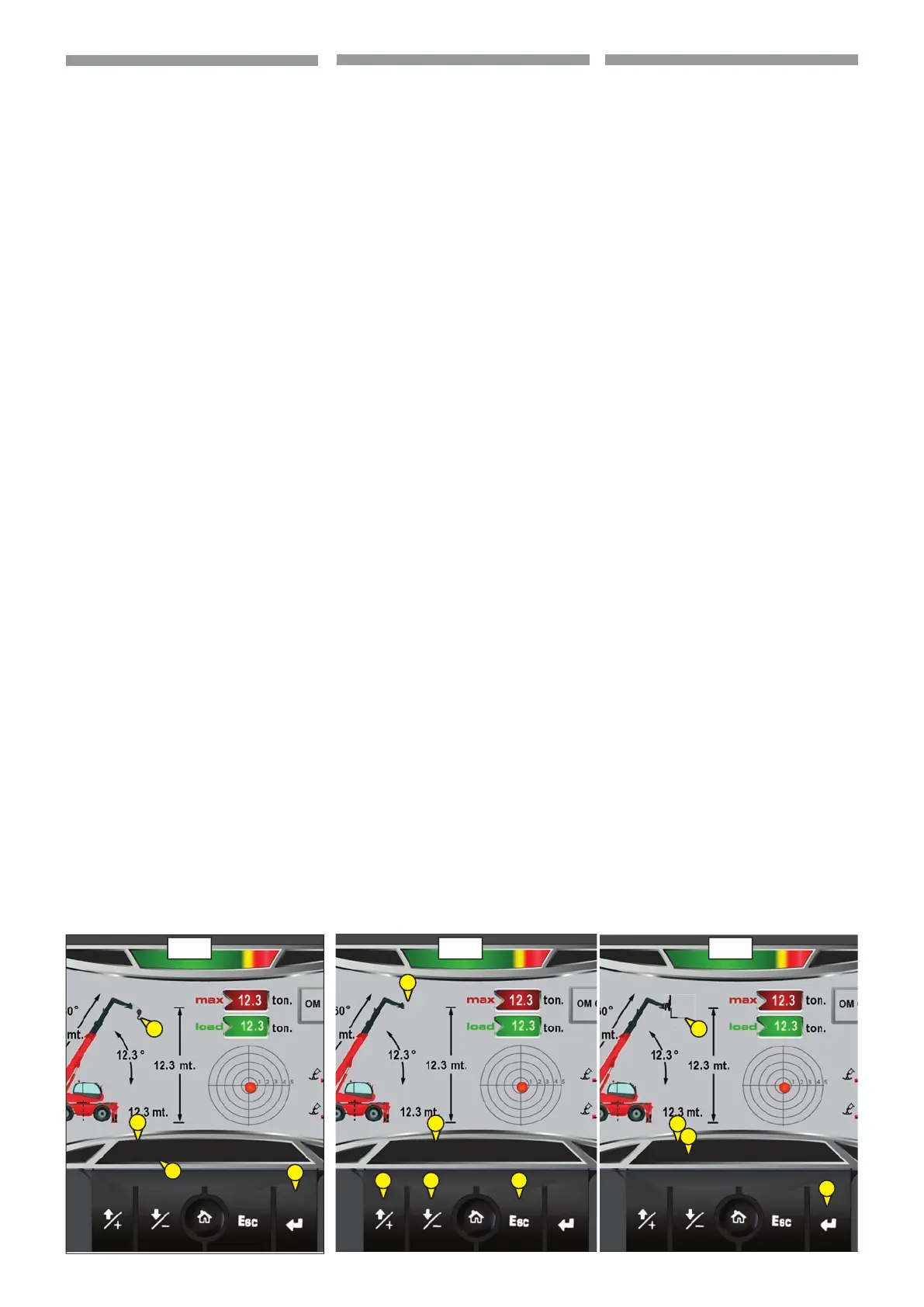
Immediately after you hooked a attach-
ment recognition system:
- Identi es the type of attachment (2),
- Requires to the Operator to con rm (1)
that the recognized accessory is the
one properly hooked at the machine,
- Press enter (3) to con rm the attach-
ment type
(
106)
Manual mode
Immediately after hooking an attach-
ment without the identi cation device,
the recognition system:
- does not recognize the attachment
hooked,
- the Operator must select the attach-
ment type hooked at the machine.
The operator must select manually the
installed attachment type, as follows:
- Press ESC (1) to exit from mode“Empty” (2)
[no attachment hooked]
(
107)
- Press the up / down (3) to select the
attachment that it has hooked (4),
- Con rm the attachment, press enter (5).
(
108)
Note: in “empty” mode, the machine can
move the telescopic boom but with a
maximum lifting cacity setted at
500kg.
p
In both modes: is the responsi-
bility of the operator to ensure
that the attachment is hooked
and view on the display is that
identi ed from the recognition
system or manually selected.
Your safety or the safe-
ty of the lift truck is at risk.
Any bending may cause malfun-
ction of your machine and dama-
ge to property and people close to
the working area of the machine.
Respect the procedures descri-
bed above.
Modalità automatica
Immediatamente dopo aver agganciato
un accessorio il sistema di riconoscimen-
to:
- identi ca il tipo di accessorio (2),
- richiede all’Operatore di confermare (1)
che l’accessorio riconosciuto sia quello
realmente agganciato sulla macchina,
- premere invio (3) per confermare il
tipo di accessorio.
(
106)
Modalità manuale
Immediatamente dopo aver agganciato
un accessorio privo del dispositivo di iden-
ti cazione, il sistema di riconoscimento:
- non riconosce l’accessorio agganciato,
- l’Operatore deve selezionare il tipo di
accessorio agganciato sulla macchina.
L’operatore deve selezionare
manualmente il tipo di accessorio
installato, come segue:
- premere ESC (1) per uscire dalla modalità
“empty”(2) [nessun accessorio agganciato],
(
107)
- premere le frecce su/giù (3) per selezionare
l’accessorio che si è agganciato (4),
- confermare l’accessorio, premere invio (5).
(
108)
Nota: in modalità “empty” la macchina può
muovere il braccio ma con una portata
massima di sollevamento
ssata a 500kg.
p
In entrambe le modalità: è re-
sponsabilità dell’operatore
assicurarsi che l’accessorio ag-
ganciato e visualizzato sul di-
splay sia quello identi cato
dal sistema di riconoscimento
o selezionato manualmente.
Sono in gioco la vostra sicurezza
e quella del carrello elevatore.
L’inosservanza potrebbe pro-
vocare malfunzionamenti al
vostro carrello elevatore e dan-
ni a cose e persone vicine all’a-
rea di lavoro della macchina.
Rispettare le procedure sopra de-
scritte.
Vuoto - Empty - Vacío
106 107
1
3
3 3
2
2
2
Conferma forche - Forks-Con rm
Con rmación horquillas
108
4
4
1
2
5
5
Conferma argano - Winch-Con rm
Con rmación cabrestante
Modo automático
Inmediatamente tras haber enganchado
un accesorio el sistema de reconocimien-
to:
- identi ca el tipo de accesorio (2),
- solicita al operador que con rme (1)
que el accesorio reconocido es el efec-
tivamente enganchado en la máquina,
- pulsar enviar (3) para con rmar el tipo
de accesorio.
(
106)
Modo manual
Inmediatamente tras haber enganchado
un accesorio sin dispositivo de identi ca-
ción, el sistema de reconocimiento:
- no reconoce el accesorio enganchado,
- el operador debe seleccionar el tipo de
accesorio enganchado en la máquina.
El operador debe seleccionar manualmen-
te el tipo de accesorio instalado, de la si-
guiente manera:
- pulsar ESC (1) para salir del modo “empty”
(2) [ningún accesorio enganchado],
(
107)
- pulsar las echas arriba/abajo (3) para
seleccionar el accesorio que se ha
enganchado (4),
- con rmar el accesorio, pulsar enviar (5).
(
108)
Nota: en modo “empty” la máquina puede
mover el brazo pero con una capacidad de
carga máxima de elevación jada a 500kg.
p
En ambos modos: es respon-
sabilidad del operador ase-
gurarse e que el accesorio en-
ganchado y visualizado en la
pantalla sea el identi cado por
el sistema de reconocimiento
o seleccionado manualmente.
Su seguridad y la de la carreti-
lla elevadora están en juego.
El incumplimiento podría cau-
sar fallas de funcionamiento en
la carretilla elevadora y daños a
objetos y personas próximas al
área de trabajo de la máquina.
Respetar los procedimientos an-
tes descritos.
ES


 To Next Page
 Loading...