P
ai
r
C
o
d
e
P
o
wer
He
ati n
g on
1. Open the receiver with screwdriver
2. Use screws to make the bottom fixed into box.
3. Connect the power supply box according to the wiring diagram.
4. Put the cover back to complete installation.
Common failure handling
Failure
Handling
Crash
1.Check the power supply wiring is correct or not .
LCD display garbled
Display normal
Remote failure
Check if the remote control battery has enough
1.The shell is deformed after installation
No output
2.Check the power key .
can be reinstalled.
power , if not replace the battery.
Since the date of products sold for 2 years warranty. In the warranty period, such as
human factors or irresistible damage caused by power failure is not covered by the
warranty, beyond the warranty period or damage caused by human factors, need to
Warranty and after-sales service
return to the maintenance company, as the case charged a certain maintenance fee.
COM
NC
NO
L
N
AC230V 50/60HZ
Imax3A
Wiring diagram
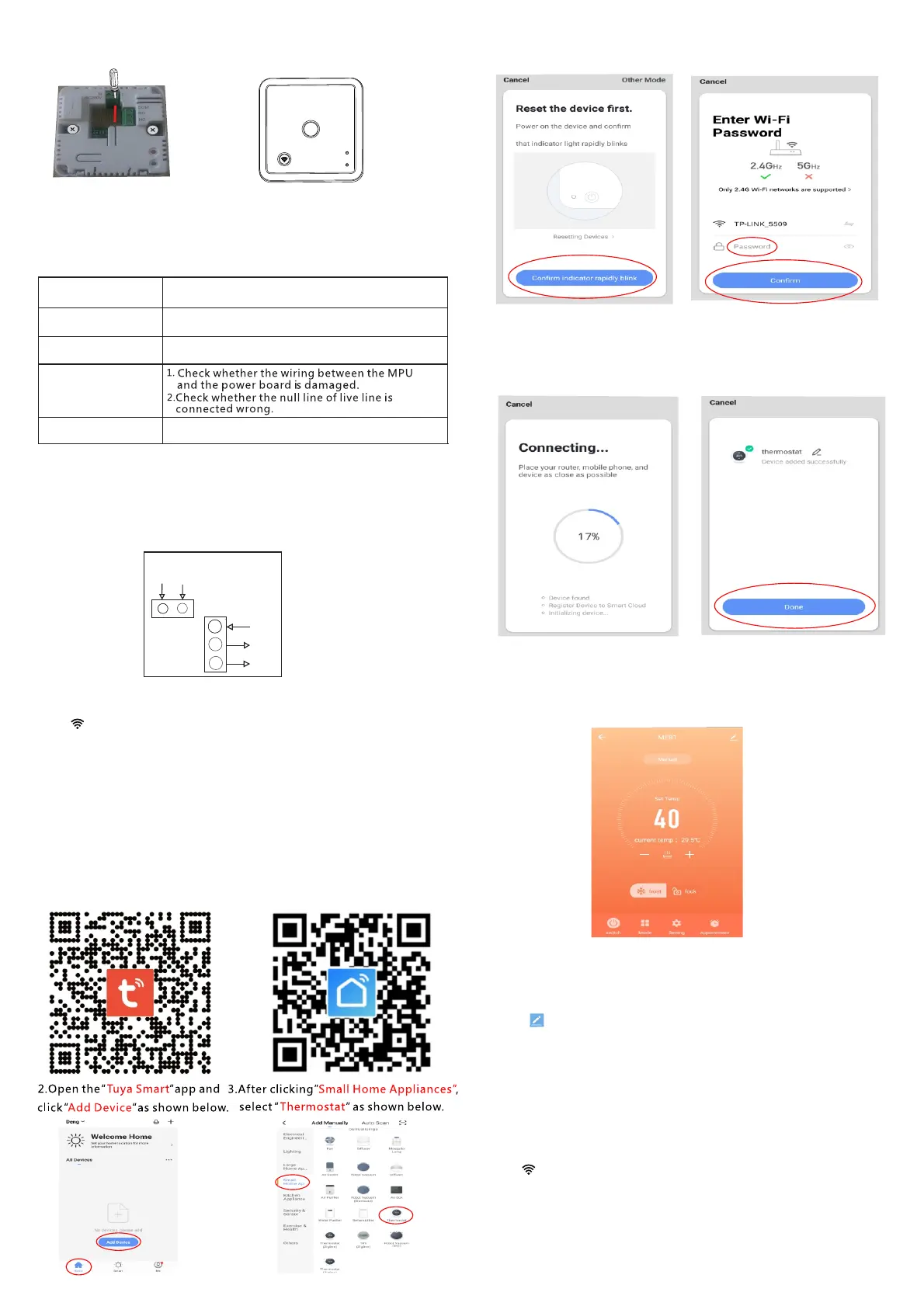
1)Thermostat network steps
Press" "on receiver for 5 seconds, when the power indicator is off
and heating
on indicator flicker, then enter the initial state of network.
Ensure that the router
or
WiFi device is on and within 5 meters,
when the power indicator is
on and
heating
on indicator stops
flickering, it’s successful to connect.
2)Mobile phone networking steps
Before configuring WIFI , please make sure your phone is connected to
1. Use your mobile phone to scan the QR code below to download the
China
Foreign
2.4GHz WIFI.
” ”app.Tuya Smart
4.Click”confirm indicator rapidly
blink”as shown below.
5.After entering the WIFI password,
press” ”as shown below.Confirm
6.The phone enters the device
search and the connection mode
7.The mobile phone adds the device
successfully, click
8.Click on the” ”button above to enter the control interface Done
is as shown below.
connection
” ”as shown below.Done
as shown below.
3) Device sharing instructions
1,Click" " in the upper right corner of interface.
2,Click ”share Device ”.
3,Click“Add sharing”.
4,Click“Done”after entering the account number.
4)Thermostat and mobile phone Exit the network
Press" " on receiver for 5 seconds, when the power
on indicator flicker, the control panel enter the
initial state
indicator is
off and
of network, at this
the receiver enter network
exit(also the distribution network state).
heating
time,


 To Previous Page
 Loading...