

EasyManua.ls Logo

Manta MM308 S - User Manual

Manta MM308 S
38 pages
Go to English
Print Icon
To Next Page IconTo Next Page
Loading...
INSTRUKCJA OBSŁUGI / MANUAL GUIDE /
BEDIENUNGSANLEITUNG /
MANUAL DE USUARIO / MANUALE
UTENTE / UŽIVATELSKÝ MANUÁL /
РУКОВОДСТВО ПОЛЬЗОВАТЕЛЯ
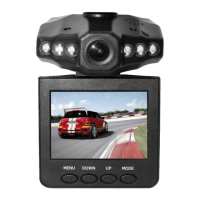
Black Box DVR Camera
MM308 S
Question and Answer IconNeed help?

Do you have a question about the Manta MM308 S and is the answer not in the manual?

Summary

Products and Function Overview

Operating the DVR

Power Options and Charging

Guide to using the built-in battery and car charger for device operation.

Recording and Camera Functions

Instructions for starting, stopping, and managing video recording and taking photos.

File Preview and System Settings

How to review recorded files, delete them, and access device configuration options.

Detailed DVR Functionality

Video Mode Configuration Options

Customizing video settings like resolution, motion detection, and loop recording.

Camera Mode Settings

Adjusting parameters specific to capturing still images with the DVR.

System Setup and Preferences

Configuring language, date, time, formatting, and system reset.

Connectivity and Technical Data

USB Connection and File Access

Steps to connect the DVR to a computer via USB for file transfer.

Technical Specifications Summary

Key technical details including resolution, format, power, and storage capacity.
Summary

Products and Function Overview

Operating the DVR

Power Options and Charging

Guide to using the built-in battery and car charger for device operation.

Recording and Camera Functions

Instructions for starting, stopping, and managing video recording and taking photos.

File Preview and System Settings

How to review recorded files, delete them, and access device configuration options.

Detailed DVR Functionality

Video Mode Configuration Options

Customizing video settings like resolution, motion detection, and loop recording.

Camera Mode Settings

Adjusting parameters specific to capturing still images with the DVR.

System Setup and Preferences

Configuring language, date, time, formatting, and system reset.

Connectivity and Technical Data

USB Connection and File Access

Steps to connect the DVR to a computer via USB for file transfer.

Technical Specifications Summary

Key technical details including resolution, format, power, and storage capacity.

Manta MM308 S Specifications

General IconGeneral
BrandManta
ModelMM308 S
CategoryDVR
LanguageEnglish