9
4.2 Android Platform(Mode A)
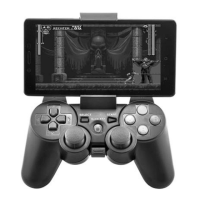
1. Firstly press button A, then press button HOME.
2. Release a fter light 1, 2, 3 keep blinking F AST .
3. Open Bluetooth and search, click the name Bluetooth Gamepa d
to connect .
4. The light 1 keeps on after s uccessful connection.
5. This mode is for gam es of sim ulator, and the func tion of buttons
need to be reset.
4.3 IOS Plat form (Mode B)
1. Firstly press button B, then press button HOME.
2. Release a fter light 1, 2, 3 keep blinking F AST .
3. Open Bluetooth and search, click the name Bluetooth Gamepa d
to connect (before connecting the game pad, yo u should c hange the
input m ethod into ENGLI SH) .
4. Both of the lig ht 1 & 2 keep on a fter successful connecti on.
5. This mode is for IOS ga mes that support gamepad themselves.
5. Auto Reconnection & Mode Change
5.1 Auto Reconnection
1. The gamepad will have memory function after connecti on with
devices, for the devices ever connected with the ga mepa d, j ust
press HOME button to reconnec t automatically. The mode lig ht
keeps on after reconnection.
2. If the gamepad has already connected with other devices, to
connect with devices ever connected with the g amepad again, you
shoul d CANCEL pairing in the Bluetooth connection management
and reconnect.
5.2 Mode Change
After connecti on, ANY mode is cha ngeabl e. To do this, firstly just
press the button related to the corresponding mode, then pr ess
HOME button to change the m ode. For example, currently if it’s
under Mode X (light 1 keeps on), if needs to change into Mode A,
User’s Manual EN


 To Next Page
 Loading...