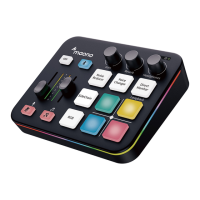
The MAONOCASTER AM100 is a comprehensive audio interface designed for podcasting, streaming, and various audio production needs. It integrates multiple audio inputs and outputs, along with intuitive controls, to offer a versatile solution for content creators.
Function Description:
The MAONOCASTER AM100 serves as a central hub for managing audio signals from various sources, including microphones, musical instruments, smartphones, and computers. Its primary function is to mix, process, and output these audio signals for live streaming, podcast recording, or other audio production tasks. The device supports both balanced and unbalanced condenser microphones, dynamic microphones, and electric guitars, providing flexibility for different recording setups. It features a built-in 48V phantom power supply, which is essential for condenser microphones, ensuring they receive adequate power for operation.
The interface allows for real-time monitoring of audio through dedicated headphone outputs, enabling users to hear their mix accurately. It also facilitates seamless integration with smartphones for streaming, phone calls, and playing background music, making it ideal for interactive live broadcasts. The AM100 connects to a computer via a USB-C cable, acting as an external sound card, and is compatible with digital audio workstations (DAWs) like Adobe Audition for recording and post-production.
Important Technical Specifications:
- Microphone Inputs:
- Condenser Mic (Balanced): XLR input, requires 48V phantom power (selectable via a dedicated switch).
- Condenser Mic (Unbalanced): XLR to 1/8" TRS input, does NOT require 48V phantom power.
- Dynamic Mic: 1/4" TS (6.35mm) input.
- Instrument Input: 1/4" TS (6.35mm) input for electric guitar.
- Auxiliary Inputs/Outputs:
- AUX Input: For connecting external audio sources like smartphones for music playback.
- POD1 Output / POD2 Output: TRRS audio cables for connecting to smartphones for streaming or linking phone calls to podcasts.
- Computer Connection: USB-C port for data transfer and power, enabling the AM100 to function as a computer audio interface.
- Monitoring: 1/8" (3.5mm) Mini-stereo headphone outputs (Monitor1, Monitor2) for real-time audio monitoring.
- Phantom Power: Selectable 48V phantom power switch for balanced condenser microphones.
- Sample Rate: Supports 48000 Hz sample rate for high-quality audio.
- Bit Depth: Supports 32 (float) bits for audio processing.
Usage Features:
- Multi-Source Audio Mixing: The MAONOCASTER AM100 allows users to connect and mix audio from up to two microphones (one balanced condenser/dynamic, one unbalanced condenser), an electric guitar, and an auxiliary input simultaneously.
- Smartphone Integration: Dedicated TRRS audio cable connections (POD1, POD2) enable direct integration with smartphones for live streaming, incorporating phone calls into podcasts, or playing background music from a mobile device. A separate TRS audio cable can be used for smartphone music playback via the AUX input.
- Real-time Monitoring: Two 1/8" (3.5mm) headphone outputs provide independent monitoring for the host and a guest, or for different monitoring mixes.
- Computer Connectivity: The USB-C connection transforms the AM100 into a powerful external sound card for computers, facilitating high-quality recording and playback with DAWs like Adobe Audition.
- Intuitive Controls: The front panel features various knobs and buttons for adjusting input levels, monitoring volume, and other audio parameters, providing hands-on control during live sessions.
- Phantom Power Control: A dedicated 48V phantom power switch ensures proper operation of balanced condenser microphones, preventing damage to microphones that do not require phantom power.
- Software Setup Guide: The manual provides a step-by-step guide for setting up the MAONOCASTER AM100 with Adobe Audition, covering audio hardware preferences, input/output selection, session creation, and recording procedures. This includes:
- Connecting the AM100 to the computer via USB-C.
- Launching Adobe Audition.
- Opening Edit > Preferences > Audio Hardware...
- Selecting "线路 (Maono Podcaster AM100)" as the Default Input and Output.
- Creating a new Multitrack Session (File > New > Multitrack Session).
- Naming the session and confirming settings (e.g., Sample Rate 48000 Hz, Bit Depth 32 (float) bits).
- Selecting "线路 (Maono Podcaster AM100)" as the track input for desired tracks.
- Arming tracks for recording by clicking the "R" button.
- Initiating recording by clicking the record button in the transport controls.
Maintenance Features:
The manual does not explicitly detail maintenance features. However, based on the device's nature, general audio equipment maintenance practices would apply:
- Cleanliness: Keep the device free from dust and debris. Use a soft, dry cloth for cleaning the exterior. Avoid liquid cleaners that could damage internal components.
- Cable Management: Ensure all cables are properly connected and not strained. Regularly check cables for wear and tear, replacing them if necessary to maintain optimal audio quality and prevent connection issues.
- Environmental Conditions: Operate the device in a stable environment, away from extreme temperatures, humidity, and direct sunlight, which can affect its performance and lifespan.
- Power Supply: Use the provided USB-C cable for power and data. Ensure a stable power source to prevent interruptions or potential damage to the device.
- Firmware Updates: While not mentioned, it is generally good practice to check the manufacturer's website for any available firmware updates that might improve performance or add new features.
The MAONOCASTER AM100 is designed for ease of use and robust performance, making it a valuable tool for anyone looking to produce high-quality audio content.

 Need help?
 General

 To Next Page