7
Operation
Remote Control
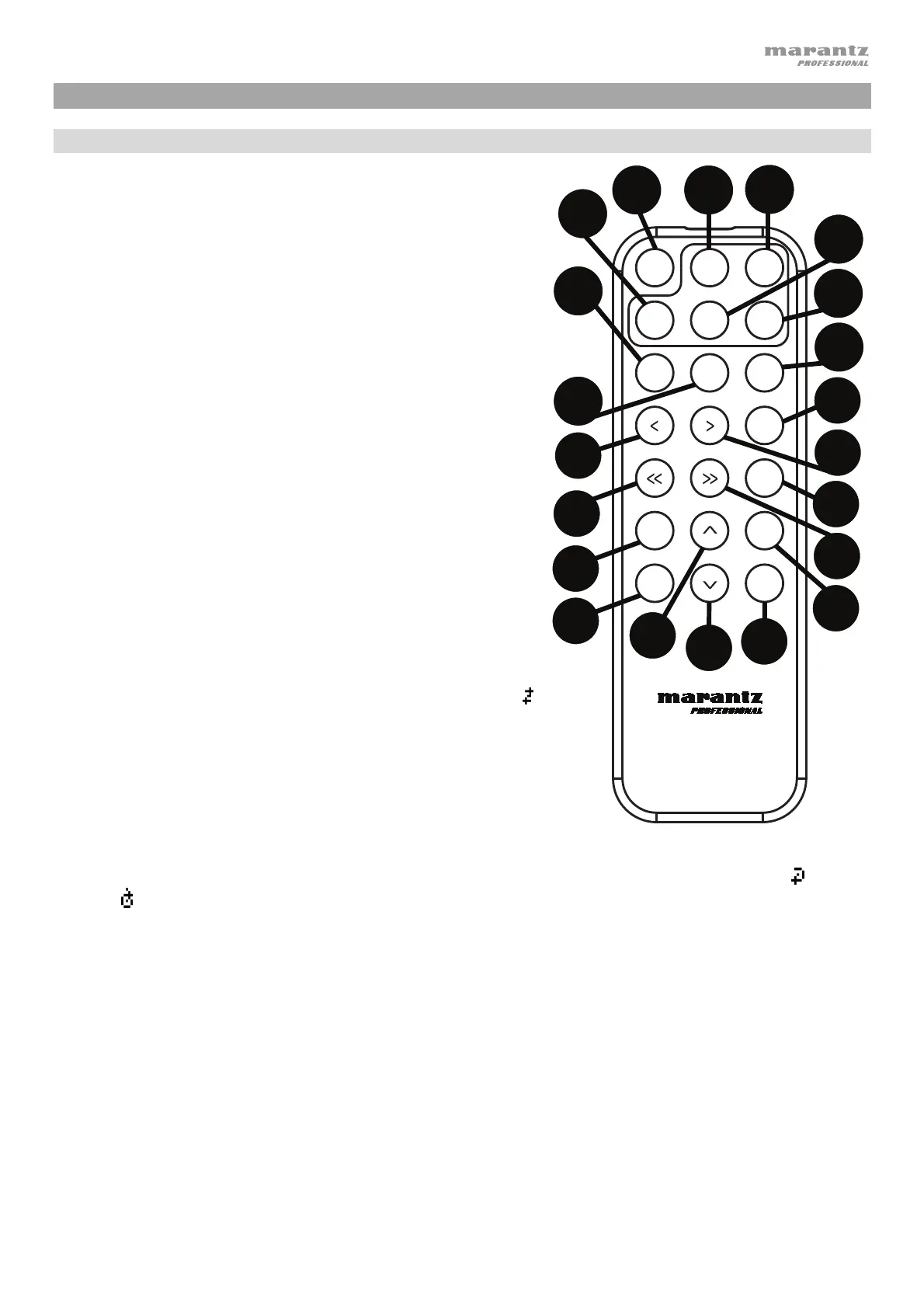
1. Mute: Disables the sound from the audio outputs.
2. BT: Switch to Bluetooth mode.
3. Tempo/Pitch Menu: Cycle through tempo and pitch
controls.
Note: Tempo/Pitch controls will only function in CD, SD
and USB modes.
4. USB/SD: Switch between USB or SD mode.
5. AUX: Switch to Aux Mode.
6. CD: Switch to CD Mode.
7. Play: Plays audio from a CD, USB flash drive, SD card,
or Bluetooth device.
8. Pause: Pause audio from a CD, USB flash drive, SD or
Bluetooth device.
9. Stop: Stops audio from a CD, USB flash drive, or SD.
10. Eject: Ejects or inserts a CD.
11. Previous Track: Goes to the previous CD, USB, or SD
track.
12. Next Track: Advances to the next CD, USB, or SD track.
13. Search Backward: Hold to rewind through a CD, USB,
or SD track.
14. Search Forward: Hold to fast forward through a CD,
USB, or SD track.
15. Random: Press to cycle through Random Play Mode
or Single Play Mode () in CD, USB, or SD mode.
16. Display: Press and release the button to adjust the
display brightness. Press and hold the button to open
the options menu. Hold the button again to close the
option menu.
17. Tempo/Pitch Up: Adjust the tempo or pitch up.
18. Tempo/Pitch Down: Adjust the tempo or pitch down.
19. Repeat: In CD, USB, or SD mode, switch between Repeat Playback modes: Repeat One
, Repeat
All
, and Repeat Off.
20. Time: In CD, USB, or SD Mode, press this button to switch the time in the display from Time
Elapsed, Time Remaining, Total Elapsed Time, or Total Time Remaining (for CD Mode only).
21. Text/Lock: In CD, USB, or SD Mode, press to switch the display between the track name and artist
name. Press and hold to turn Panel Lock on and off.
TEMPO / PITCH
PAUSE
EJECT
PLAY
AUX CD
BTMUTE
TEMPO/
PITCH
STOP
USB/SD
RANDOM
DISPLAY
TIME
REPEAT
TEXT
LOCK
PMD-526C
1
2
3
4
5
6
7
8
9
10
13
15
14
19
16
20
21
17
18
11
12


 To Next Page
 Loading...