12
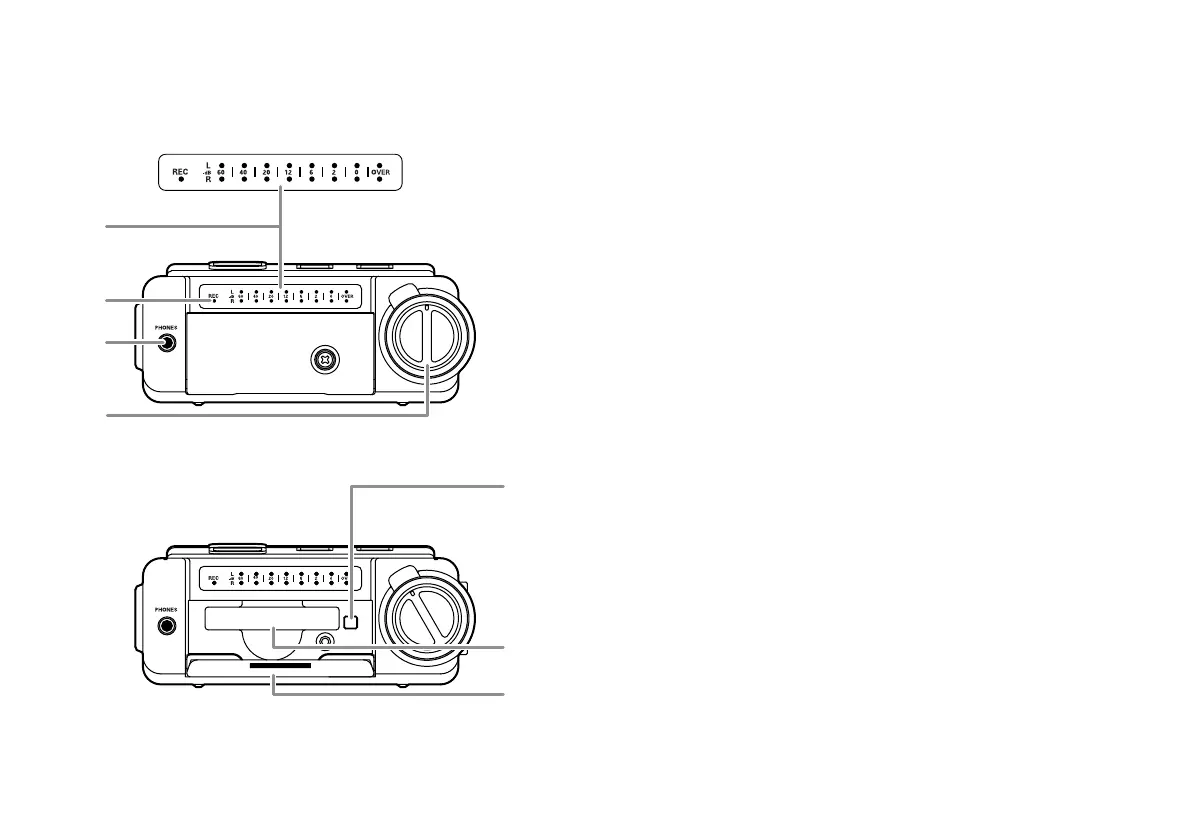
16. Level meter
The louder the sound input to the recorder on the
Left/Right channel, the more LED lights are displayed.
When the "Meter Mode" of preset menu is "Peak Only",
only a peak level is displayed. (page 52)
17. REC indicator
Red indicator light is lit and steady during Record and
flashing during Record pause.
18. PHONES jack
Stereo headphones are plugged into this jack.
Set “Output” of the preset menu to SP/HP (See Page 44).
19. REC LEVEL controls
Turn to adjust the record level when the "LevelCont" of
preset menu is "Manual" or "ALC+Manual".
The inside control (Right channel) and outside control
(Left channel) turn together, unless you hold one while
turning the other.
The optimum record level is when the level meter goes
as close to 0dB as possible but does not go OVER.
20. CF card compartment
Pull the card door open to access the CF card.
20-a. Card eject button
20-b. CF card slot
20-c. CF card door
Front side


 To Next Page