13
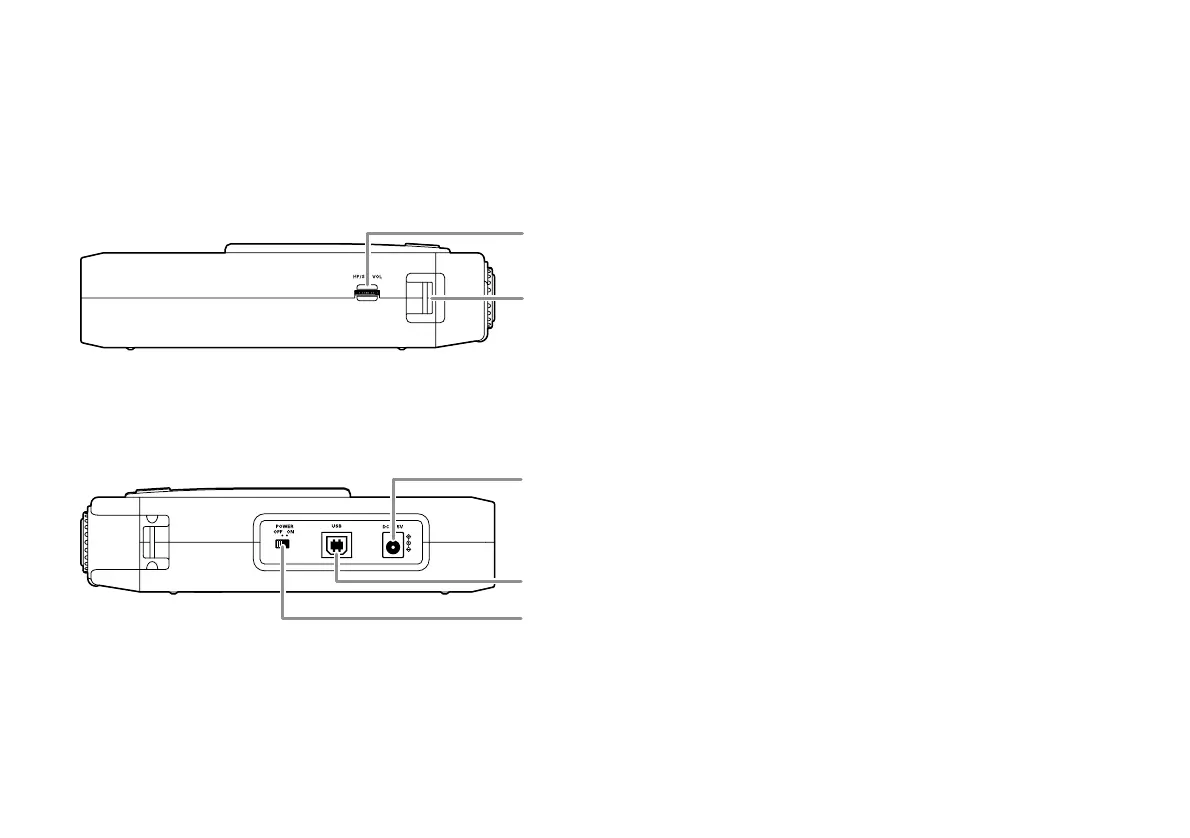
21. HP/SPK VOL control
Turn to adjust the volume of headphones plugged into
the PHONE jack or the built-in speaker. Audio on the
built-in speaker is automatically interrupted when
recording with the internal microphone.
22. Carry strap shaft
Attach the supplied carry strap here.
23. DC IN jack
Plug the supplied AC adapter in this jack.
The power supplied is 2.0A at 5V DC.
The PMD660 automatically switches to adapter power if it
was running on battery power. If AC power is interrupted
by a power outage or unplugging the adapter, the
PMD660 automatically switches to battery power.
24. USB port
Plug the supplied USB cable in this port and connect
the other end to your computer.
25. POWER switch
Slide to turn Power on or off.
Left / Right side


 To Next Page