EasyManua.ls Logo

Marantz CD6005 - Handling Semiconductors and Optical Units; Grounding Procedures

Marantz CD6005
10 pages
Print Icon
To Next Page IconTo Next Page
To Previous Page IconTo Previous Page
Loading...
6
Play an iPod
2
MODE
MENU
HOME
M-DAX
TIME
FAVORITE
PROG
VOLUME
SEARCH
A - B
RA NDOMDIMMER
REP E AT
MUTE
SOURCE DIRECT
REMOTE MODE
TUNER PRESET
RC001PMCD
POWER
. / ABC
DEF
GHI JKL
MNO
PQRS
a / A
TUV WXYZ
*
PHONO
CD
TUNER
COAXIAL OPTICAL
RECORD ER NETWORK
SOUND
MODE
ENTER
CLEAR
1 2 3
4 5 6
7 8 9
+10 0
NETCD
INFO
INPUT
AMP POWER
VO
LUME
MUTE
SOURCE DIRECT
MODE
INFO
INPUT
2
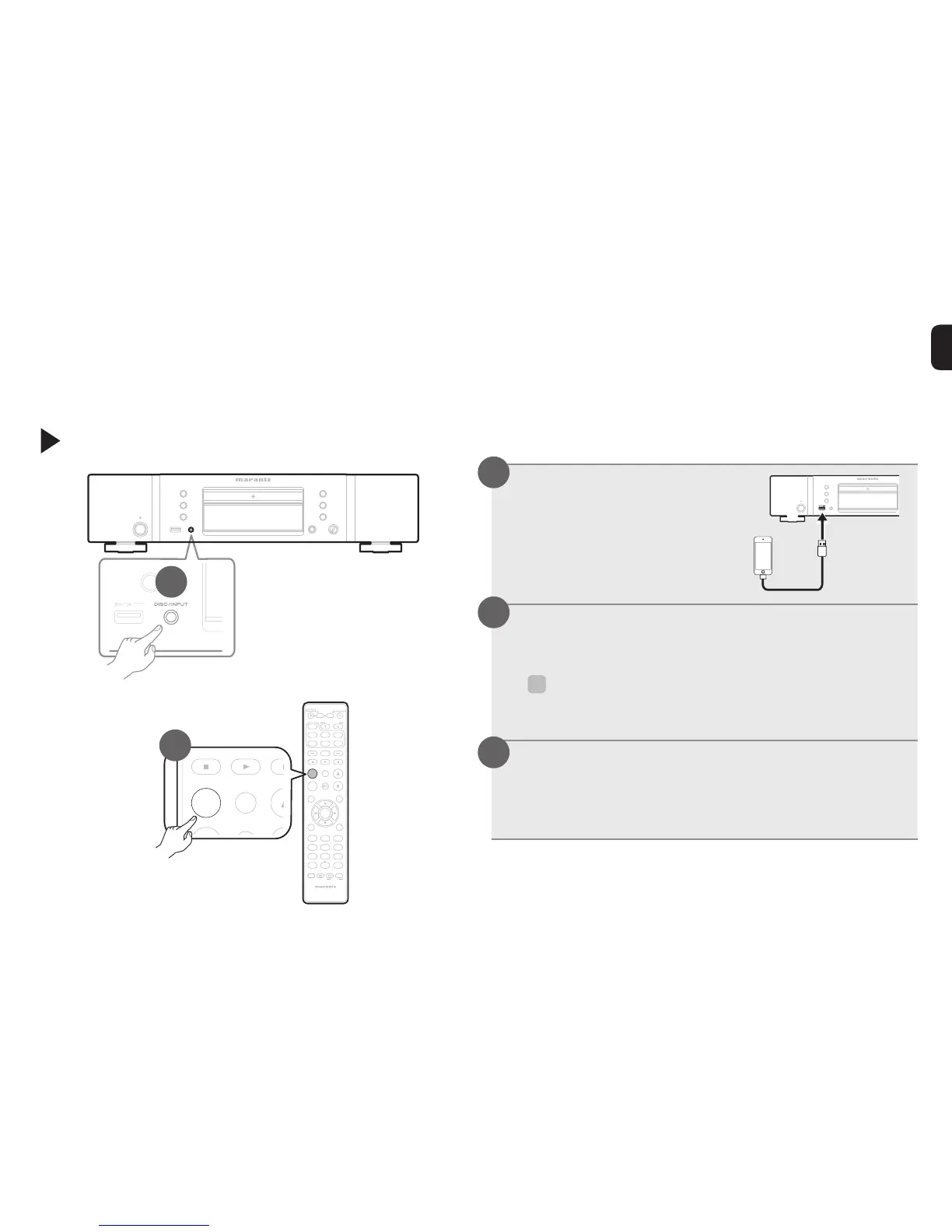
Connect the iPod to
the USB port.
Press INPUT to select the playback
media mode to “USB”.
%
•You can also select the playback media mode by
pressing DISC/INPUT on the unit.
Operate iPod itself directly while seeing
the iPod screen to play back music.
Playback starts.
1
2
3

Other manuals for Marantz CD6005

Related product manuals