1-9
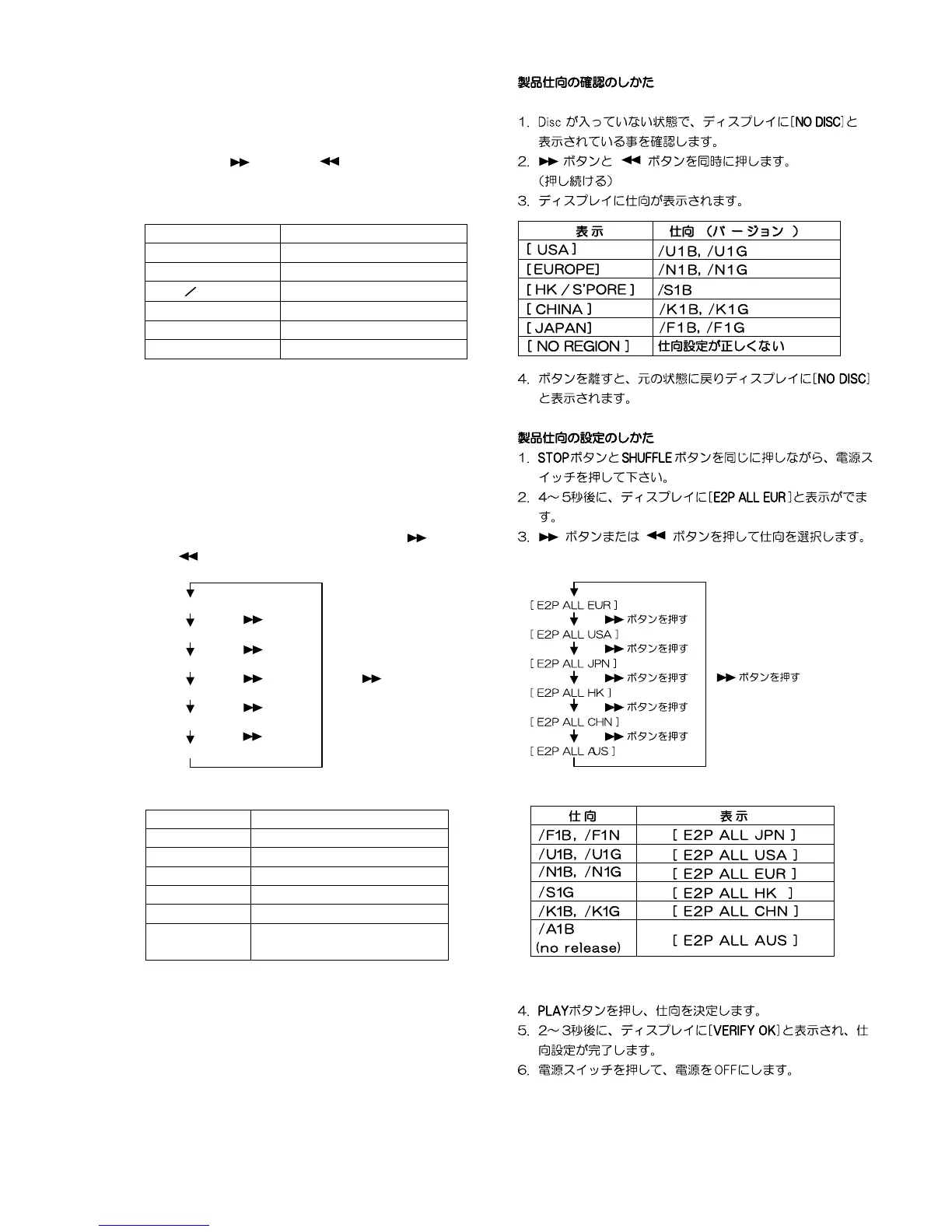
Type version confirmation
1. Power ON the DVD player. The FL display must be
shown <NO DISC>.
2. Pressing the
button and button simultaneously.
3. FL display shows product versions as follows.
.
4. Release buttons. Then FL display shows <NO DISC>
and status will be in usual mode.
Type Version setup
1. Press the mains switch (POWER BUTTON) while
depressing the STOP button and SHUFFLE button.
2. The FL display shows <E2P ALL EUR> after a couple of
seconds.
3. Type versions can be changed by pressing
button
and
button.
4. Memorize the version by pressing PLAY button.
5. The FL display shows <VERIFY OK> after a couple of
seconds.
6. Power OFF the mains switch.
DISPLAY VERSIONS
[ USA ]
/U1B, /U1G
[ ]
/N1B, /N1G
[ HK S ‘PORE ]
/S1G
[ CHINA ]
/K1B, /K1G
[ J A PAN ]
/F1B, /F1N
[ NO REGION ]
Incorrect setup.
EUROPE
VERSIONS DISPLAY
/F1B, /F1N [ E2P ALL JPN ]
/U1B, /U1G [ E2P ALL USA ]
/N1B, /N1G [ E2P ALL EUR ]
/S1G [ E2P ALL HK ]
/K1B, /K1G [ E2P ALL CHN ]
/A1B
(no release)
[ E2P ALL AUS ]
[ E2P ALL EUR ]
[ E2P ALL USA ]
[ E2P ALL JPN ]
[ E2P ALL HK ]
[ E2P ALL CHN ]
[ E2P ALL AUS ]
Press button
Press button
Press button
Press button
Press button
Press button



 To Next Page