EasyManua.ls Logo

Marantz EQ551 - Introduction; Shock, Fire Hazard Service Test; P.W. Boards

Marantz EQ551
6 pages
Print Icon
To Next Page IconTo Next Page
To Previous Page IconTo Previous Page
Loading...
English
FOREWORD
Your
Marantz
product
has
been
specially
prepared
to
comply
with
the
household
power
and
safety
require-
ments
that
exist
in
your
region.
This
product
has
a,2-
position
voltage
selector
(110—120/220—240V)
on
the
rear
panel
(E
version).
Since
the
voltage
has
been
adjusted
as
shown
below
upon
shipment
from
the
factory,
please
check
the
third
alphabetical
letter
of
the
serial
number
and
refer
to
the
following
table
to
note
the
characteristics
of
the
model
in
your
possession:
SUFFIX
VOLTAGE
A-
240V
AC,
50/60
Hz
c-
120V
AC,
60
Hz
U-
120V
AC,
60
Hz
N—-
220V
AC,
50/60
Hz
T-
240V
AC,
50/60
Hz
E-
220—240V
AC,
50/60
Hz
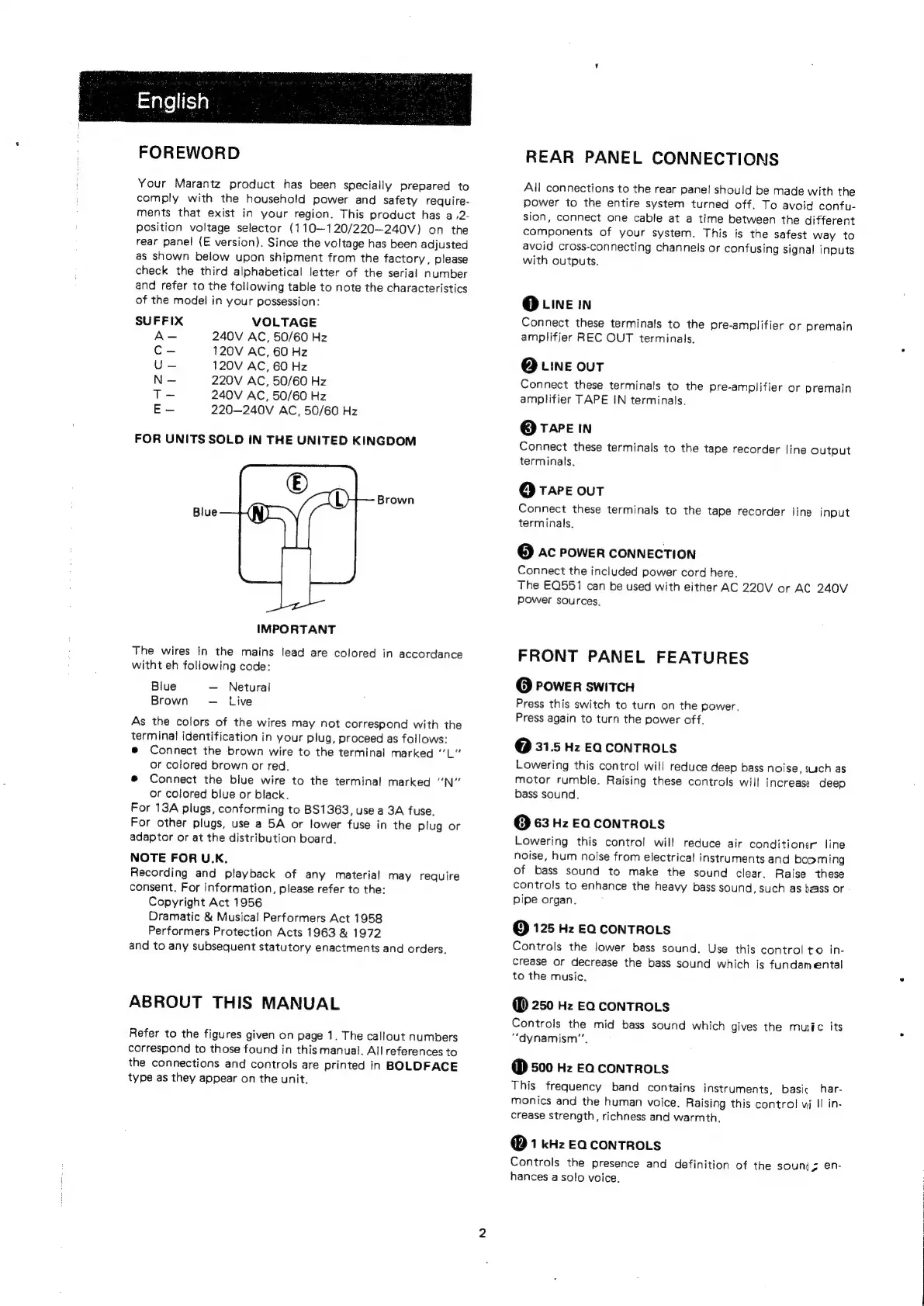
FOR
UNITS
SOLD
IN
THE
UNITED
KINGDOM
IMPORTANT
The
wires
in
the
mains
lead
are
colored
in
accordance
witht
eh
following
code:
Blue
Netural
Brown
Live
As
the
colors
of
the
wires
may
not
correspond
with
the
terminal
identification
in
your
plug,
proceed
as
follows:
®
Connect
the
brown
wire
to
the
terminal
marked
‘‘L"’
or
colored
brown
or
red.
®
Connect
the
blue
wire
to
the
terminal
marked
'‘N”
or
colored
blue
or
black.
For
13A
plugs,
conforming
to
BS1363,
use
a
3A
fuse.
For
other
plugs,
use
a
5A
or
lower
fuse
in
the
plug
or
adaptor
or
at
the
distribution
board.
NOTE
FOR
U.K.
Recording
and
playback
of
any
material
may
require
consent.
For
information,
please
refer
to
the:
Copyright
Act
1956
Dramatic
&
Musical
Performers
Act
1958
Performers
Protection
Acts
1963
&
1972
and
to
any
subsequent
statutory
enactments
and
orders.
ABROUT
THIS
MANUAL
Refer
to
the
figures
given
on
page
1.
The
callout
numbers
correspond
to
those
found
in
this
manual.
All
references
to
the
connections
and
controls
are
printed
in
BOLDFACE
type
as
they
appear
on
the
unit.
REAR
PANEL
CONNECTIONS
All
connections
to
the
rear
panel
should
be
made
with
the
power
to
the
entire
system
turned
off.
To
avoid
confu-
sion,
connect
one
cable
at
a
time
between
the
different
components
of
your
system.
This
is
the
safest
way
to
avoid
cross-connecting
channels
or
confusing
signal
inputs
with
outputs.
@
Line
in
Connect
these
terminals
to
the
pre-amplifier
or
premain
amplifier
REC
OUT
terminals.
@
wine
out
Connect
these
terminals
to
the
pre-amplifier
or
premain
amplifier
TAPE
IN
terminals.
@
TAPE
IN
Connect
these
terminals
to
the
tape
recorder
line
output
terminals.
@
TAPE
ouT
Connect
these
terminals
to
the
tape
recorder
line
input
terminals.
@
Ac
POWER
CONNECTION
Connect
the
included
power
cord
here.
The
EQ551
can
be
used
with
either
AC
220V
or
AC
240V
power
sources.
FRONT
PANEL
FEATURES
@
POWER
SWITCH
Press
this
switch
to
turn
on
the
power.
Press
again
to
turn
the
power
off.
@
31.5
Hz
EQ
CONTROLS
Lowering
this
contro!
will
reduce
deep
bass
noise,
such
as
motor
rumble.
Raising
these
controls
will
increase
deep
bass
sound.
@
63
Hz
EQ
CONTROLS
Lowering
this
control
will
reduce
air
conditioner
line
noise,
hum
noise
from
electrical
instruments
and
booming
of
bass
sound
to
make
the
sound
clear,
Raise
these
controls
to
enhance
the
heavy
bass
sound,
such
as
baass
or
pipe
organ.
@
125
Hz
EQ
CONTROLS
Controls
the
lower
bass
sound.
Use
this
control
to
in-
crease
or
decrease
the
bass
sound
which
is
fundamental
to
the
music.
@
250
Hz
EQ
CONTROLS
Controls
the
mid
bass
sound
which
gives
the
musfc
its
“dynamism”.
@
500
Hz
Ea
conTROLS
This
frequency
band
contains
instruments,
basic
har-
monics
and
the
human
voice.
Raising
this
control
vj
II
in-
crease
strength,
richness
and
warmth.
@
1
kHz
EQCONTROLS
Controls
the
presence
and
definition
of
the
souni
;
en-
hances
a
solo
voice.

Other manuals for Marantz EQ551