3
User Guide (English)
Introduction
Box Contents
PMD-300CP
Rack Ears with Screws
User Guide
Safety & Warranty Manual
Support
For the latest information about this product (system requirements, compatibility information,
etc.), product registration, and software download, visit marantzpro.com.
Features
Front Panel
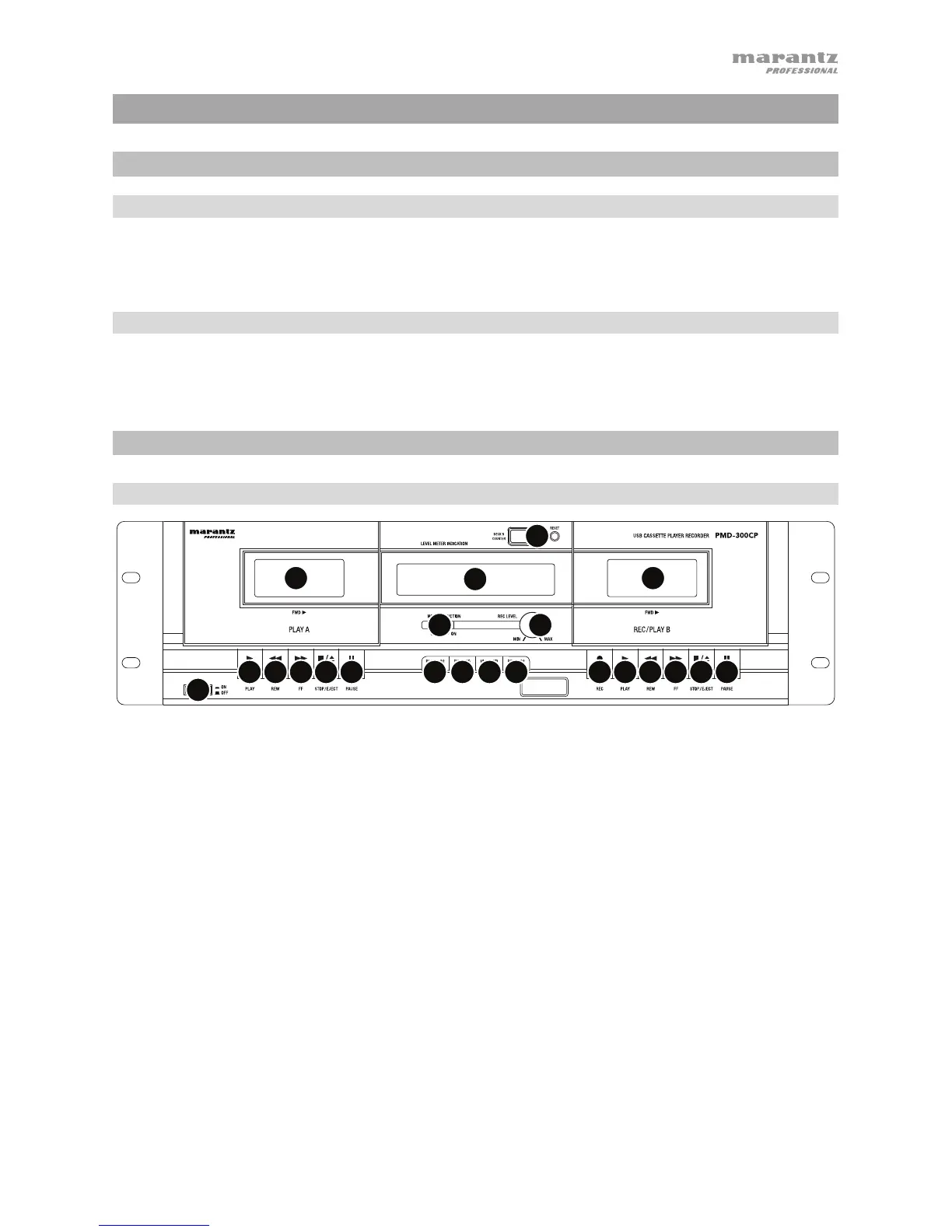
1. Power Button: Use this button to turn the unit on and off. If the unit is not being used for a
prolonged period of time, please also remove the AC plug from the power socket.
2. Cassette Holder: Insert your cassettes into either of these two holders. The holders may be
opened by pressing the corresponding Stop/Eject button. Please note that both decks can
be used for playback but only deck B can be used for recording/dubbing.
3. Dynamic Noise Reduction: Dynamic Noise Reduction should be turned on whenever
playing back tapes which were recorded using this feature.
4. Display: The display will help you keep track of audio levels and the features which have
been engaged.
• Peak Level Indicator: The meters indicate the audio level during recording and playback.
• Rec: Lights when deck B is recording or in record-pause mode.
• Hi Sp Dub: Lights when high-speed dubbing mode is engaged.
• Play Cr02: Lights when Play Cr02 function is engaged.
• Rec Cr02: Lights when Rec Cr02 function is engaged.
5. Tape Counter and Reset Button: The tape counter indicates the tape position when
playing or recording tapes (Deck B only). To reset the counter, press the Reset button.
6. Rec Level Knob: Use this knob to adjust the recording level when recording external
sources to deck B.
1
2
3
4
5
6
8
9
10
11
12
7
2
11
12 13 13 1414
15
15
16


 To Next Page